
ibis Paint X
Screenshots


Description
About ibis Paint X Feature - A Professional Drawing Tool in Your Pocket
ibis Paint X is a highly popular and versatile drawing application designed for digital artists, illustrators, and hobbyists. Renowned for its robust set of professional-grade features combined with an intuitive interface, it brings the power of desktop digital art software to smartphones and tablets. The app supports a comprehensive suite of tools including over 15,000 brushes, advanced layer functionality with blending modes, and a wide array of filters and rulers. Its standout feature is the recording function, which allows artists to share their creative process as time-lapse videos. Catering to both beginners and seasoned professionals, ibis Paint X successfully bridges the gap between accessibility and high-end functionality, making it a go-to choice for creating digital artwork on the go.
Chapter 1: Function
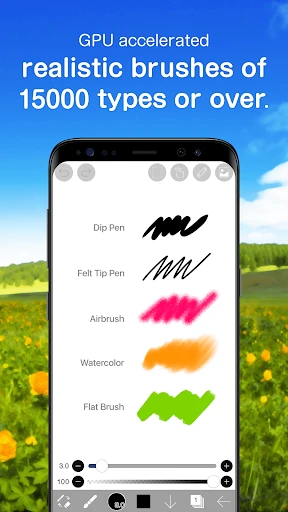
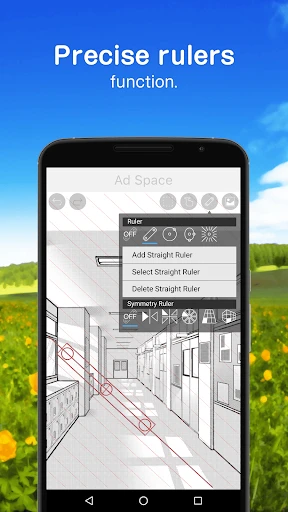
ibis Paint X delivers a comprehensive suite of core functions tailored for digital creation. At its heart is an extensive brush engine, offering users more than 15,000 customizable brushes, including dip pens, felt tip pens, digital pens, airbrushes, flat brushes, and textured brushes, each with adjustable parameters like size, opacity, and blending. The app supports full layer management, allowing artists to work with multiple layers, utilize clipping masks, employ various layer blending modes such as multiply and overlay, and apply layer effects. Essential drawing aids include over 80 filters, numerous rulers like symmetry and perspective rulers, and a stabilizer function for smooth lines. Furthermore, it features text tool support, canvas rotation, and a unique recording capability that automatically captures the drawing process as a video, which can be shared directly to social platforms.
Chapter 2: Value
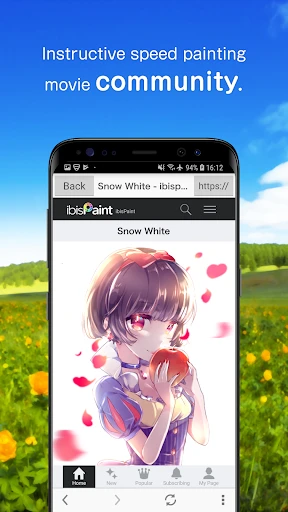
The value proposition of ibis Paint X lies in its unparalleled combination of professional depth and mobile accessibility. Its primary advantage is offering desktop-level artistic control on a mobile device without a subscription barrier, operating on a one-time purchase model for its premium features. The sheer volume and quality of brushes, coupled with sophisticated layer controls and filters, empower artists to produce work that rivals creations from expensive computer software. The recording and sharing feature adds immense educational and community-building value, allowing artists to learn from each other and showcase their techniques. Unlike many competitors, ibis Paint X maintains a lightweight and responsive performance, ensuring a smooth drawing experience even on mid-range devices. Its user interface is highly customizable, enabling artists to tailor the workspace to their workflow. This focus on powerful, customizable tools within a stable and accessible platform makes it an exceptional value, democratizing high-quality digital art creation for a global audience and fostering a vibrant, sharing-oriented artist community.
Chapter 3: Scenarios
ibis Paint X primarily targets a diverse range of users, from aspiring amateur artists and students to professional illustrators and comic artists. For hobbyists and beginners, it serves as an accessible entry point into digital art, providing easy-to-use tools and tutorials to practice sketching, painting, and doodling directly on their phones. Students and art enthusiasts use it for visual note-taking, creating fan art, or designing personal projects. Professional artists leverage its advanced features for on-the-go concept sketching, detailed illustration work, and even creating full comic panels or character designs, often using a stylus for precision. The app is also widely used by content creators for designing social media graphics, YouTube thumbnails, and digital lettering. Everyday use cases include quick sketching during a commute, completing a layered digital painting at home, using the symmetry ruler for mandala creation, or recording a drawing tutorial to share on platforms like YouTube or Instagram, making it a versatile tool for both casual creativity and serious artistic production.
Uninstall Instructions
For step-by-step guidance on how to safely remove this application from your device, please refer to our 《Uninstall Instructions》 document.
Pros
- offers over 15
- 000 brushes including realistic watercolor and manga tools
- one-time purchase unlocks pro features without a subscription
- frame-by-frame animation support within a drawing app
- records and exports the entire drawing process as a video
- precise stabilizer and ruler tools for detailed line work
Cons
- advanced features require navigating a dense interface
- large canvas files consume significant device storage
- ad-supported free version interrupts workflow frequently
- some cloud features need a separate account registration
- high layer counts can slow performance on older devices
Frequently Asked Questions
What is ibis Paint X and what does it do?
ibis Paint X is a popular mobile drawing and painting application. Its core function is to provide a comprehensive digital art studio, allowing users to create illustrations, manga, and other artwork directly on their devices. It features over 15,000 brushes, advanced layer functionality with blending modes, and a variety of tools like rulers and frame-by-frame animation support. It is positioned as a professional-grade yet accessible tool for artists of all levels.
Is ibis Paint X free to use, and what are the in-app purchases?
Yes, ibis Paint X is free to download and use with core functionality. It is supported by video ads, which can be removed via a one-time purchase. Additional premium features are available through a subscription model called 'Prime Membership' or one-time purchases of specific brush sets and materials. The subscription unlocks advanced features like more layers, high-resolution canvas export, and extra filter effects.
What devices and operating systems does ibis Paint X support?
ibis Paint X is primarily designed for mobile devices. It is available for Android via Google Play and iOS via the App Store. It also has versions for Chrome OS and Huawei AppGallery. The app is optimized for smartphones and tablets, including support for stylus input like Apple Pencil and S Pen. There is no dedicated desktop version for Windows or macOS, but it can be used on some Chromebooks.
How does the time-lapse playback feature work?
The time-lapse feature automatically records your entire drawing process. Once you finish a piece, you can play back a sped-up video of your work from start to finish. This video can be saved directly to your device's gallery or shared on social media platforms. It is a unique feature for reviewing your technique, creating process videos, or sharing your artistic journey. The recording is automatic and requires no manual setup for each canvas.
Can I use ibis Paint X offline, and how do I save my work?
Yes, you can use ibis Paint X and create artwork offline. Your work is automatically saved as a proprietary '.ipv' file within the app's gallery as you draw. To export and share your finished work, you need to use the 'Export as Image' function, which requires an internet connection only if you choose to share it online immediately. For full backup and transfer, you can export the '.ipv' project file to your device storage or cloud services.
App Info
Technical Info
Recommended For You
AR Drawing: Art, Trace, Sketch
Art & Design

WhisperFM - Romance Novels
Books & Reference

Messages - Text SMS App
Communication

Holy Bible, KJV Bible + Audio
Books & Reference

Whova - Event & Conference App
Business

Job Search by ZipRecruiter
Business

Google Messages
Communication

Comics Price Guide
Comics

eBird by Cornell Lab
Books & Reference

CARFAX Car Care App
Auto & Vehicles

ReadEra Premium – ebook reader
Books & Reference

Batman Miniature Game
Comics

Invoice Simple: Invoice Maker
Business

PixAI: AI Anime Art Generator
Art & Design

Invitation Maker & Card Design
Art & Design

Time Clock: Easy Tracker
Business

FunSwap - AI Face Swap
Beauty

Bible Homescreen - Read Now
Books & Reference

Key Collector Comics
Comics

AI Logo Generator, Logo Maker
Art & Design