
Asana: Where work connects
Screenshots


Description
About Asana: Where Work Connects Feature – Overview
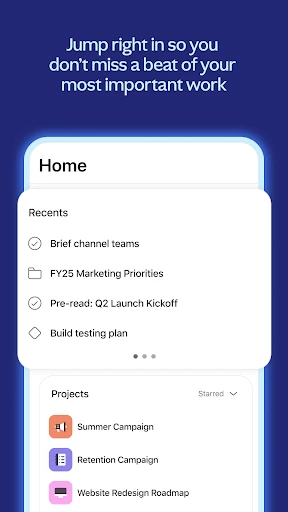
Asana is a leading work management platform designed to help teams organize, track, and manage their work in one shared space. It transforms how teams collaborate by moving beyond scattered emails, spreadsheets, and chat tools to a centralized system for clarity and accountability. The app connects goals, projects, and daily tasks, ensuring everyone understands how their work contributes to broader objectives. Suitable for teams of all sizes and across various industries, Asana provides a flexible structure that adapts to different workflows, from simple task lists to complex multi-departmental projects. Its intuitive interface and powerful integrations make it a cornerstone for modern, connected work.
Chapter 1: Function
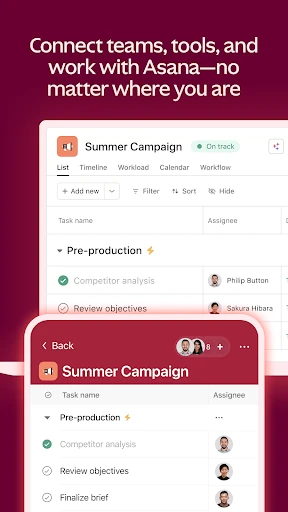
Asana's core functionality revolves around project and task management. Users can create projects, break them down into individual tasks and subtasks, assign them to team members with due dates, and add detailed descriptions, attachments, and comments. The platform offers multiple viewing options including List, Board, Timeline, and Calendar views to suit different planning preferences. Key features include the ability to set dependencies between tasks, establish custom rules for automation, and create templates for recurring work. Centralized communication occurs directly on tasks, reducing email clutter. Furthermore, Asana supports goal tracking at the organizational, team, and individual levels, allowing for alignment from high-level strategy to daily execution. Real-time updates and notifications keep all members synchronized on progress and changes.
Chapter 2: Value
The primary value proposition of Asana lies in its ability to create a single source of truth for work, thereby reducing confusion, minimizing duplicate efforts, and accelerating project completion. Its key advantages are clarity, efficiency, and alignment. By providing visual tools like Timeline view for Gantt-style planning and Portfolios for high-level oversight, managers gain unprecedented visibility into workload, progress, and potential bottlenecks. This enables proactive resource management and ensures strategic goals are on track. For team members, the value is in reduced cognitive load; they have a clear list of priorities and context for their work, which enhances focus and personal accountability. Asana's extensive integration ecosystem, connecting with tools like Slack, Google Drive, Microsoft Teams, and Salesforce, ensures it fits seamlessly into existing workflows without creating new silos. Unlike basic to-do lists, Asana scales with complexity, handling intricate projects with multiple stakeholders and phases while maintaining simplicity for everyday tasks. This balance between power and usability fosters widespread adoption across teams, driving a culture of transparency and results-oriented collaboration, ultimately saving time and improving outcomes.
Chapter 3: Scenarios
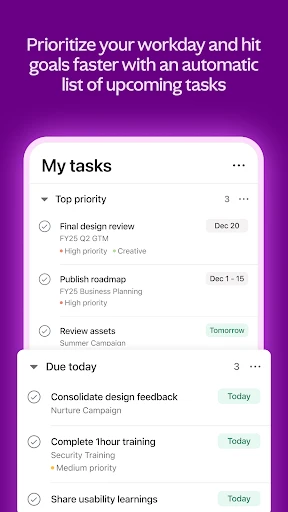
Asana serves a wide range of target users and everyday scenarios. It is ideal for project managers and team leads in marketing, software development, and operations who need to coordinate complex campaigns, product launches, or event planning. They use Asana to map out timelines, assign responsibilities, and monitor milestones. Creative and professional services teams utilize it to manage client deliverables and internal reviews, tracking feedback directly on tasks. Remote and hybrid teams rely on Asana as their digital headquarters to stay aligned despite different locations and time zones, ensuring nothing falls through the cracks. Executives and department heads use Portfolios and Goals to monitor the status of key initiatives and ensure team efforts align with company objectives. Even small teams or individuals find value in using Asana to organize their workweek, manage personal goals, or plan collaborative projects like community events or content calendars. In everyday use, a team member might check their 'My Tasks' list to prioritize their day, update a task as complete, attach a final document, and use a custom rule to automatically notify the next reviewer, streamlining the entire workflow handoff.
Uninstall Instructions
For step-by-step guidance on how to safely remove this application from your device, please refer to our 《Uninstall Instructions》 document.
Pros
- visual project timelines with drag-and-drop simplicity
- custom rules automate routine task assignments and statuses
- integrates with over 200 tools like slack and google drive
- offers multiple views: list
- board
- calendar
- and timeline
- workflow builder requires no coding for process automation
Cons
- steep learning curve for advanced features and automation
- premium features like timelines require a paid plan
- can feel overwhelming for simple
- individual task tracking
- mobile app lacks some desktop workflow customization
- advanced reporting and admin controls locked in higher tiers
Frequently Asked Questions
What is Asana and what does it do?
Asana is a work management platform designed to help teams organize, track, and manage their work. Its core function is to serve as a centralized hub for tasks, projects, and collaboration. Teams can create projects, assign tasks with due dates, share files, and communicate within the context of their work. It positions itself as a tool to improve clarity and accountability, connecting team members to their shared goals and reducing the need for lengthy status meetings and chaotic email threads.
Is Asana free to use, and what are the limits?
Asana's Timeline feature (available on paid plans) is a Gantt-chart style visualization tool. It allows project managers to map out project plans by visually laying out tasks on a timeline, showing their duration and dependencies between tasks. You can drag and drop tasks to adjust dates, and if one task is delayed, dependent tasks automatically shift on the timeline. This helps in planning realistic schedules and understanding the impact of changes.
What devices and systems does Asana support?
Asana offers a robust free plan for individuals and small teams, which includes unlimited tasks, projects, messages, and file storage (up to 100MB per file). The free plan supports up to 15 collaborators. For advanced features like timelines, custom fields, advanced search, admin controls, and more integrations, paid plans (Premium, Business, Enterprise) are available. The app itself is free to download, with subscriptions managed through its website.
How does Asana's timeline feature work?
Asana is a cross-platform application with broad adaptation. It offers a full-featured web application accessible via modern browsers. Native mobile apps are available for iOS (iPhone/iPad) and Android devices, allowing for on-the-go task management. Asana also integrates with numerous popular workplace tools like Slack, Google Drive, Microsoft Teams, and Outlook to fit into existing workflows seamlessly.
Can I recover a deleted task or project in Asana?
Yes, in most cases, you can recover recently deleted items. Deleted tasks and projects are moved to the 'Trash' section in your organization's admin console (for team and workspace admins) or project menu (for project members, if enabled). Items remain in the trash for 30 days before being permanently deleted. During this period, an admin or authorized member can restore them to their original location with all associated data.
App Info
Technical Info
Recommended For You

Draw Cartoons 2
Comics

Salesforce
Business

Personal stickers StickerMaker
Communication

Rosa Mystica
Books & Reference

Textify- Art Font Photo Editor
Art & Design

AR Drawing: Sketch, Art, Trace
Art & Design

Sky Tonight - Star Gazer Guide
Books & Reference

Cars.com: Buy and sell cars
Auto & Vehicles

CL Theme C1
Auto & Vehicles

Infinite Painter
Art & Design

Face Swap Magic: AI Avatars
Art & Design

Lezhin Comics -การ์ตูนและนิยาย
Comics

CosmoProf Beauty
Beauty

Webmotors: comprar carro
Auto & Vehicles

Beauty Plus Princess Camera
Beauty

Beauty Camera Selfie Makeup
Beauty

Bookmory - reading tracker
Books & Reference

Bazaart AI Photo Editor Design
Art & Design

RingCentral
Business

Hexa AI: Logo & Design Creator
Art & Design