
PENUP – Drawing-sharing SNS
Screenshots

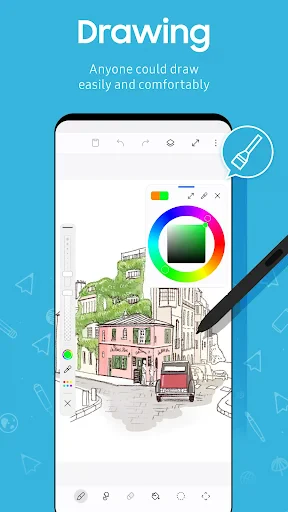

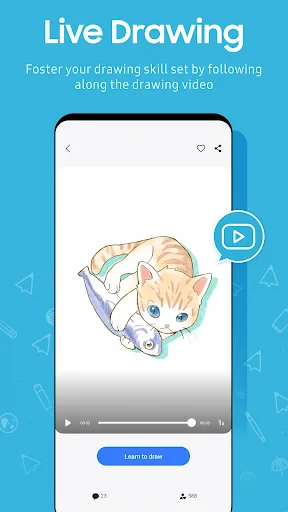
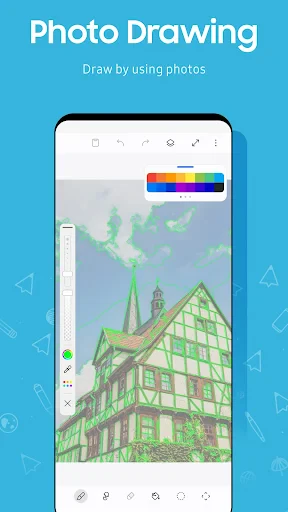
Description
About PENUP – Drawing-sharing SNS Feature
PENUP is a creative social networking service dedicated to drawing and digital art. Developed by Samsung but available for all Android and iOS users, it seamlessly blends a feature-rich drawing studio with a community-driven platform. At its core, PENUP allows users to create artwork using versatile digital tools and then share their creations within its integrated social feed. It transcends being a mere painting application by fostering a global network where artists and hobbyists alike can connect, exchange feedback, and draw inspiration from millions of shared pieces. This unique combination of creation and community makes PENUP a distinctive hub for artistic expression in the mobile ecosystem.
Chapter 1: Function
PENUP's primary function is to provide a comprehensive and accessible digital drawing studio coupled with a dedicated social sharing space. The app offers a robust set of drawing tools, including various brush types, pens, pencils, and an advanced color picker with palette customization. Users can draw on a blank canvas or utilize tracing features over imported photos for practice and creation. Beyond creation, the app is built around its social feed, where users publish their artwork, title their pieces, add descriptions, and categorize them. The platform supports following other artists, liking, and commenting on posts, creating a interactive gallery. Additional functionalities include participating in daily drawing challenges, accessing tutorial content, and bookmarking favorite works for later inspiration, all within a single, streamlined interface.
Chapter 2: Value
The value of PENUP lies in its successful integration of a professional-grade drawing tool with a positive, niche social community, lowering the barrier to artistic engagement. Its key advantage is the synergistic environment it creates: the drawing tools encourage practice and skill development, while the community provides immediate audience and motivation. Unlike generic social networks, PENUP's focus on art cultivates a supportive space where feedback is constructive and content is inherently inspiring. The app is free to use with no advertisements, offering substantial value without cost. Its association with Samsung ensures smooth performance and regular updates, including features like support for S-Pen precision, which enhances the experience for compatible device users. Furthermore, by hosting regular contests and providing learning materials, PENUP actively nurtures user growth rather than being a passive platform. It transforms the often solitary act of drawing into a shared, social journey, making the process of learning and creating art more enjoyable and sustainable for users of all skill levels.
Chapter 3: Scenarios
PENUP primarily targets a wide spectrum of users with an interest in visual art, from complete beginners to seasoned digital illustrators. For hobbyists and casual doodlers, it serves as a stress-relieving creative outlet and a platform to casually share sketches with a like-minded community. Aspiring artists and students find significant value in using the app for daily practice, participating in challenges to hone their skills, and receiving constructive feedback from peers. Educators may utilize the app's tracing and tutorial features for basic art instruction. Furthermore, parents might encourage their children to use PENUP as a safe, creative, and educational digital playground. In everyday use, a user might open the app to quickly sketch an idea during a commute, follow a tutorial to learn a new technique, browse the feed for inspiration during a break, or dedicate time in the evening to complete a daily challenge and share the result. It effectively fits into fragmented moments of daily life, turning them into opportunities for creative expression and social connection.
Uninstall Instructions
For step-by-step guidance on how to safely remove this application from your device, please refer to our 《Uninstall Instructions》 document.
Pros
- community voting system for daily drawing challenges
- automatic time-lapse replay of every drawing process
- full-featured drawing tools with zero cost barrier
- seamless integration with Samsung S-Pen pressure sensitivity
- social feed exclusively for visual artwork discovery
Cons
- limited layer support compared to professional desktop apps
- community interaction features overshadow advanced tool organization
- time-lapse replays cannot be edited or trimmed post-creation
- primary optimization for Samsung devices may limit others
- no direct import of custom brush files or textures
Frequently Asked Questions
What is PENUP and what can I do with it?
PENUP is a free social networking app focused on drawing and digital art. Its core function is to provide a platform for creating artwork using various digital brushes and tools, and then sharing your creations within the app's community. It combines the features of a drawing studio with a social network, allowing users to browse, like, and comment on art from other users worldwide. The app is designed for both casual doodling and more serious digital art creation.
Is PENUP free to use, or does it have in-app purchases?
Yes, PENUP allows you to import photos from your device's gallery to use as a background or reference image. You can layer your drawing on top of the imported image. This is useful for tracing, creating photo-based art, or practicing. The app also provides a blank canvas for starting from scratch. All artwork created or finished in the app can be saved directly to your device's gallery in common image formats.
Can I import my own images to draw over in PENUP?
PENUP is completely free to download and use. The app does not contain any in-app purchases or subscription fees. All drawing tools, brushes, and social features are available without cost. It is primarily supported by its developer, Samsung, and does not display third-party advertisements within the core drawing and sharing experience, making it a fully free creative platform.
What devices and operating systems are compatible with PENUP?
PENUP is officially available for Android devices through the Google Play Store. While it was initially popular on Samsung Galaxy devices, it is compatible with a wide range of Android smartphones and tablets. There is no official version for iOS (iPhone/iPad) or desktop operating systems. The app requires an internet connection for sharing and social features but can be used offline for drawing.
How do I share my drawings or find other artists on PENUP?
After finishing a drawing, you can post it to your PENUP profile with a title and tags. Your post then becomes visible in the public feed and relevant tag categories for the community to discover. To find other artists, you can browse the 'Popular' or 'Recent' feeds, search by specific tags, or use the search function to find users. You can follow artists, like their work, and leave comments to interact.
App Info
Technical Info
Recommended For You

O'Reilly Pro
Business

MangaGo - Ultimate Manga App
Comics

My crochet designer
Art & Design

Stickers and Emoji - WASticker
Comics

Ink AI – Tattoo design maker
Art & Design

Second Phone Number - 2Number
Communication

Watchgram for Telegram
Communication

PSA | Card Grading Service
Books & Reference

MyChoice Benefits
Business

Al Quran MP3 Audio Offline App
Books & Reference
Duo Mobile
Business

AlfaOBD
Auto & Vehicles

Lyft Driver
Business

AutoZen-Car Dashboard&Launcher
Auto & Vehicles

ArtistAI: AI Photo Generator
Art & Design

Batman Miniature Game
Comics

My Mitsubishi Connect
Auto & Vehicles

Autolink
Auto & Vehicles

AMarkets: Trade & Invest
Business

Perfect Viewer
Comics