
Messenger: Text Messages, SMS
Screenshots



Description
About Messenger: Text Messages, SMS Feature
Messenger: Text Messages, SMS is a streamlined and efficient mobile application designed to serve as a primary hub for personal communication via SMS and MMS. It replaces the default messaging app on Android devices, offering users a clean, intuitive interface to manage all their text-based conversations. The app focuses on delivering a fast, reliable, and ad-free experience for sending and receiving messages, organizing contacts, and handling multimedia. It emphasizes simplicity and speed, ensuring that the fundamental task of texting remains straightforward and hassle-free, without unnecessary bloat or complex features that can clutter the user experience.
Chapter 1: Function
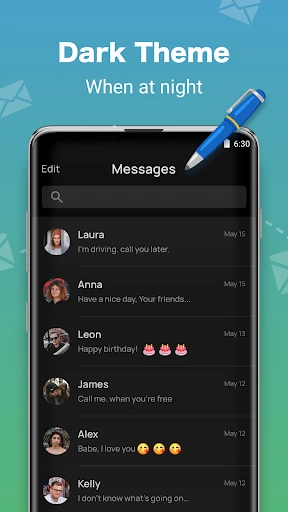
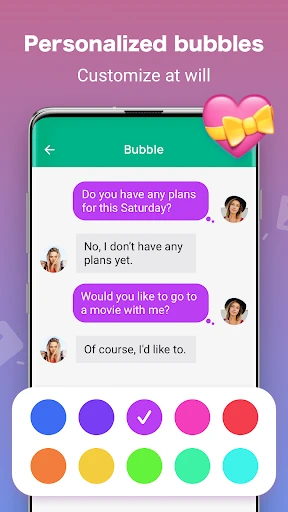
The core function of Messenger: Text Messages, SMS is to provide a comprehensive platform for traditional SMS and MMS communication. It allows users to send and receive text messages, create and participate in group chats, and share photos, videos, and audio files seamlessly. The app organizes conversations in a familiar threaded view, making it easy to follow dialogue history. It supports essential features like delivery reports, message scheduling for future sending, and the ability to block unwanted numbers to reduce spam. Users can customize conversation backgrounds and notification sounds for different contacts, adding a layer of personalization. The app also includes a search function to quickly find specific messages or contacts, and it efficiently manages contact integration from the device's address book. Its design prioritizes quick loading times and smooth performance for everyday texting tasks.
Chapter 2: Value
The primary value proposition of Messenger: Text Messages, SMS lies in its commitment to a pure, efficient, and user-controlled messaging experience. In an era dominated by internet-based messaging platforms, this app carves out its niche by perfecting the standard SMS/MMS protocol, which remains universally compatible and does not require both parties to have the same app or an active data connection. Its key advantage is its simplicity and reliability; it performs its intended function exceptionally well without distractions. The absence of advertisements ensures a clean interface and protects user privacy from intrusive marketing. Furthermore, the app offers meaningful customization, allowing users to tailor visual and notification settings to their preferences, which enhances daily usability. For users seeking a straightforward, no-fuss texting application that respects their need for speed and privacy, this app delivers significant value. It is particularly valuable for those who communicate frequently with contacts who may not use popular OTT messaging services or in areas with unstable internet connectivity, ensuring communication lines remain open through the robust cellular network. Its lightweight design also means it consumes minimal system resources, contributing to better device performance and battery life compared to more feature-heavy alternatives.
Chapter 3: Scenarios
The primary target users for Messenger: Text Messages, SMS are individuals who prioritize simplicity, reliability, and universal compatibility in their daily communications. This includes a broad demographic, from younger users who appreciate a clean, customizable interface for coordinating with friends and family via standard texting, to older adults or less tech-savvy individuals who prefer a straightforward app without the learning curve of complex social features. It is also highly suitable for professionals or anyone who needs a dependable fallback for communication when internet-based apps fail or are unavailable. Everyday use cases are centered around core texting activities: sending quick updates, coordinating meet-ups, sharing moments through pictures and videos via MMS, and managing group conversations for family events or small project teams. The message scheduling feature is handy for sending birthday greetings or reminders at a specific time without forgetting. The robust blocking functionality makes it ideal for users plagued by spam or unwanted messages, helping them maintain a clean and secure inbox. Ultimately, this app serves as the go-to daily driver for anyone who views text messaging as an essential, utility-based service and desires a focused, efficient tool to manage it.
Uninstall Instructions
For step-by-step guidance on how to safely remove this application from your device, please refer to our 《Uninstall Instructions》 document.
Pros
- integrates sms with messenger chats in one unified inbox
- free messaging over wi-fi to bypass carrier sms fees
- delivery and read receipts for all message types
- supports high-quality photo/video sharing via data
- seamless sync across mobile
- desktop
- and web platforms
Cons
- requires contacts to use the app for full feature access
- defaults to messenger for sending
- removing sms-only choice
- can create duplicate threads for the same contact
- heavier battery usage than a basic sms application
- interface merges chats
- complicating sms organization
Frequently Asked Questions
What is Messenger: Text Messages, SMS?
Messenger: Text Messages, SMS is a free messaging app for Android that serves as an alternative to your phone's default SMS/MMS service. Its core function is to send and receive standard text messages and picture messages. It positions itself as a fast, simple, and customizable messaging client, with unique features often including extensive theme customization, scheduled messages, and enhanced privacy options like private inboxes.
Is this app completely free to use?
Yes, the core SMS/MMS messaging functionality of this app is completely free. It does not charge for sending texts. However, it may contain optional in-app purchases for premium themes or additional customization features. The app is supported by advertisements, which can typically be removed via a one-time purchase. No additional equipment is needed beyond a standard Android phone with cellular service.
What devices and Android versions does it support?
The app is designed for Android devices. It generally supports a wide range of Android versions, typically from Android 5.0 (Lollipop) and up. It adapts to phones and tablets but requires a device with cellular capability to send and receive standard SMS/MMS. It is not available for iOS, Windows, or desktop operating systems as a standalone SMS client.
How does it handle group messaging and media?
The app supports standard MMS group messaging, allowing you to send texts and media to multiple contacts. It can send and receive pictures, videos, and audio files via MMS, subject to your carrier's size limits and charges. For very large media or group chats with non-Android users, functionality is limited by the SMS/MMS protocol. It does not provide advanced chat features like read receipts or typing indicators with iPhone users.
Can I set it as my default SMS app?
Yes, a core requirement for this app to function is that you set it as your default SMS/MMS application on your Android device. During setup, it will request the necessary SMS permissions to read, send, and manage your messages. This permission is essential for its operation. You can revert to another default app at any time through your device's settings, which will transfer message handling back to the previous application.
App Info
Technical Info
Recommended For You

AutoTempest - Car search
Auto & Vehicles

Livensa: AI Video Maker
Art & Design

Holy Bible - Verse+Audio
Books & Reference

Perfect365 Makeup Photo Editor
Beauty

Draw Cartoons 2
Comics

Arch - AI Home Design
Art & Design

World History Atlas
Books & Reference

FlipaClip: Create 2D Animation
Art & Design

Spark Driver
Business

Uber - Driver: Drive & Deliver
Business

Lezhin Comics - Daily Releases
Comics

Spirit Fanfiction and Stories
Books & Reference

ZoiPer Pro - SIP Softphone
Communication

Rebtel: Recharges And Calls
Communication

WhisperFM - Romance Novels
Books & Reference

Job Search by ZipRecruiter
Business

Duo Call - Dual Global Calling
Communication

Beauty Camera & Makeup Camera
Beauty

VoyceMe: Manga and Webtoons
Comics

Jotform - Form, Sign & Survey
Business