
Pixelcut AI Photo Editor
Screenshots



Description
About Pixelcut AI Photo Editor Feature
Pixelcut AI Photo Editor is a mobile application designed for effortless, professional-grade photo editing powered by artificial intelligence. It simplifies complex editing tasks, allowing users to enhance, retouch, and transform their images with just a few taps. The app stands out by making advanced editing techniques, such as background removal and object erasure, accessible to everyone, regardless of their technical skill level. Available on both iOS and Android platforms, Pixelcut merges intuitive design with powerful AI tools to cater to the growing demand for quick and high-quality visual content creation for social media, personal projects, and online commerce.
Chapter 1: Function
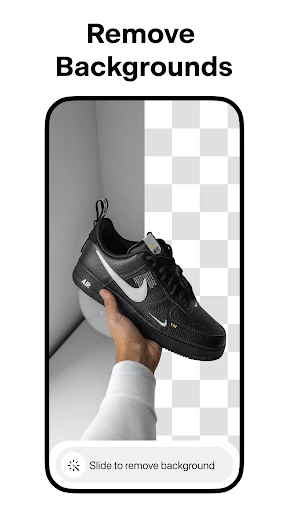
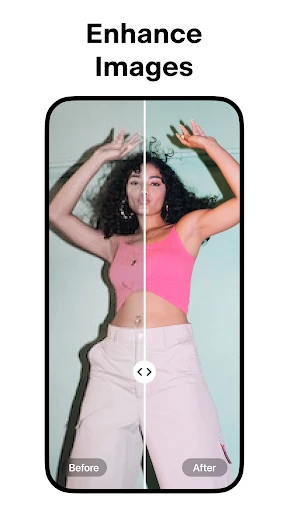
Pixelcut AI Photo Editor centers its functionality on a suite of AI-driven tools that automate and refine the photo editing process. Its core feature is the instant background remover, which cleanly isolates subjects from their surroundings. Complementing this is a magic eraser tool that allows users to seamlessly remove unwanted objects or people from photos. The app also provides essential editing capabilities like filters, adjustments for brightness and contrast, and portrait-specific enhancements such as skin smoothing and blemish removal. Furthermore, it includes templates and design tools for creating graphics for social media posts or marketing materials, consolidating basic graphic design within the editing workflow. All these functions are packaged in a user-friendly interface that prioritizes speed and simplicity, delivering impressive results in seconds.
Chapter 2: Value
The primary value proposition of Pixelcut lies in its democratization of professional photo editing. By leveraging sophisticated AI, it eliminates the steep learning curve traditionally associated with software like Photoshop, saving users significant time and effort. Its key advantage is the unparalleled speed and accuracy of its background removal, which rivals manual techniques performed by experts. This is particularly valuable for e-commerce sellers, content creators, and small business owners who need to produce polished product images or engaging content consistently without a dedicated budget for professional editing services. The app operates on a freemium model, offering robust functionality for free, which lowers the barrier to entry. Paid subscriptions unlock higher-resolution exports and advanced features, providing scalable value. Beyond tools, Pixelcut delivers the value of convenience and empowerment, enabling anyone to elevate their visual storytelling, enhance their personal brand, and create a more professional online presence directly from their mobile device. It transforms the smartphone from a capture device into a complete, portable editing studio.
Chapter 3: Scenarios
Pixelcut AI Photo Editor serves a diverse range of user groups across everyday scenarios. Social media enthusiasts and influencers are primary users, employing the app to craft visually cohesive and attention-grabbing content for platforms like Instagram and TikTok, quickly removing distracting backgrounds or creating themed collages. Online sellers and small business owners form another core group, utilizing the background remover to create clean, white-background product photos for their e-commerce listings on Shopify, Etsy, or Amazon, which is crucial for driving sales. Students and professionals use it to polish presentation visuals or create compelling graphics for reports and personal portfolios. In personal use cases, individuals edit vacation photos, remove photobombers from group shots, or enhance portrait pictures for dating profiles or professional headshots. Essentially, Pixelcut is ideal for any scenario requiring fast, high-quality image optimization without desktop software, fitting seamlessly into the mobile-first, content-driven routines of modern digital life.
Uninstall Instructions
For step-by-step guidance on how to safely remove this application from your device, please refer to our 《Uninstall Instructions》 document.
Pros
- one-tap background removal with high edge accuracy
- generates studio-quality product mockups automatically
- magic eraser removes objects without leaving artifacts
- batch processing for multiple images simultaneously
- offers precise manual cutout brush for fine details
Cons
- requires in-app purchase for full-resolution exports
- advanced features need stable internet connection
- limited creative filters compared to full editors
- can struggle with highly complex backgrounds
- free version includes a watermark on outputs
Frequently Asked Questions
What is Pixelcut AI Photo Editor and what does it do?
Pixelcut AI Photo Editor is a mobile application designed for photo editing and graphic design. Its core functions leverage artificial intelligence to automate complex edits, such as removing backgrounds, retouching portraits, and enhancing image quality. It is positioned as a user-friendly tool for creating social media content, marketing materials, and personal photos without requiring professional design skills. Basic usage involves uploading a photo and selecting from various AI-powered tools to achieve the desired edit quickly.
Is Pixelcut free to use or does it have in-app purchases?
Pixelcut operates on a freemium model. The app can be downloaded and used for free with access to a basic set of editing tools and features. However, advanced features, higher-resolution exports, removal of watermarks, and access to premium templates or stock assets typically require a subscription or one-time in-app purchases. Specific pricing and plan details are available within the app's subscription settings.
What devices and systems is Pixelcut compatible with?
Pixelcut AI Photo Editor is primarily a mobile application. It is available for download on iOS devices through the Apple App Store and on Android devices via the Google Play Store. The app is designed for smartphones and tablets. For the most current information on supported operating system versions (e.g., minimum iOS or Android version), please refer to the app's listing page on your device's respective app store.
How does the AI background removal feature work?
The AI background remover automatically detects the main subject in a photo and separates it from the background. You simply upload an image, and the AI algorithm identifies edges and subjects to create a clean cutout. The result can then be placed on a new background, made transparent, or edited further. This feature is designed for speed and accuracy, handling complex edges like hair or fur, though results may vary with image quality and subject contrast.
What should I do if the app crashes or an edit fails to process?
If you encounter crashes or processing failures, first ensure your device has a stable internet connection, as many AI features require online processing. Try closing and restarting the app, or restarting your device. Check for app updates in your device's app store, as issues are often resolved in newer versions. If problems persist, you can contact Pixelcut's customer support through the help or settings section within the app for specific troubleshooting and after-sales assistance.
App Info
Technical Info
Recommended For You

MyNISSAN®
Auto & Vehicles

Ficbook: Read Fictions Anytime
Comics

Bible Homescreen - Read Now
Books & Reference

Coloring games: speed drawing
Art & Design

My Total Wireless: Account App
Communication

Contacts
Communication

hoopla Digital
Books & Reference

Cover Hunter - 3v3 Team Battle
Comics

mobile.de - car market
Auto & Vehicles

Numero: Travel eSIM & Numbers
Communication

CL theme 3D Glass
Auto & Vehicles

eBay Motors: Parts, Cars, more
Auto & Vehicles

UC Browser-Safe, Fast, Private
Communication

Flowt Wear
Auto & Vehicles

Call Blocker - Block Numbers
Communication

Manga Library - مكتبة المانجا
Comics

starryai - AI Art Generator
Art & Design

AI Video - AI Video Generator
Art & Design

Tattoo Simulator Tattoo Maker
Art & Design

Marvel Unlimited
Comics