
YACReader Remote
Screenshots
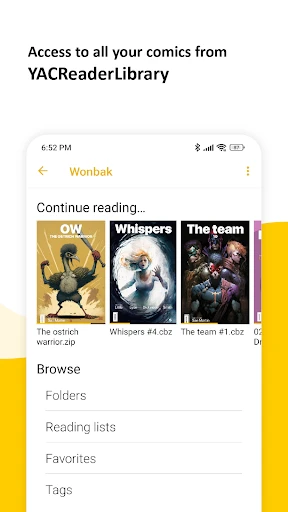



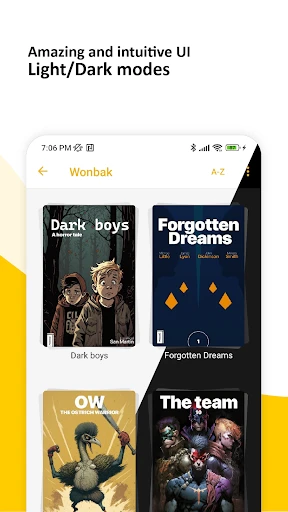
Description
About YACReader Remote Feature – Your Digital Comics Command Center
YACReader Remote is a specialized companion application designed to enhance the experience of using YACReader, a powerful digital comic and manga library manager for desktop computers. It functions as a wireless remote control and viewer, allowing users to seamlessly browse their extensive comic collections stored on a PC and read them directly on their mobile devices. By bridging the desktop library with portable convenience, it transforms a personal computer into a dedicated comics server, enabling comfortable reading anywhere within the same network. The app prioritizes a streamlined workflow from library management to immersive reading, making it an essential tool for serious comic enthusiasts.
Chapter 1: Function
YACReader Remote serves two primary, interconnected functions: remote library navigation and wireless comic streaming. First, it connects via Wi-Fi to a computer running the YACReader server software, granting full access to the organized digital library. Users can browse series, authors, and curated lists directly from their phone or tablet. Second, upon selecting a comic, the app streams the pages to the mobile device in real-time, displaying them in a optimized reader with configurable viewing modes. Core functionalities include managing reading progress, which syncs back to the main library, and offering intuitive controls for zooming, panning, and navigating between pages. It effectively turns the mobile device into a remote control for the desktop library and a high-resolution display for the content itself.
Chapter 2: Value
The core value of YACReader Remote lies in its ability to liberate a vast digital comics collection from the confines of a desktop computer, without the need for manual file transfers or cloud storage sync. Its key advantage is the preservation of a centralized, meticulously organized library on a powerful PC, while enabling flexible, comfortable reading on portable devices. This eliminates storage limitations on mobile devices and leverages the superior processing power of a computer for managing large archives. The app adds significant value through seamless synchronization of reading progress and metadata across all devices, ensuring a unified experience. Furthermore, it provides a superior reading interface tailored for comics, with smooth scrolling, multiple viewing formats, and accurate color reproduction. For users with extensive collections, it offers an efficient discovery and retrieval system far surpassing standard file browsers. Compared to reading directly on a desktop, it offers ergonomic benefits and casual reading scenarios. The value proposition is a professional-grade, integrated ecosystem that enhances both library management and the actual reading pleasure, making it an indispensable tool for collectors and avid readers.
Chapter 3: Scenarios
YACReader Remote primarily targets dedicated comic book and manga collectors who maintain large, organized digital libraries on their personal computers. The first key user group includes enthusiasts who have digitized their physical collections or purchase digital editions and require a robust system to manage thousands of files. The second group comprises readers who prefer reading on tablets for their larger screens and portability but want to avoid the hassle of manually loading files onto the device. Typical use cases involve a user settling on a couch or bed, opening the app on their iPad, and browsing their entire desktop library to choose a comic to read streamingly. Another common scenario is using a smartphone as a remote control to navigate the library on a PC connected to a large monitor or TV for shared viewing. It is also ideal for readers who wish to continue a comic on a different device without losing their place, as progress syncs instantly. Everyday use extends to quickly checking new additions to the library or managing reading lists from the convenience of a mobile device, making the entire collection perpetually accessible at home.
Uninstall Instructions
For step-by-step guidance on how to safely remove this application from your device, please refer to our 《Uninstall Instructions》 document.
Pros
- directly browses and reads comics from home NAS
- preserves original comic archive formats like CBR/CBZ
- syncs reading progress across all devices instantly
- offers a desktop-grade library management interface
- supports remote reading without file duplication
Cons
- requires a running YACReaderLibrary server setup
- initial network configuration can be technical
- lacks built-in cloud services for novice users
- interface prioritizes function over modern aesthetics
- dependent on local server uptime for access
Frequently Asked Questions
What is YACReader Remote and what does it do?
YACReader Remote is a free companion app for iOS and Android that allows you to wirelessly browse and read your digital comic book library stored on your computer. It connects to the YACReader desktop server software (for Windows, macOS, Linux), letting you remotely view your organized collection, control reading progress on your PC, and stream comics directly to your mobile device for offline reading.
Is YACReader Remote free to use, and are there in-app purchases?
Yes, the YACReader Remote mobile app is completely free to download and use, with no in-app purchases or subscriptions. The core functionality requires the free YACReader desktop server application to be installed and running on your home computer. There are no hidden costs for remote browsing, streaming, or basic library management within the app.
What devices and systems are compatible with YACReader Remote?
YACReader Remote is available for iOS (iPhone/iPad) and Android devices. It requires the free YACReader server to be installed on a desktop computer running Windows, macOS, or Linux. Both your mobile device and computer must be on the same local Wi-Fi network for initial connection and optimal performance. Internet access is needed for potential remote setup features.
How does the app handle reading comics on a mobile device?
The app streams comic pages from your computer to your device in real-time. You can choose to download entire comic archives or specific issues to your mobile device for true offline reading. It supports standard comic formats (CBR, CBZ, PDF, etc.) and offers a tailored mobile reading view with features like guided view, zoom, and swipe navigation, syncing your progress with the desktop library.
Can I use YACReader Remote over the internet outside my home?
The primary and most reliable connection method is through a local Wi-Fi network. While the official documentation mentions experimental support for internet-based remote access, this requires complex manual router configuration (port forwarding). For most users, seamless functionality is guaranteed only within the same local network as the computer hosting the YACReader server.
App Info
Technical Info
Recommended For You

Buenovela - Webnovel & Stories
Books & Reference

SAP Concur
Business

Vaporwave PRO Wallpapers
Art & Design

Job Hai - Search Job, Vacancy
Business

Logo Maker : Logo Creator
Art & Design
[KNA008] COMBINE
Art & Design

OBD2 Car Scanner - ELM Torque
Auto & Vehicles

Nail Art Design Ideas
Beauty

ShiftLock
Books & Reference

Minicraft Crafting Building
Comics

The Bible in pictures
Comics

АЗС Татнефть
Auto & Vehicles

MyFrontier
Communication

Video Background Changer
Beauty

PCGS CoinFacts - U.S. Coin Val
Books & Reference

Quran for Android
Books & Reference

Texture Maker for Minecraft PE
Art & Design

Bible Offline-KJV Holy Bible
Books & Reference

King James Bible - KJV Offline
Books & Reference

Typology Paris - Skincare
Beauty