
Messenger: Text Messages
Screenshots
Description
About Messenger: Text Messages Feature - Seamless Communication at Your Fingertips
Messenger: Text Messages is a dedicated mobile application designed to handle SMS and MMS messaging on Android devices. It serves as a clean, efficient, and user-friendly alternative to default system messaging apps, focusing on delivering a reliable and straightforward texting experience. The app prioritizes core communication, allowing users to send and receive text messages, share multimedia content like photos and videos, and manage group conversations with ease. Its intuitive interface ensures that staying in touch with contacts is a seamless process, free from unnecessary clutter or complex features. By centering on the fundamental need for direct and dependable text-based communication, Messenger: Text Messages carves out its niche in a market filled with multifunctional chat platforms, appealing to users who value simplicity and effectiveness in their daily messaging tasks.
Chapter 1: Function
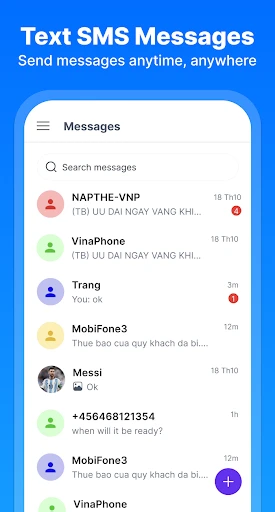
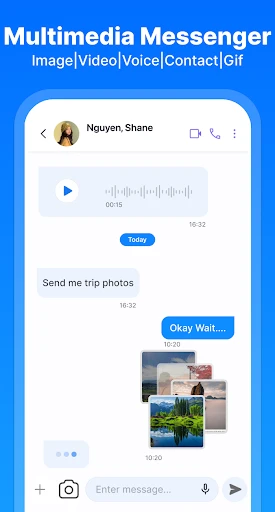
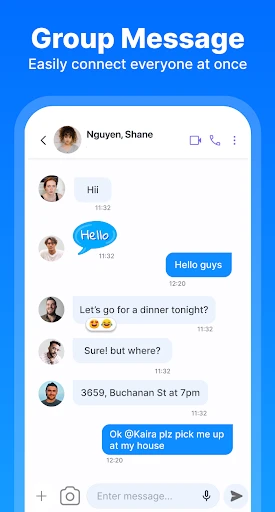
The core function of Messenger: Text Messages revolves around managing traditional SMS and MMS communications. Upon launching the app, users are greeted with a familiar conversation list, where they can view ongoing message threads. Creating a new message is straightforward, involving selecting a contact from the device's address book or entering a phone number manually. The app supports the sending and receiving of standard text messages, as well as multimedia messages, enabling the sharing of images, audio clips, and video files directly within conversations. It facilitates group messaging, allowing multiple contacts to be added to a single thread for coordinated discussions. Basic organizational features are included, such as the ability to archive, delete, or block conversations. Notifications are customizable, ensuring users never miss an important message. The app also integrates with the device's core functions, allowing for quick replies from notification shades and functioning as the default SMS handler for the system, ensuring all textual communications are centralized in one accessible location.
Chapter 2: Value
The primary value proposition of Messenger: Text Messages lies in its commitment to simplicity, reliability, and performance. In an era where messaging apps are often bloated with social features, stickers, and payment systems, this app offers a refreshing focus on doing one thing exceptionally well: text-based communication. Its key advantage is a lightweight and fast interface that loads quickly and operates smoothly even on devices with limited hardware resources. This focus on core functionality translates to enhanced reliability for sending and receiving messages, a critical factor for time-sensitive or important communications. The app provides a clutter-free environment, reducing cognitive load and allowing users to communicate without distractions. For users who prefer not to use data-reliant messaging platforms or need to communicate with contacts who only have standard cellular service, the app's reliance on universal SMS/MMS protocols is a significant advantage, ensuring maximum compatibility. Furthermore, by positioning itself as a capable alternative to pre-installed messaging apps, it offers users choice and control over their communication experience. Its design often emphasizes readability with clear fonts and sensible layout choices, enhancing accessibility. The value is clear: a dedicated, efficient, and dependable tool that handles the essential task of texting with precision and without unnecessary complexity, making everyday communication straightforward and stress-free.
Chapter 3: Scenarios
Messenger: Text Messages is ideally suited for several key user groups and everyday situations. Primarily, it targets Android users who are dissatisfied with their device's default messaging application, whether due to performance issues, a cluttered interface, or personal preference for a more minimalist tool. It is highly valuable for individuals who prioritize reliability in communication, such as professionals coordinating with teams or clients via SMS, or family members sharing quick updates and multimedia moments without requiring everyone to be on the same social or data-based platform. The app is also excellent for users in areas with unstable or expensive mobile data coverage, as SMS functions over basic cellular networks. Everyday use cases include sending quick check-in texts, receiving verification codes from banks or services, coordinating logistics like delivery instructions, and sharing photos from events directly via MMS with contacts who may not use smartphone apps. It serves as a vital communication fallback when internet connectivity is poor. Furthermore, users who manage multiple messaging apps can utilize Messenger: Text Messages as their dedicated hub for all standard SMS/MMS traffic, keeping data-based chats separate from traditional texting for better organization. In essence, it fits seamlessly into the daily routines of anyone who needs a straightforward, no-fuss, and universally compatible method for textual communication.
Uninstall Instructions
For step-by-step guidance on how to safely remove this application from your device, please refer to our 《Uninstall Instructions》 document.
Pros
- integrates SMS and chat in a unified inbox
- offers end-to-end encryption for selected chats
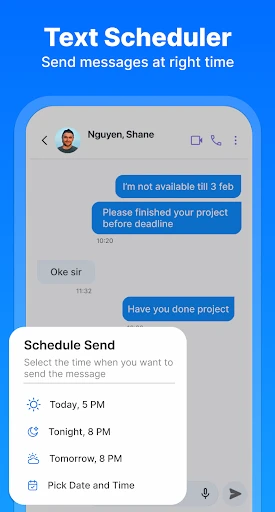
- provides message scheduling for SMS and chats
- supports quick replies with customizable templates
- includes a built-in dual-SMS filter for carriers
Cons
- requires contact permission for full SMS parsing
- encryption limited to app-to-app messages only
- scheduled messages need precise timezone settings
- template replies lack AI-based context suggestions
- dual-SMS filter may mislabel some business texts
Frequently Asked Questions
What is Messenger: Text Messages?
Messenger: Text Messages is a free mobile application for sending and receiving SMS and MMS messages. It functions as a default messaging app replacement, focusing on core texting features like individual and group chats, media sharing, and message organization. It does not require an internet connection for standard SMS/MMS, as it uses your cellular plan. The app is positioned as a straightforward, no-frills alternative to more complex messaging platforms.
Is this app completely free to use?
Yes, the core messaging functionality of Messenger: Text Messages is completely free. It sends standard SMS and MMS messages using your existing cellular plan, so carrier messaging rates may apply. The app itself does not require a subscription. It may contain advertisements or offer optional in-app purchases for premium themes or additional customization features, which are not necessary for basic texting.
What devices and systems is this app compatible with?
Messenger: Text Messages is designed for Android devices. Specific system version requirements (e.g., Android 8.0 and above) should be checked on the Google Play Store listing, as they are subject to change by the developer. The app is not available for iOS (iPhone) or desktop operating systems. It is adapted for general use by anyone needing a primary or alternative SMS application on their Android phone or tablet.
How does this app handle message backup and restoration?
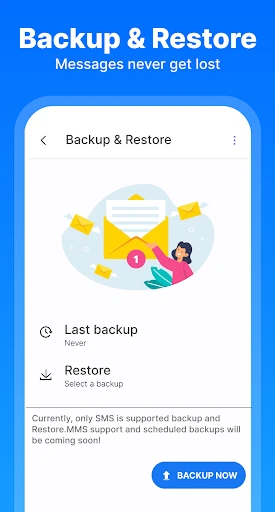
Messenger: Text Messages may offer basic backup options within the app's settings, often allowing you to save messages to your device's internal storage or SD card. For reliable, cloud-based backup and sync across devices, users typically rely on their Google account and the built-in backup services of the Android operating system itself. The app's specific backup features and limitations should be reviewed in its in-app help section.
Can I use this app to message iPhone users?
Yes, you can message iPhone users. Since it sends standard SMS/MMS, it communicates with any phone number. However, these will be traditional green bubble texts, not Apple's iMessage service (blue bubbles). Features like read receipts, typing indicators, or high-quality media sharing that are specific to iMessage or internet-based apps (like WhatsApp) will not function when messaging between this Android app and an iPhone.
App Info
Technical Info
Recommended For You

TeslaMirror
Auto & Vehicles

N5_Theme for Car Launcher app
Auto & Vehicles

HiPaint -Sketch Draw Paint it!
Art & Design

Sunoco: Pay fast & save
Auto & Vehicles

Stripe Dashboard
Business

Cartoon Video & Gif Maker
Comics

Manga Renta
Comics

کتابراه: کتاب الکترونیک و صوتی
Books & Reference

DriveTime Used Cars for Sale
Auto & Vehicles

PhiApp
Beauty

Reverso Translate and Learn
Books & Reference

DayComics
Comics

@Voice Aloud Reader (TTS)
Books & Reference

GlobalComix: Comic Book Reader
Comics

Comic Book Reader (cbz/cbr)
Comics

The Book of Mormon
Books & Reference

Phone Dialer - Call Recorder
Communication

Mirror Plus - HD Mirror app
Beauty

myColorado
Business

StyleKorean
Beauty