
MyWalmart
Screenshots
Description
About MyWalmart App Features – Your Digital Shopping Companion
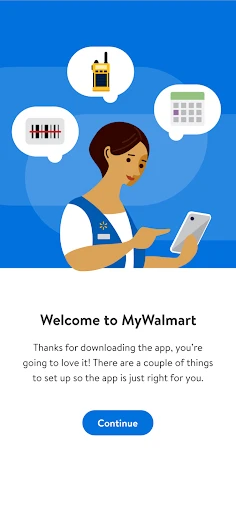
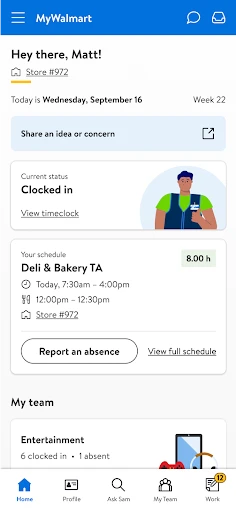
MyWalmart is the official mobile application of Walmart Inc., designed to seamlessly integrate the in-store and online shopping experience. It serves as a comprehensive digital tool that empowers customers to browse products, manage lists, locate items in-store, handle prescriptions, and access exclusive savings. By bridging the gap between Walmart's vast physical inventory and its e-commerce platform, the app provides a unified, convenient, and efficient shopping journey for millions of users, reinforcing Walmart's commitment to everyday low prices through modern digital convenience.
Chapter 1: Function
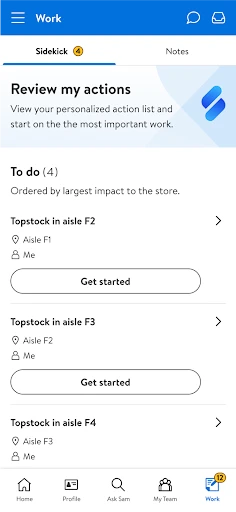
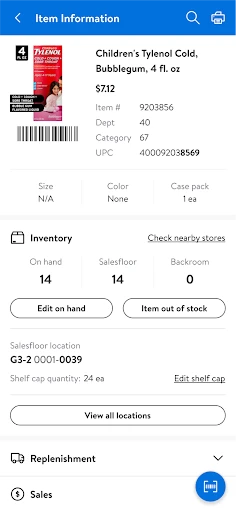
The MyWalmart app is built around several core functions that streamline the shopping process. Primarily, it allows users to browse the full Walmart catalog, check real-time pricing, and verify in-store stock availability at their local store. A key feature is the item location map, which provides the precise aisle number for products within the selected store. The app also includes a digital wallet for storing Walmart Pay and gift cards, a prescription management center for refills and transfers, and a robust shopping list creator that can be shared with others. Furthermore, it integrates online grocery pickup and delivery services, enabling users to order groceries and general merchandise for convenient collection or home delivery, all from a single interface.
Chapter 2: Value
The value proposition of MyWalmart lies in its ability to save users time, money, and effort, effectively consolidating multiple shopping tasks into one intuitive application. Its foremost advantage is significant time savings; the in-store map function eliminates the frustration of searching aisles, while features like quick reordering of frequent purchases and streamlined grocery pickup reduce shopping trips. Financially, the app provides direct access to Rollbacks, special offers, and digital coupons that can be clipped within the app and applied automatically at checkout, both online and in-person via Walmart Pay. This ensures users never miss out on savings. The integration of Walmart Pay offers a fast, secure, and contactless payment method, linking directly to the user's saved payment options and digital receipts. Beyond transactions, the app adds value through services like pharmacy management, photo printing orders, and the ability to track all Walmart orders—online, pickup, and delivery—in one place. It personalizes the experience by providing recommendations based on purchase history and list contents. Ultimately, MyWalmart enhances the omnichannel retail experience by making the physical store smarter and the digital experience more practical, strengthening customer loyalty through unparalleled convenience.
Chapter 3: Scenarios
The MyWalmart app primarily targets everyday Walmart shoppers who value efficiency and savings, including busy families, budget-conscious individuals, and tech-savvy consumers. A common scenario involves a parent preparing for a weekly grocery run; they can create a shared shopping list at home, clip digital coupons, check which items are in stock, and use the store map to navigate the aisles efficiently, turning a potentially lengthy chore into a quick, targeted trip. For users opting for contactless shopping, the app facilitates a complete online order for grocery pickup, where they can schedule a time slot, pay through the app, and simply drive to the store for loading without leaving their car. Another frequent use case is prescription management, where individuals or caregivers can easily refill medications, receive refill reminders, and check pickup readiness. Furthermore, in-store shoppers can use the app's barcode scanner to compare prices and read reviews instantly, and use Walmart Pay for a swift checkout. The app is also invaluable during major shopping events like Black Friday, allowing users to preview deals and plan their purchases strategically.
Uninstall Instructions
For step-by-step guidance on how to safely remove this application from your device, please refer to our 《Uninstall Instructions》 document.
Pros
- integrates store maps with real-time aisle inventory checks
- scan-and-go payment bypasses traditional checkout lines
- personalized weekly ad based on past purchase history
- in-store mode auto-switches for location-relevant coupons
- pharmacy features include prescription refills via barcode scan
Cons
- requires store-specific setup for accurate map navigation
- scan-and-go limited to participating locations and items
- cluttered interface from combining retail and grocery features
- heavy battery usage from constant GPS and barcode scanning
- pharmacy module lacks integration with external health records
Frequently Asked Questions
What is MyWalmart and what are its core functions?
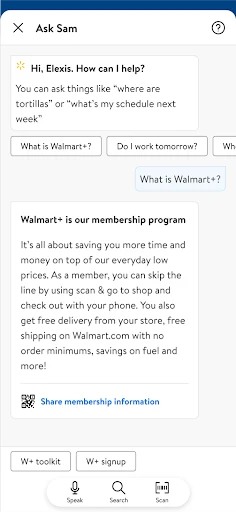
MyWalmart is the official mobile shopping and store companion app for Walmart. Its core functions include browsing and purchasing items online for delivery or pickup, managing Walmart+ membership, creating shopping lists, finding in-store item locations using the store map, and accessing digital receipts. It serves as a unified tool for both online and in-store Walmart shopping.
Is the MyWalmart app free to download and use?
Yes, the MyWalmart app is completely free to download and install. There are no fees required to use its basic shopping features like browsing, list-making, or in-store maps. Optional paid services, such as Walmart+ membership for free delivery, are processed through the app but are separate subscriptions. The app itself does not have mandatory in-app purchases.
What devices and systems are compatible with MyWalmart?
MyWalmart is compatible with most modern smartphones and tablets. It is available for download on devices running iOS (typically iOS 13.0 or later) from the Apple App Store and on devices running Android (typically Android 8.0 or later) from the Google Play Store. The app is designed for individual consumer use and is not tailored for enterprise or wholesale accounts.
How does the in-store map and item finder feature work?
The in-store map feature uses your device's location (with permission granted) to detect your local Walmart store. It displays an interactive map of the store's aisles. You can search for a specific product, and the app will show its precise aisle location. This feature relies on the store's specific layout data and requires location services and internet access to function accurately.
What should I do if I have a problem with an order or the app?
For issues with a specific order (e.g., returns, refunds, delivery problems), you should use the 'Account' section to access your purchase history and initiate a return or contact customer support directly through the app. For technical app issues (crashes, login problems), you can check for updates in your device's app store, restart the app, or reinstall it. Walmart's general customer service can also be contacted for further assistance.
App Info
Technical Info
Recommended For You

WebComics - Webtoon & Manga
Comics

Messages: Text SMS
Communication

Volvo Cars
Auto & Vehicles

Car Key: Smart Car Remote Lock
Auto & Vehicles

Whoosh
Auto & Vehicles

Mirror App - Beauty Mirror
Beauty

マンガほっと -話題の漫画や人気コミックが読めるマンガアプリ
Comics

Zebra Comics: Webtoons & Manga
Comics

Autolink
Auto & Vehicles

Christmas Photo Frames & Cards
Beauty

Zoom Workplace for Intune
Business

VINELink
Books & Reference

Sweet Beauty Camera Fillter
Beauty

DMV Practice Test Permit Genie
Auto & Vehicles

Beauty Makeup Editor & Camera
Beauty

BlueDriver OBD2 Scan Tool
Auto & Vehicles

Second Phone Number - 2Number
Communication

Pray Daily - KJV Bible & Verse
Books & Reference

漫画 ”Renta”マンガ レンタル漫画アプリ
Comics

AnExplorer Pro File Transfer
Business