
VSD Viewer for Visio Drawings
Screenshots


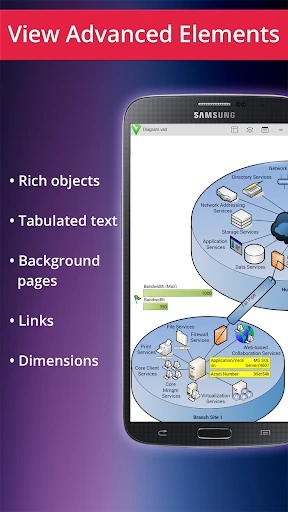


Description
About VSD Viewer for Visio Drawings Feature – A Portable Solution for Microsoft Visio Files
VSD Viewer for Visio Drawings is a specialized mobile application designed to open, view, and inspect Microsoft Visio drawing files directly on smartphones and tablets. It serves as a crucial tool for professionals and students who need to access Visio diagrams, flowcharts, org charts, and floor plans while on the move, without requiring a desktop installation of Microsoft Visio. The app supports a wide range of Visio file formats, including VSD, VSDX, VSDM, and VSX, ensuring compatibility with both older and newer diagram types. By providing a dedicated, lightweight viewing platform, it bridges the gap between complex desktop diagramming software and the need for mobile accessibility, enabling users to carry their technical and business diagrams in their pockets.
Chapter 1: Function
The core functionality of VSD Viewer centers on rendering and navigating Microsoft Visio files with accuracy and ease. Upon opening a file, the app presents a clear, zoomable view of the diagram, preserving layers, shapes, connectors, and embedded text. Users can zoom in and out using pinch gestures to examine fine details and zoom out for an overview of the entire page layout. Basic navigation features include scrolling across large diagrams and switching between multiple pages within a single Visio document. The app also supports searching for text within the diagram, which is essential for locating specific elements in complex charts. Furthermore, it allows users to browse their device's local storage or cloud services like Google Drive and Dropbox to locate and open Visio files. The primary function remains viewing; it does not include editing capabilities, positioning itself as a reliable reader rather than a creator.
Chapter 2: Value
The primary value proposition of VSD Viewer lies in its convenience and reliability for mobile professionals. In today's fast-paced work environment, the ability to reference critical diagrams during meetings, site visits, or client calls without a laptop is a significant advantage. The app eliminates the dependency on desktop software or converting files to alternative formats, saving time and preserving the integrity of the original design. Its key advantages include broad format support, ensuring that files created in various versions of Visio are accessible. The rendering engine aims for high fidelity, maintaining the visual accuracy of shapes, colors, and formatting, which is crucial for technical and architectural diagrams where details matter. Another major value point is its offline functionality; once a file is loaded, it can be viewed without an internet connection, making it useful in environments with poor connectivity. For teams, it facilitates easier sharing and quick reviews, as stakeholders can view diagrams on their own devices instantly. Compared to trying to open Visio files in generic document viewers, this dedicated app provides a smoother, more specialized experience with fewer rendering errors, making it a trustworthy tool for anyone who regularly works with Visio outputs.
Chapter 3: Scenarios
The app primarily targets professionals and students in fields that rely heavily on diagrammatic communication. IT network architects and system administrators can use it to review network topology diagrams and system layouts during infrastructure audits or troubleshooting sessions. Business analysts and process consultants can reference flowcharts and BPMN diagrams in workshops or while gathering requirements on-site. Project managers might access Gantt charts or project timelines embedded within Visio files during status update meetings. Engineers and architects can view technical drawings, floor plans, or circuit diagrams during field inspections. Students studying business processes, engineering, or computer science can use the app to study course materials provided in Visio format on their personal devices. Everyday use cases include a sales professional pulling up a product deployment flowchart during a client presentation, a facilities manager checking a building's floor plan while walking the premises, or a remote team member quickly accessing an updated org chart shared via email. It is ideal for any situation where immediate, read-only access to a Visio diagram is needed, and a computer is not readily available.
Uninstall Instructions
For step-by-step guidance on how to safely remove this application from your device, please refer to our 《Uninstall Instructions》 document.
Pros
- opens visio files without microsoft visio installed
- preserves original layer and shape data accurately
- offers measurement and area calculation tools
- supports batch viewing and quick file navigation
- lightweight with minimal system resource usage
Cons
- limited editing beyond comments and markups
- no support for real-time collaborative editing
- advanced diagram analysis features are absent
- file export formats are basic and restricted
- stylus input optimization is not fully developed
Frequently Asked Questions
What is VSD Viewer for Visio Drawings?
VSD Viewer is a dedicated mobile application designed to open, view, and inspect Microsoft Visio drawing files (.vsd, .vsdx) on the go. Its core function is to provide a reliable way to review diagrams, flowcharts, floor plans, and network diagrams created in Visio without needing the desktop software. It positions itself as a practical viewer for professionals and students who need to access these technical drawings from their mobile devices.
Is this app free to use, and are there in-app purchases?
This could be due to several factors. The app supports common Visio formats (.vsd, .vsdx), but very old or corrupted files may fail to load. Ensure the file is not password-protected, as the viewer may not support encrypted files. Also, extremely complex drawings with custom stencils or proprietary add-ons might not render fully. For persistent issues, contacting the developer's support through the app's official channel is recommended.
Why can't I open a specific Visio file?
The app is typically free to download and install. It offers basic viewing functionality at no cost. However, to access advanced features such as exporting diagrams to other formats, detailed measurement tools, or removing watermarks, the app usually requires a one-time purchase or subscription through in-app purchases. The specific pricing tiers are detailed within the app's store page.
What devices and systems does this viewer support?
VSD Viewer for Visio Drawings is primarily available for iOS and Android mobile devices. It is adapted for smartphones and tablets. The app supports files created in various versions of Microsoft Visio. It does not require additional specialized hardware. For optimal performance, a relatively recent version of the mobile operating system is recommended, as specified on the app's download page.
Can I edit Visio files with this app?
No, this app is fundamentally a viewer. Its core technical characteristic is rendering Visio drawings accurately for inspection and review. You cannot create new shapes, edit text, or modify the underlying structure of the diagram. For full editing capabilities, you need Microsoft Visio desktop software or other advanced diagramming tools. This app focuses on providing a clear, navigable view.
App Info
Technical Info
Recommended For You

Freewave: Romance Audiobooks
Books & Reference

Boost Mobile
Communication
HD Camera for Android: 4K Cam
Beauty

Beauty Camera -AI Photo Editor
Beauty

Librera PRO - Book reader
Books & Reference

Tattoo Simulator Tattoo Maker
Art & Design

When I Work Team Scheduling
Business

Hinovel
Books & Reference

EasyTether Pro
Communication

Chirp Audiobooks
Books & Reference

Session - Private Messenger
Communication

AnExplorer Pro File Transfer
Business

Perfect365 Makeup Photo Editor
Beauty

Member Tools
Books & Reference

AutoTempest - Car search
Auto & Vehicles

Infocar - OBD2 ELM Scanner
Auto & Vehicles

Dictionary - Merriam-Webster
Books & Reference

Haircare app for women
Beauty

ABP for Samsung Internet
Communication

ArtRage Vitae Mobile Painting
Art & Design