
Whoscall - Caller ID & Block
Screenshots
Description
About Whoscall - Caller ID & Block Features
Whoscall is a leading global application for identifying and blocking spam calls and SMS. By leveraging a massive, continuously updated database of phone numbers, it empowers users to screen incoming calls in real-time, effectively filtering out harassment, fraud, and telemarketing. Originally developed by Gogolook, a trust technology company, Whoscall has gained widespread popularity for its accuracy and user-friendly design, serving as a essential tool for safeguarding personal communication security and tranquility in the digital age.
Chapter 1: Function
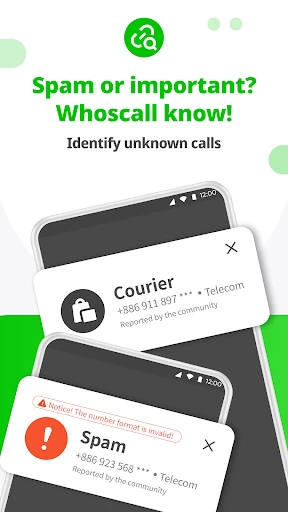
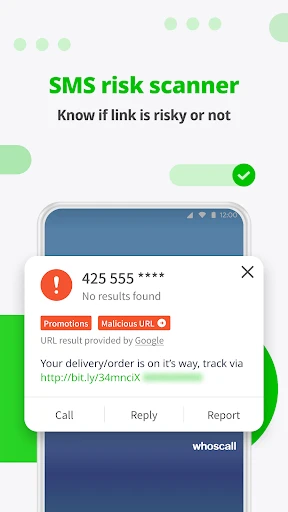
Whoscall's core functionality revolves around real-time caller identification and proactive call blocking. Upon receiving an incoming call, the app instantly cross-references the number with its extensive online database, displaying the caller's identity—whether it's a business, a suspected spam number, or a potential fraud attempt—directly on the phone screen before the user answers. Users can manually create custom blocklists or rely on the app's AI-powered automatic blocking for known nuisance numbers. Additionally, Whoscall features SMS filtering, sorting promotional and spam messages into separate folders. The app also includes a reverse number search function, allowing users to actively look up unknown numbers. Its offline database ensures basic identification even without an internet connection, while the cloud database provides the most up-to-date spam number information.
Chapter 2: Value
The primary value of Whoscall lies in its powerful defense against communication risks and its restoration of user control over incoming calls. In an era rife with phone fraud and relentless telemarketing, Whoscall acts as a smart guard, significantly reducing the likelihood of users falling victim to scams or suffering harassment. Its key advantages include a massive and precise database, which is crowdsourced from millions of users worldwide and updated in real-time, ensuring high identification accuracy and coverage. The app's AI learning engine continuously refines its blocking strategies, becoming more effective over time. Furthermore, Whoscall prioritizes user privacy; it does not upload personal contact lists to its servers, and all query processes are designed with security in mind. The user interface is intuitive, requiring minimal configuration to start working seamlessly in the background. For businesses, being correctly identified enhances their professional image and improves call answer rates. Ultimately, Whoscall saves users time, reduces anxiety associated with unknown calls, and provides peace of mind, making it an indispensable utility app for modern smartphone users.
Chapter 3: Scenarios
Whoscall primarily targets a broad user base susceptible to spam calls, including professionals, the elderly, and general consumers. Office workers can use it to filter out endless sales calls during busy work hours, ensuring they don't miss important client calls. The elderly, who are often targets of fraud, benefit greatly as Whoscall clearly labels high-risk numbers, providing a crucial layer of protection. Parents can install the app on their family's phones to safeguard them from harassment and scams. Freelancers and small business owners can use it to identify potential customer calls while blocking distractions. In everyday life, users activate Whoscall when receiving calls from unknown numbers before a meeting, when screening post-service inquiry calls from merchants, or when managing a flood of promotional SMS during shopping festivals. It is also particularly valuable for individuals who have recently had their number leaked online, helping them block a surge of nuisance calls. Essentially, any smartphone user seeking a cleaner, safer, and more efficient communication environment is a potential beneficiary of Whoscall.
Uninstall Instructions
For step-by-step guidance on how to safely remove this application from your device, please refer to our 《Uninstall Instructions》 document.
Pros
- identifies unknown calls globally in real-time
- blocks spam and fraud calls with a community-updated database
- offline number lookup without consuming mobile data
- automatic call blocking for numbers marked as spam
- minimal battery and performance impact during operation
Cons
- requires granting extensive call and contact permissions
- offline database updates require manual user initiation
- caller ID accuracy varies by region and carrier
- free version displays ads and has limited block list size
- background service may be terminated by aggressive battery savers
Frequently Asked Questions
What is Whoscall and what does it do?
Whoscall is a caller identification and spam blocking app. Its core function is to identify unknown incoming calls and SMS in real-time using a global database of phone numbers. It displays the caller's name, business type, or labels it as spam, fraud, or telemarketing. The app can automatically block suspected nuisance calls, helping users avoid scams and unwanted interruptions. It operates primarily as a call and message screening tool.
Is Whoscall free to use, or does it have in-app purchases?
Whoscall operates on a freemium model. The basic version is free and offers core features like caller ID and basic spam blocking. A premium subscription (Whoscall Premium) is available via in-app purchase, which unlocks advanced features such as automatic spam number updates, offline database access, custom block lists, and removal of ads. The specific pricing varies by region and subscription plan.
How does Whoscall protect user privacy with call data?
Whoscall states that it uses phone number data for identification purposes only. According to its privacy policy, it does not sell users' personal call logs or contact lists. The app requires permissions to access calls and contacts to function, but user-contributed spam reports are anonymized. Data is encrypted during transmission. Users should review the official privacy policy for detailed information on data handling and storage practices.
On which devices and operating systems is Whoscall available?
Whoscall is primarily available for Android and iOS devices (iPhone). It is designed to work on smartphones and tablets running compatible versions of these operating systems. The app's functionality and database are adapted for specific countries and regions. It does not require additional hardware. For the most current information on supported OS versions and regional availability, please check the official Google Play Store or Apple App Store listings.
Can Whoscall completely block all spam and scam calls?
While Whoscall effectively blocks a significant volume of spam and scam calls using its extensive and frequently updated database, no app can guarantee 100% blockage. New spam numbers emerge constantly. The app's effectiveness depends on community reports and database updates. Premium features may offer more proactive blocking. Users are advised to remain cautious with unknown calls, even if not flagged, as some new fraudulent numbers may not yet be in the system.
App Info
Technical Info
Recommended For You

Online chat, calls - Gem Space
Communication

Microsoft Authenticator
Business

MySubaru
Auto & Vehicles

Tattoo Design & Tattoo Maker
Beauty

DailyBible Lite - KJV Version
Books & Reference

Bible App by Olive Tree
Books & Reference

TapRead - Romance Stories
Books & Reference

LinkedIn: Jobs & Business News
Business

Pango Comics: cartoon for kids
Comics

Draw Cartoons 2
Comics

Al Quran MP3 Audio Offline App
Books & Reference

Cookie Cutters
Beauty

Christmas Photo Frames & Cards
Beauty

Drawing Apps: Draw, Sketch Pad
Art & Design

Wear OS by Google Smartwatch
Communication

Penny Puss 2.0
Business

FoxFi Key (supports PdaNet)
Communication

One Block for Minecraft Maps
Books & Reference

Abyss Reader
Comics

POCKET COMICS: Premium Webtoon
Comics