
Thunderbird: Free Your Inbox
Screenshots


Description
About Thunderbird: Free Your Inbox Feature
Thunderbird: Free Your Inbox is a powerful, open-source desktop email client developed by the community behind Mozilla. It transcends the limitations of basic webmail interfaces by offering a comprehensive, privacy-focused, and highly customizable platform for managing multiple email accounts, calendars, and contacts. Designed for users who seek control and efficiency, Thunderbird consolidates communications into a single, unified application. It stands out with its robust feature set, commitment to user privacy without ads or data mining, and extensive library of add-ons for personalization. This application is ideal for professionals, power users, and anyone dissatisfied with the constraints of mainstream web-based email services, providing a mature and reliable alternative to take back control of their digital correspondence.
Chapter 1: Function
Thunderbird's core functionality centers on being a versatile, all-in-one communication hub. Primarily, it allows users to securely set up and manage an unlimited number of email accounts from various providers (like Gmail, Outlook, Yahoo, or IMAP/POP3 servers) within a single, unified interface. Its powerful mail management tools include advanced filtering, tagging, and search capabilities to organize massive inboxes efficiently. The application integrates a built-in calendar for scheduling events and tasks, alongside a robust address book for contact management. It supports real-time chat via protocols like IRC, XMPP, and Matrix. Security is foundational, featuring strong phishing protection, automatic updates, and support for OpenPGP encryption. Furthermore, its functionality can be massively extended through a vast ecosystem of add-ons, allowing users to tailor everything from the user interface to specific workflow enhancements.
Chapter 2: Value
The primary value proposition of Thunderbird lies in granting users true sovereignty over their email and communication data. Unlike many free webmail services that monetize user data through advertising, Thunderbird is open-source and developed with a staunch commitment to privacy. It does not show ads, track user behavior, or mine personal information. This creates a trustworthy, distraction-free environment. Its second major advantage is unparalleled customization. The application's look, feel, and behavior can be modified extensively through themes and add-ons, enabling users to craft a workflow that perfectly matches their needs, from productivity boosters to visual overhauls. Thirdly, it offers powerful, offline-capable functionality. All email data is stored locally, allowing for full access and management without an internet connection, with seamless synchronization when online. This combination of privacy, customization, and powerful offline management makes Thunderbird a uniquely user-empowering tool. It reduces reliance on any single service provider, centralizes fragmented communication channels, and provides a stable, feature-rich platform that evolves based on user needs rather than corporate interests, ensuring long-term reliability and control.
Chapter 3: Scenarios
Thunderbird is optimally suited for specific user groups who prioritize efficiency, privacy, and centralized control. The primary audience includes professionals and small business owners who manage multiple email identities (e.g., work, personal, project-specific) and require a dependable, offline-accessible system with integrated calendar scheduling. Academic researchers, journalists, and privacy-conscious individuals benefit greatly from its encryption support and lack of tracking, safeguarding sensitive communications. Non-profit organizations and educational institutions value its zero-cost licensing and open-source nature, allowing deployment without vendor lock-in. Power users and tech enthusiasts appreciate the deep customization through add-ons to automate filters, enhance security, or integrate with other tools. Everyday use cases involve a user launching Thunderbird in the morning to see consolidated emails from all accounts, using quick filters to prioritize messages, scheduling team meetings directly from the email interface via the calendar, and using encrypted email for confidential documents. It serves as the central command desk for all digital correspondence, freeing users from constantly switching between browser tabs and different service platforms.
Uninstall Instructions
For step-by-step guidance on how to safely remove this application from your device, please refer to our 《Uninstall Instructions》 document.
Pros
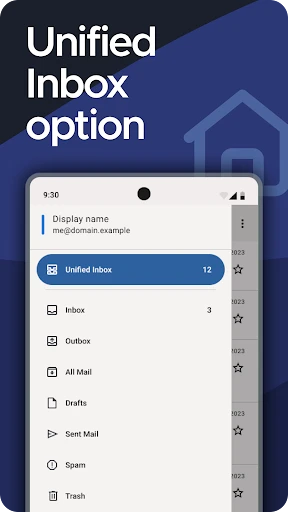
- unified inbox for multiple email and chat services
- powerful local filtering and tagging without cloud reliance
- open-source code ensures transparency and customizability
- handles very large mail archives with minimal lag
- master password protection for all account credentials
Cons
- steep learning curve for non-technical users
- interface feels dated compared to modern web clients
- manual setup required for services like gmail imap
- limited real-time sync for modern chat integrations
- add-ons needed for basic calendar and contact sync
Frequently Asked Questions
What is Thunderbird: Free Your Inbox?
Thunderbird: Free Your Inbox is a free, open-source email client application. It centralizes multiple email accounts (like Gmail, Outlook, Yahoo) into one unified inbox. Its core positioning is to provide a powerful, private, and customizable alternative to webmail interfaces, helping users efficiently manage email, contacts, and calendars without being locked into a single service provider.
Is Thunderbird completely free to use?
Yes, Thunderbird is completely free to download and use. There are no in-app purchases, subscription fees, or premium tiers required to access its core features like email management, calendar integration, and contact organization. It is developed by the non-profit MZLA Technologies Corporation, relying on donations. Some optional add-ons from third-party developers might be available, but the core app remains free.
What devices and systems does Thunderbird support?
Thunderbird is a desktop application available for Windows (10 and later), macOS (10.15 and later), and Linux operating systems. It is not a web app or a native mobile application. While there are unofficial methods to access it on other platforms, official support and development are focused on these primary desktop environments. It does not require special hardware.
How does Thunderbird protect my privacy and data?
Thunderbird prioritizes user privacy by storing all your email data locally on your device, not on company servers. It supports encrypted connections (SSL/TLS) to mail servers. Features like built-in phishing protection, junk mail filtering, and the ability to use end-to-end encryption via OpenPGP enhance security. As open-source software, its code is publicly auditable for transparency.
Can I add my Gmail or Outlook account to Thunderbird?
Yes, you can easily add accounts from major providers like Gmail, Outlook.com, Yahoo, and standard IMAP/POP3 email services. The setup wizard typically automates the configuration process. For Gmail, you may need to generate an 'App Password' if you use two-factor authentication. Thunderbird downloads and stores your emails locally, allowing offline access and management.
App Info
Technical Info
Recommended For You

Picify: AI Art Editor
Art & Design

Security Camera Mod Minecraft
Books & Reference

Draw Cartoons 2 PRO
Art & Design

Phoner 2nd Phone Number + Text
Communication

Gruveo - Video Conferencing
Communication

AI Image Generator: ImagineArt
Art & Design

Figma: view. comment. mirror.
Art & Design

Picture Editor
Beauty

KJV Daily Bible - Verse+Audio
Books & Reference

Cover Hunter - 3v3 Team Battle
Comics

aiMail - Al Email Accounts
Communication

Mirror App - Beauty Mirror
Beauty

850 OBD-II
Auto & Vehicles

Messages: SMS Message Text App
Communication

AI Hairstyle Try On・Wigs・Bangs
Beauty

Google Messages
Communication

Gmail
Communication

Getcontact
Communication

Bible Daily, KJV Bible + Audio
Books & Reference

Personal stickers StickerMaker
Communication