
Drawing Desk: Learn to Draw
Screenshots
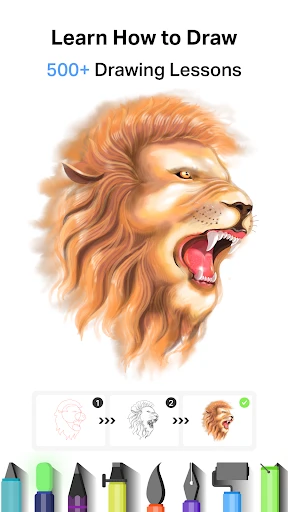




Description
About Drawing Desk: Learn to Draw Feature
Drawing Desk: Learn to Draw is a comprehensive digital art application designed for users of all skill levels who wish to explore, learn, and create visual art. It transcends being a simple sketching tool by integrating guided tutorials, a vast library of brushes and tools, and a user-friendly interface that mimics real drawing desks. The app successfully bridges the gap between casual doodling and serious artistic practice, offering a structured yet flexible environment. Available on both iOS and Android platforms, it serves as a portable art studio, enabling users to transition from following step-by-step lessons to expressing their own unique creativity on a digital canvas.
Chapter 1: Function
Drawing Desk: Learn to Draw is built around a core suite of functions that facilitate both learning and freeform creation. At its heart is a multi-layered canvas supporting high-resolution artwork. Users have access to an extensive array of digital tools, including realistic pencils, inks, markers, and a variety of textured brushes, alongside advanced features like layers, blending modes, and color palettes. A standout function is its integrated learning module, which offers a wide range of step-by-step drawing tutorials categorized by difficulty and theme, such as animals, characters, and objects. Additional functionalities include photo editing capabilities, coloring pages for relaxation, and a suite of decorative stickers and stamps. The app also provides basic shape guides and symmetry tools to assist in constructing accurate drawings, making the process accessible to beginners.
Chapter 2: Value
The primary value of Drawing Desk: Learn to Draw lies in its dual role as both an educational platform and a powerful creative suite. For beginners and children, its greatest advantage is the structured, bite-sized tutorials that demystify the drawing process, building confidence and foundational skills progressively. The app lowers the barrier to entry for art, requiring no expensive physical materials and offering undo/redo functions that encourage experimentation without fear of mistakes. For intermediate artists, the value extends to its professional-grade tools like layers and custom brushes, which allow for complex digital artwork creation. The app's all-in-one nature consolidates the need for multiple applications, providing lessons, sketching, painting, and photo editing in a single ecosystem. Its offline functionality for core features ensures creativity is not hindered by connectivity. Furthermore, by offering a stress-free coloring book experience, it provides therapeutic value, promoting mindfulness and relaxation. This combination of guided learning, robust creation tools, and mental wellness support delivers exceptional utility and engagement for a minimal cost compared to traditional art supplies or premium desktop software.
Chapter 3: Scenarios
Drawing Desk: Learn to Draw caters to a diverse range of user groups across everyday scenarios. Primary target users include art enthusiasts and absolute beginners seeking a guided path to improve their drawing skills. They might use the app during commutes, in waiting rooms, or at home to complete short, instructive tutorials. Children and parents form another key demographic, utilizing the coloring books and simple lessons for educational play and creative development. Hobbyists and diary keepers employ the app to sketch ideas, illustrate journals, or add artistic flair to personal photos. In educational settings, teachers can incorporate it as a supplementary tool for basic art instruction. Professionals, such as designers or illustrators, may use it for quick conceptual sketches or brainstorming on the go. Common use cases involve a user following a tutorial to draw a cartoon character for fun, a parent and child collaboratively coloring a page to unwind in the evening, or an individual using the advanced brushes to create a digital painting from imagination during their leisure time. The app seamlessly integrates into moments of learning, creativity, and relaxation throughout the day.
Uninstall Instructions
For step-by-step guidance on how to safely remove this application from your device, please refer to our 《Uninstall Instructions》 document.
Pros
- step-by-step tutorials for diverse art styles
- offline access to all drawing lessons and tools
- layered canvas with blending modes for digital art
- daily drawing challenges with community feedback
- minimalist ui reduces clutter for focused practice
Cons
- advanced brushes require separate in-app purchases
- auto-save limited to cloud-linked accounts only
- no vector-based tools for scalable artwork
- community gallery lacks content moderation filters
- high-resolution exports need subscription plan
Frequently Asked Questions
What is Drawing Desk: Learn to Draw?
Drawing Desk: Learn to Draw is a mobile application designed for digital art creation and learning. It falls under the Art & Design category. Its core positioning is to provide an accessible platform for users to draw, sketch, and learn artistic techniques through guided tutorials. The app combines a versatile digital canvas with structured learning content to help users improve their drawing skills.
Is the app free to use or does it have in-app purchases?
The app is free to download and use with basic features. However, it operates on a freemium model and includes in-app purchases. These purchases typically unlock premium content such as advanced drawing tools, a wider variety of brushes and colors, additional tutorial packs, and the removal of advertisements. No additional physical equipment is required beyond a compatible touchscreen device.
What devices and systems is the app compatible with?
Drawing Desk: Learn to Draw is primarily designed for mobile devices. It is available for both iOS and Android operating systems. Specific version requirements can be found on the respective app stores (Apple App Store and Google Play Store). The app is generally suitable for all age groups interested in drawing, from beginners to hobbyists, and is adapted for use on smartphones and tablets.
How does the 'Learn to Draw' feature work?
The 'Learn to Draw' feature provides step-by-step guided tutorials. These tutorials break down drawings into manageable steps, allowing users to trace or follow along to create complete artworks. The feature may include various difficulty levels and themes. It leverages the app's drawing tools within the tutorial interface, offering a hands-on learning experience directly on the digital canvas.
Can I export and save my drawings created in the app?
Yes, the app allows you to save your artwork locally to your device's gallery or internal storage. It also typically supports exporting drawings in common image formats like PNG or JPEG. Some sharing functionalities to social media or other platforms may be included. For issues with saving or exporting, standard troubleshooting involves checking device storage permissions and available space. No specific after-sales maintenance service is detailed within the app's public information.
App Info
Technical Info
Recommended For You

MTS Urent
Auto & Vehicles

Bible Offline-KJV Holy Bible
Books & Reference

AMarkets: Trade & Invest
Business

Groundwire: VoIP SIP Softphone
Communication

Magic Doodle: Glow Art Drawing
Art & Design

Cheogram (Jabber, Call, Text)
Communication

Mens Hairstyles And Haircuts
Art & Design

Messages - Text SMS App
Communication

Zebra Comics: Webtoons & Manga
Comics

Tor Browser
Communication

Moon+ Reader Pro
Books & Reference

CarParts.com
Auto & Vehicles

Mahjong Dots Elimination
Comics

Staffmark WorkNOW
Business

Solo: Your Gig Business App
Business

Asana: Where work connects
Business

Challenger Comics Viewer
Comics

Infinite Design
Art & Design

Google Pixel Watch
Communication

myAudi
Auto & Vehicles