
ComicScreen - PDF, ComicReader
Screenshots

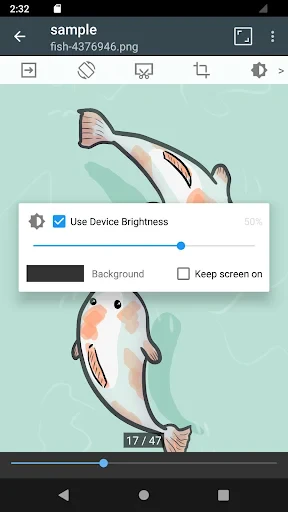

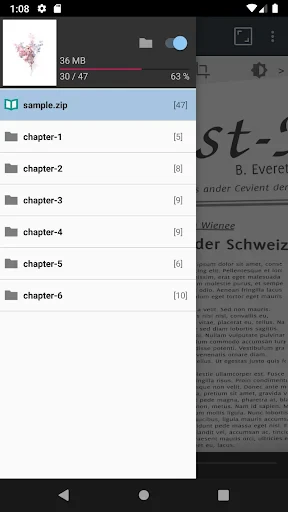

Description
About ComicScreen - PDF, ComicReader Feature
ComicScreen - PDF, ComicReader is a dedicated application designed for reading digital comics, manga, and PDF files on Android devices. It positions itself as a powerful and versatile viewer, going beyond basic display functions to offer a tailored experience for comic enthusiasts. The app supports a wide array of archive formats, including CBZ, CBR, PDF, and ZIP, making it a one-stop solution for personal digital libraries. With a focus on customization, performance, and user-centric navigation, ComicScreen transforms a smartphone or tablet into a portable comics reader, aiming to replicate the tactile feel of flipping through physical pages while leveraging the advantages of digital technology.
Chapter 1: Function
ComicScreen's core functionality revolves around robust file management and a highly adaptable reading engine. It seamlessly opens comics stored in popular compressed formats like CBZ and CBR, as well as PDF documents. The app features multiple reading modes, such as single-page, continuous vertical scrolling, and two-page spreads, to suit different comic styles and user preferences. Its sophisticated zooming interface allows for precise panel-by-panel navigation with intuitive taps or swipes. A central function is the advanced library management system, which automatically catalogs imported files, supports folder-based organization, and remembers the last read position for each book. Additional utilities include a thumbnail browser for quick navigation within a file, configurable touch controls, and support for external storage, forming a comprehensive toolkit for digital comic consumption.
Chapter 2: Value
The primary value of ComicScreen lies in its deep customization and performance optimization, which collectively deliver a superior, distraction-free reading experience. Unlike generic PDF viewers or multipurpose media apps, ComicScreen is fine-tuned specifically for the visual narrative flow of comics. Its key advantage is the extensive control it grants users over the visual presentation. Readers can meticulously adjust brightness, contrast, and apply screen filters like a monochrome mode or anti-ghosting to reduce eye strain. The app's rendering engine is optimized for speed, ensuring quick loading and smooth transitions even for high-resolution archives. Another significant value proposition is its intelligent navigation system, featuring a 'Smart Scroll' for guided panel reading and an automatic 'Crop Borders' function to maximize screen real estate by removing white margins. It supports right-to-left reading mode essential for traditional manga, alongside comprehensive metadata tagging. By combining these professional-grade features with a stable, ad-free core experience, ComicScreen offers exceptional utility that justifies its premium status, making it a favored tool among serious collectors and casual readers alike who seek full command over their digital reading session.
Chapter 3: Scenarios
ComicScreen is ideally suited for a diverse range of users whose common thread is a passion for sequential art. The primary user group comprises comic and manga fans who have amassed large digital collections and require a reliable, organized platform to manage and read them on the go. It is equally valuable for readers who source material from various online libraries or creators, as its format compatibility ensures everything opens in one place. Everyday use cases are varied: a commuter using a tablet to catch up on the latest manga chapter during a train ride, leveraging the precise panel navigation to follow the story easily; a collector at home browsing their meticulously sorted library to reread a classic arc, enjoying the two-page spread view on a larger device; or a student reading graphic novels or illustrated PDF textbooks, using annotation and bookmarking features for study purposes. The app also serves professionals in the field, such as indie comic artists, who may use it to review their own exported PDF or CBZ proofs. Essentially, any scenario that involves comfortable, immersive, and controlled reading of digital comics is where ComicScreen excels.
Uninstall Instructions
For step-by-step guidance on how to safely remove this application from your device, please refer to our 《Uninstall Instructions》 document.
Pros
- automatically organizes scanned PDFs into readable comic pages
- supports direct reading from cloud drives and NAS without import
- offers a minimalist
- ad-free interface for distraction-free reading
- precise panel-by-panel guided view for complex layouts
- includes a built-in file manager with metadata editing
Cons
- advanced cropping tools require a learning curve to master
- no built-in comic store or online discovery features
- guided view can be slow on very large
- high-resolution files
- interface customization is limited compared to rivals
- cloud sync setup is manual and lacks automation
Frequently Asked Questions
What is ComicScreen and what are its core functions?
ComicScreen is a dedicated comic and PDF reader app for Android. Its core function is to provide a seamless reading experience for digital comics, manga, and PDF files stored on your device or network. It supports a wide range of archive formats like CBZ, CBR, and PDF, and focuses on features essential for comic reading, such as customizable page viewing modes, smart zoom, and library management.
Is ComicScreen free to use or does it have in-app purchases?
ComicScreen is a paid app with a one-time purchase. There is no free version or subscription model. The initial purchase grants access to all current features. The app description does not mention any additional in-app purchases for core functionality, but it's always recommended to check the latest listing on the Google Play Store for the most current pricing and offer details.
What file formats and devices does ComicScreen support?
ComicScreen supports major comic archive formats (CBZ, CBR, CBT, CB7) and PDF files. It is designed specifically for Android devices and is not available for iOS or desktop operating systems. The app can read files from local device storage, SD cards, and networked sources like LAN shares or cloud storage services, adapting to various user storage setups.
How does the reading experience and zoom function work?
The app offers multiple viewing modes, including single page, double-page spread, and vertical scrolling. Its technical focus includes a high-quality zoom engine with smart panel detection, which can automatically zoom in on individual comic panels for easier reading. Users can also configure touch controls for manual zoom and navigation to fit their personal reading preference.
Can I organize my comic library within the app?
Yes, ComicScreen includes library management features. It can automatically scan designated folders on your device or network to build a comic collection. You can organize your library using categories, series grouping, and favorites. The app also supports metadata retrieval for some files to automatically sort and label your collection, though this feature's effectiveness depends on the available file information.
App Info
Technical Info
Recommended For You

Draw Anime: AR Drawing Sketch
Art & Design

Smartsheet: Projects & Teams
Business

English-Myanmar Dictionary
Books & Reference

DMV Practice Test Permit Genie
Auto & Vehicles
Coloring games: speed drawing
Art & Design

LinkedIn: Jobs & Business News
Business

Stitch Photos: Long Screenshot
Art & Design

Messages - SMS, Chat Messaging
Communication

Cryptoguru: Trading Simulator
Business

Whitepages - Find People
Communication

Virtual Dyno PRO
Auto & Vehicles

MediBang Paint:Draw Art, Comic
Art & Design

AR Art Projector: Da Vinci Eye
Art & Design

AI Video - AI Video Generator
Art & Design

Thrift Savings Plan
Business

Pashto short stories پښتو قیصی
Comics

Mangamo Manga & Comics
Comics

리디 - 웹툰, 만화, 웹소설, 전자책 모두 여기에!
Comics

iDraw
Art & Design

Poster Maker - Flyer Maker
Art & Design