
Smartsheet: Projects & Teams
Screenshots


Description
About Smartsheet: Projects & Teams Feature – Overview
Smartsheet: Projects & Teams is a powerful work execution platform designed to empower teams to plan, track, automate, and report on work at scale. Bridging the gap between traditional spreadsheet simplicity and robust project management functionality, it provides a flexible, collaborative environment. The app transforms static sheets into dynamic living hubs for project data, enabling real-time updates, automated workflows, and centralized file management. It is trusted by organizations of all sizes to streamline operations, enhance visibility, and drive efficiency across diverse projects and team collaborations, all accessible through its intuitive mobile application.
Chapter 1: Function
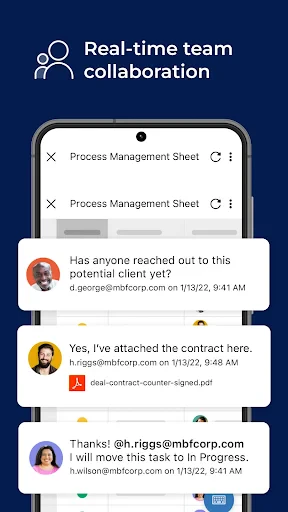
The core function of Smartsheet: Projects & Teams centers on providing a dynamic, grid-based interface for managing work. Users can create sheets that function as project plans, task lists, issue trackers, or data collections. Key functionalities include task assignment with deadlines and dependencies, real-time collaboration where multiple users can edit simultaneously, and automated alert notifications. The app supports file attachments directly to rows, enabling centralized document access. Furthermore, it offers customizable views such as Gantt charts for timeline visualization, card views for Kanban-style workflows, and calendar views for scheduling. Users can also build simple automated workflows to route requests and approvals, ensuring processes move forward without manual intervention. These features combine to create a centralized command center for project execution.
Chapter 2: Value
The primary value proposition of Smartsheet lies in its unique ability to balance flexibility with structure, making advanced work management accessible without extensive training. Its key advantage is the familiar spreadsheet-like model, which lowers the adoption barrier for users accustomed to tools like Excel, while infusing it with powerful relational database and project management capabilities. This facilitates a single source of truth for projects, eliminating silos and version control issues. The platform drives significant efficiency through automation, reducing repetitive manual tasks and minimizing errors. Enhanced visibility is another critical value; dashboards and reports can be generated to provide real-time insights into project health, resource allocation, and performance metrics, supporting data-driven decision-making. For teams, it fosters accountability through clear task ownership and transparency. Scalability is a cornerstone of its value, supporting everything from simple team task lists to complex enterprise-wide project portfolios. The mobile app extends this value by ensuring stakeholders can update, review, and approve work from anywhere, keeping projects agile and responsive.
Chapter 3: Scenarios
Smartsheet: Projects & Teams serves a wide array of user groups across industries. Project managers and team leaders are primary users, leveraging it for detailed project planning, resource tracking, and milestone monitoring. Marketing teams utilize it to manage campaign calendars, content calendars, and event planning with shared asset repositories. Operations and IT teams find it ideal for tracking service requests, managing agile sprints, and overseeing system implementations. Its flexibility also makes it perfect for cross-functional teams working on complex initiatives like product launches or construction projects, where coordination between departments is crucial. Everyday use cases include a remote team collaborating on a product roadmap using the Gantt chart view, a finance team automating a budget approval process, or an HR manager tracking candidate interviews across different departments via a shared sheet. Essentially, any professional or team that needs to move work forward in an organized, visible, and collaborative manner will find Smartsheet an indispensable tool for daily execution.
Uninstall Instructions
For step-by-step guidance on how to safely remove this application from your device, please refer to our 《Uninstall Instructions》 document.
Pros
- dynamic row highlighting visually flags critical path items
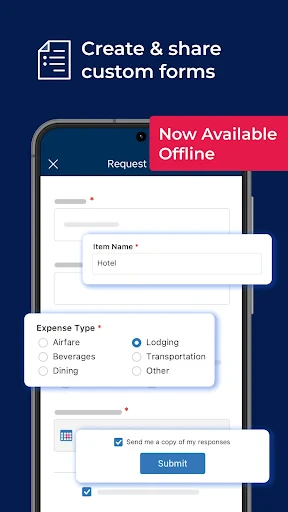
- automated request routing via structured forms and sheets
- proofing workflow consolidates feedback directly on assets
- real-time co-editing with cell-level change tracking
- integrates Gantt
- card
- and grid views in one workspace
Cons
- steep learning curve for spreadsheet-like formula syntax
- automation builder requires technical admin configuration
- mobile app offers limited dashboard editing capabilities
- premium features like resource management need higher tiers
- report dashboards lack real-time external guest commenting
Frequently Asked Questions
What is Smartsheet and what is it used for?
Smartsheet is a cloud-based work execution platform designed for project management and team collaboration. Its core function is to provide a flexible, spreadsheet-like interface for planning, tracking, automating, and reporting on work. It uniquely blends the familiarity of a spreadsheet with robust project management features like Gantt charts, automated workflows, and file sharing. It is primarily used for managing tasks, timelines, resources, and processes across teams.
Is Smartsheet free to use, and what are the costs?
While it uses a familiar grid interface, Smartsheet adds powerful project-specific functionalities not found in standard spreadsheets. Key unique features include automated workflow and approval processes, real-time collaborative editing with activity logging, interactive Gantt charts and calendar views, robust form creation for data collection, and deep integrations with apps like Microsoft 365, Google Workspace, and Slack. It is built specifically for dynamic work management.
What devices and systems does Smartsheet support?
Smartsheet operates on a freemium model. It offers a limited-feature free individual plan. For full functionality, including team collaboration and advanced features, paid subscriptions are required. Pricing is per user, per month, with tiers offering different levels of capabilities like automation, reporting, and admin controls. There are no in-app purchases; all billing is handled through subscription plans on their website.
How does Smartsheet differ from traditional spreadsheets?
Smartsheet is a web-based application accessible through modern browsers like Chrome, Firefox, and Safari. It also offers dedicated mobile apps for iOS and Android devices, allowing users to view, edit, and manage sheets on the go. It does not require specific additional hardware. The platform is designed for business teams across various departments, from IT and marketing to operations.
Can I import data from Excel or Google Sheets?
Yes, Smartsheet allows for easy import of data from Microsoft Excel (.xlsx, .xls) and CSV files. You can directly import these files to create new sheets. Integration with Google Sheets is also supported, primarily through a published integration that allows for data transfer. For common usage problems, extensive help articles, community forums, and email support are available. Paid plans include phone support and dedicated customer success managers.
App Info
Technical Info
Recommended For You

YouVersion Bible App + Audio
Books & Reference

AI Dress up-Try Clothes Design
Beauty

eBay Motors: Parts, Cars, more
Auto & Vehicles

AR Drawing: Sketch, Art, Paint
Art & Design

FantacyStory: novels, fictions
Books & Reference

Gencraft - AI Art Generator
Art & Design

Truecaller: Caller ID Blocker
Communication

Lezhin Comics - Daily Releases
Comics

Black Magic
Books & Reference

Draw Anime: Paint & Sketch App
Art & Design

Microsoft Teams
Business

WOMBO Dream - AI Art Generator
Art & Design

Mary Kay® MirrorMe™
Beauty

AutoZen-Car Dashboard&Launcher
Auto & Vehicles

JusTalk - Video Chat & Calls
Communication

CDisplayEx Comic Reader Lite
Comics

Twenty-Four Hours a Day
Books & Reference

AR Drawing - Trace Drawing App
Art & Design

Girls Hairstyle Step By Step
Beauty

Blue Letter Bible
Books & Reference