
Resume Builder - CV Maker
Screenshots



Description
About Resume Builder - CV Maker Feature
Resume Builder - CV Maker is a professional mobile application designed to simplify the often daunting task of creating a compelling resume or curriculum vitae. It provides users with a streamlined, step-by-step process to craft, format, and customize their career documents directly from their smartphones or tablets. The app caters to job seekers across all experience levels, from fresh graduates to seasoned professionals, by offering a wide array of modern, ATS-friendly templates and industry-specific content suggestions. Its core philosophy is to empower users to present their skills, experiences, and achievements in the most effective manner possible, thereby enhancing their chances of securing interviews and advancing their careers.
Chapter 1: Function
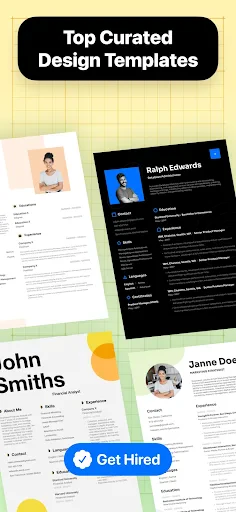
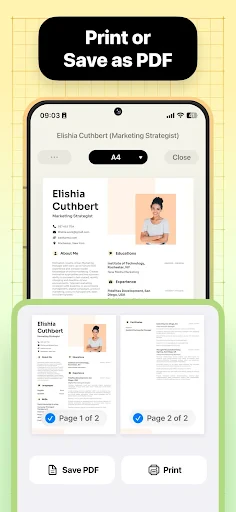
The core functionality of Resume Builder - CV Maker centers on guided document creation and professional formatting. Users begin by selecting a visually appealing template from a curated library designed to pass through Applicant Tracking Systems (ATS). The app then leads them through a structured process to input personal details, work experience, education, skills, and other relevant sections. Key features include an intuitive text editor with formatting tools, the ability to import existing LinkedIn profiles to auto-fill sections, and a built-in spell-checker. Users can also manage multiple resume versions for different job applications. Once the content is complete, the app allows for easy exporting in multiple formats such as PDF and DOCX, with options for direct sharing via email or cloud storage platforms, completing the creation-to-distribution cycle seamlessly within the app.
Chapter 2: Value
The primary value proposition of Resume Builder - CV Maker lies in its ability to democratize professional resume creation, saving users significant time, money, and effort. Unlike generic word processors, it provides expert-guided structure and design, ensuring that resumes meet professional standards and are optimized for both human recruiters and automated ATS software. Its key advantages include a vast collection of professionally designed templates that are regularly updated to reflect current trends, which eliminates the need for costly graphic designers. The app offers intelligent content suggestions and pre-written phrases tailored for various industries and roles, helping users articulate their achievements powerfully even if they struggle with writing. Furthermore, it provides immense convenience through its mobile-first approach, allowing users to create or edit their resumes anytime, anywhere. The one-time purchase or subscription model often proves more economical than repeatedly hiring professional services. By consolidating template design, content guidance, formatting, and export into a single, user-friendly platform, the app delivers exceptional value by increasing the user's confidence and the perceived quality of their application, directly impacting their job search success.
Chapter 3: Scenarios
The primary target users for Resume Builder - CV Maker are job seekers at all career stages. This includes university students and recent graduates entering the job market for the first time, who benefit immensely from the structured guidance and professional templates to compensate for limited experience. Mid-career professionals looking to change jobs or industries use the app to reframe their extensive experience into modern, impactful formats. Even senior executives find value in the app for crafting concise, high-impact summaries of their leadership tenure. Everyday use cases are varied: a student might quickly draft a resume after a career fair using their phone on the bus ride home; an employed professional could discreetly update their CV during a lunch break to apply for a newly discovered opportunity; a freelancer might maintain multiple tailored versions for different client proposals. The app is also frequently used in scenarios requiring immediate document submission, such as applying for a spontaneously found job posting, or preparing for a sudden interview opportunity where an updated CV is required. It serves as an essential digital tool for anyone who needs to present their professional story effectively and efficiently in the modern, fast-paced job market.
Uninstall Instructions
For step-by-step guidance on how to safely remove this application from your device, please refer to our 《Uninstall Instructions》 document.
Pros
- generates tailored resumes from minimal user input
- integrates real-time job market keyword optimization
- offers one-click reformatting for different job roles
- provides ATS-friendly templates as a core technical feature
- includes industry-specific phrasing suggestions from its database
Cons
- advanced template customization requires a subscription
- offline editing functionality is severely limited
- deep industry-specific edits need manual override
- initial AI-generated content requires significant user verification
- free version exports with mandatory platform watermark
Frequently Asked Questions
What is Resume Builder - CV Maker?
Resume Builder - CV Maker is a mobile application designed to help users create professional resumes and CVs quickly. Its core function is to provide structured templates, step-by-step guidance, and editing tools for inputting personal information, work experience, education, and skills. It positions itself as a tool for job seekers to craft tailored documents suitable for various industries without requiring prior design expertise.
Is Resume Builder free to use, or does it have in-app purchases?
The app typically operates on a freemium model. It is free to download and use basic features, such as accessing a limited selection of templates and creating a resume. However, to unlock advanced templates, export documents in formats like PDF without watermarks, or access premium features such as multiple resume versions or cover letter builders, in-app purchases or a subscription are usually required. No additional physical equipment is needed.
What devices and operating systems does this app support?
Resume Builder - CV Maker is generally available for both iOS and Android devices, including smartphones and tablets. It is commonly optimized for recent versions of these operating systems. The app is designed for a broad user group, including students, professionals, and career changers. It does not require specialized hardware, but a stable internet connection may be needed for some functions like downloading templates or saving to cloud services.
How does the app ensure my resume's privacy and security?
The app's privacy policy typically states that user data, such as personal and professional information entered, is stored locally on the device or on secured servers. It may use encryption for data transmission. However, users should review the specific privacy settings within the app and the developer's policy to understand data usage, sharing practices, and options for data deletion. The app generally does not guarantee absolute security and advises against including extremely sensitive personal details like social security numbers.
Can I customize the design and format of my resume extensively?
While the app offers various templates and allows editing of text, sections, and colors, customization has limitations. Users can typically rearrange sections, choose fonts, and adjust layouts within the constraints of the selected template. However, deep graphical design changes or creating fully bespoke layouts from scratch are usually not supported. For highly specific formatting needs, such as academic CVs with complex structures, the pre-set options might be insufficient, and a dedicated desktop publishing tool could be more suitable.
App Info
Technical Info
Recommended For You

Bookshelf-Your virtual library
Books & Reference

Mango: Lector de Manga Español
Comics

Booksy Biz: For Businesses
Beauty

Visible mobile
Communication

ArtistAI: AI Photo Generator
Art & Design

One Block for Minecraft Maps
Books & Reference

Al Quran MP3 Audio Offline App
Books & Reference

iScanner - PDF Scanner App
Business

Opera Mini: Fast Web Browser
Communication

InnoCaption Live Call Captions
Communication

Face Massage, Skincare: forYou
Beauty

Photoleap: AI Photo Generator
Art & Design

TCA Plus (TCA 2024)
Books & Reference

Amazon Kindle
Books & Reference

Bible Hub
Books & Reference

Telegram
Communication

AlfaOBD
Auto & Vehicles

Remove Background From Video
Beauty

The Cepher
Books & Reference

MyWalmart
Business