
iScanner - PDF Scanner App
Screenshots



Description
About iScanner - PDF Scanner App Feature
iScanner is a comprehensive mobile document management application that transforms smartphones into powerful portable scanners. It goes beyond basic scanning, offering robust tools for creating, editing, organizing, and securely sharing digital documents. Available on both iOS and Android platforms, iScanner is designed for professionals, students, and anyone looking to digitize paper workflows with high accuracy and efficiency. Its core promise is to replace bulky physical scanners by leveraging the smartphone's camera, enhanced with intelligent image processing algorithms to produce clean, professional-grade PDFs and images from any physical document.
Chapter 1: Function
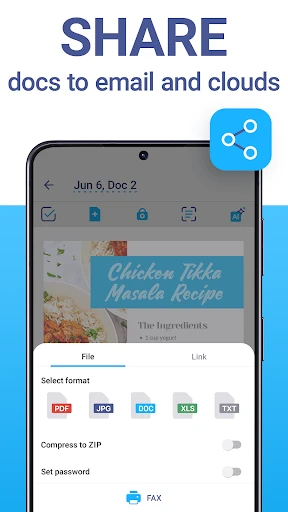
iScanner's primary function is to capture physical documents and convert them into digital formats like PDF or JPG. Using the device's camera, the app automatically detects document edges, corrects perspective, and removes shadows and imperfections to create a clear, flat scan. Beyond capture, it includes a built-in editor for cropping, rotating, and adjusting color filters (like Black & White or Photo) to optimize readability. The app features optical character recognition technology, extracting text from images to create searchable PDFs or editable text files. It also allows users to combine multiple scans into a single document, organize files into folders, add signatures or annotations, and protect files with passwords. Direct sharing to cloud services, email, or other apps completes its functional suite.
Chapter 2: Value
The value of iScanner lies in its ability to deliver a professional scanning experience that is both accessible and feature-rich. Its key advantage is the exceptional output quality achieved through advanced image processing, which consistently produces scans rivaling those from dedicated hardware. The OCR functionality adds significant value by making documents searchable and editable, saving users considerable time on data entry. The app's intuitive and clean interface ensures a smooth user journey from capture to sharing, minimizing the learning curve. Unlike many basic scanner apps, iScanner offers robust organization tools and editing capabilities within a single ecosystem, reducing the need for multiple applications. It operates fully offline for core scanning functions, ensuring privacy and availability anywhere. The subscription model provides continuous access to premium features like unlimited OCR, advanced editing tools, and cloud integration, offering a compelling cost-saving alternative to physical scanners and fragmented software solutions. This combination of reliability, comprehensive features, and user-centric design establishes iScanner as a valuable tool for personal and professional productivity.
Chapter 3: Scenarios
iScanner is ideally suited for a diverse range of users and daily situations. Students form a primary user group, utilizing the app to digitize textbook pages, lecture notes, and library materials for organized study and easy sharing with peers. Professionals, including freelancers, consultants, and office workers, rely on it to scan contracts, receipts, business cards, and whiteboards during meetings, enabling quick digital archiving and professional correspondence. Small business owners and remote workers use it to manage invoices, tax documents, and shipping labels, integrating seamlessly with accounting or storage software. In personal life, users digitize family photos, warranty cards, and important identification documents for secure backups. The app is particularly valuable for on-the-go scenarios, such as scanning a document at a client's site, capturing a recipe from a cookbook in a store, or archiving travel tickets and boarding passes. Its ease of use makes it accessible to less tech-savvy individuals needing to send a clear copy of a form via email. Essentially, any scenario requiring the transition from paper to a clean, manageable digital file is a perfect use case for iScanner.
Uninstall Instructions
For step-by-step guidance on how to safely remove this application from your device, please refer to our 《Uninstall Instructions》 document.
Pros
- converts paper docs into searchable PDFs instantly
- batch scanning mode handles multi-page documents efficiently
- offline functionality ensures scanning without internet access
- auto-edge detection and perspective correction for clarity
- exports to cloud services with original formatting preserved
Cons
- advanced OCR features require a subscription to unlock
- complex document organization lacks folder nesting options
- high-resolution scans consume significant device storage
- auto-crop can misalign with non-standard document sizes
- limited direct editing tools for scanned text post-processing
Frequently Asked Questions
What is iScanner and what does it do?
iScanner is a mobile document scanning and management application. Its core function is to use your device's camera to scan physical documents, receipts, whiteboards, or photos and convert them into high-quality PDF or JPG files. It also includes features for editing, organizing, and sharing these digital documents. The app positions itself as an all-in-one tool for digitizing paperwork and reducing clutter.
Is iScanner free to use, or does it require payment?
iScanner operates on a freemium model. You can download and use the app for free with access to basic scanning and sharing functions. However, advanced features like OCR (text recognition), removing backgrounds from scans, extensive editing tools, and removing watermarks are typically locked behind a paid subscription (iScanner Pro). The app may also show ads in the free version.
What devices and systems is iScanner compatible with?
iScanner is primarily designed for mobile devices. It is available for both iOS (iPhone, iPad) and Android smartphones and tablets. You can download it from the Apple App Store and Google Play Store. The app does not require any additional specialized hardware; it uses your device's built-in camera. Some cloud sync features may require a separate account.
How accurate is the text recognition (OCR) feature?
iScanner's OCR feature is designed to accurately extract printed text from scanned documents into editable and searchable formats like TXT or PDF. Its accuracy is generally high for clear, typed documents under good lighting. However, performance can vary with handwritten text, poor image quality, or complex layouts. This is a core Pro feature, and results should be verified for critical documents.
Can I edit and sign a PDF after scanning with iScanner?
Yes, iScanner includes a set of editing tools for scanned documents. You can perform basic edits like cropping, rotating, adjusting color filters, and correcting perspective. For PDFs, you can also merge files, reorder pages, and add annotations. The app supports adding digital signatures or text notes directly onto the document, which is useful for signing forms or adding comments before sharing.
App Info
Technical Info
Recommended For You

Buenovela - Webnovel & Stories
Books & Reference

scan my tesla
Auto & Vehicles

Clay Box
Art & Design

CL theme 3D Glass
Auto & Vehicles

Google Play Books & Audiobooks
Books & Reference

Color by Number for Adults
Art & Design

Wavy: Photo Editor & AI Art
Art & Design

Workforce Tools
Business

Draw Anime: Paint & Sketch App
Art & Design

Zoom for Chromebook
Business

Dayforce
Business

Bible App by Olive Tree
Books & Reference

Talkatone: Texting & Calling
Communication

Castle - Make and Play
Art & Design

미스터블루 - 웹툰, 만화, 소설앱
Comics

AI Dress up-Try Clothes Design
Beauty

Signal Private Messenger
Communication

RoughAnimator - animation app
Art & Design

Photo App - AI Photo Enhancer
Art & Design

Smart Watch app - BT Notifier
Communication