TurboScan™ Pro: PDF scanner
Screenshots

Description
About TurboScan™ Pro: PDF Scanner Feature
TurboScan™ Pro: PDF Scanner is a professional-grade mobile application designed to transform smartphones into powerful portable scanners. It enables users to quickly and accurately digitize documents, receipts, whiteboards, and other physical pages into high-quality PDF or JPEG files. Leveraging advanced image processing technology, the app corrects perspective, enhances clarity, and produces clean, professional digital documents suitable for archiving, sharing, and printing. It stands out as an essential tool for professionals, students, and anyone looking to reduce paper clutter and streamline document management directly from their mobile device.
Chapter 1: Function
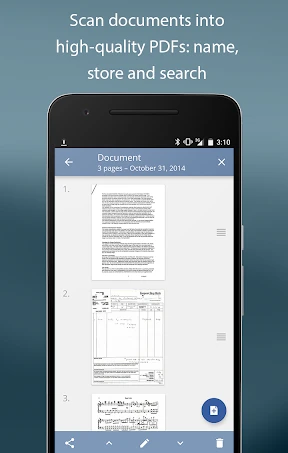
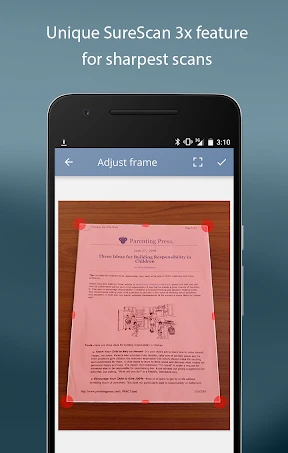
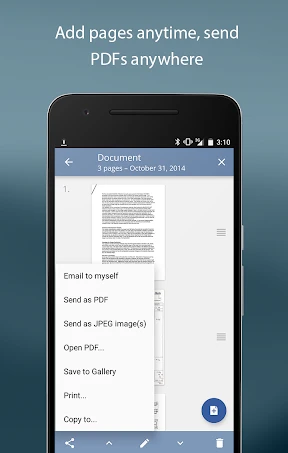
TurboScan™ Pro excels at converting physical documents into crisp digital files with just a few taps. Its core functionality begins with using the device's camera to capture a document. The app automatically detects edges, corrects skew, and crops the image precisely. Users can scan single or multiple pages, which the app then compiles into a single, multi-page PDF document. It offers multiple scan modes, including 'Document' for standard papers, 'Photo' for pictures, and 'Whiteboard' for capturing content from boards or signs. Post-capture, users can apply filters like Black & White, Color, or Grayscale to optimize text readability and file size. The app also features OCR (Optical Character Recognition) capability, allowing users to extract and search text from scanned documents. Finally, it provides seamless integration with cloud storage services like Dropbox, Google Drive, and iCloud, as well as direct sharing via email or other messaging platforms.
Chapter 2: Value
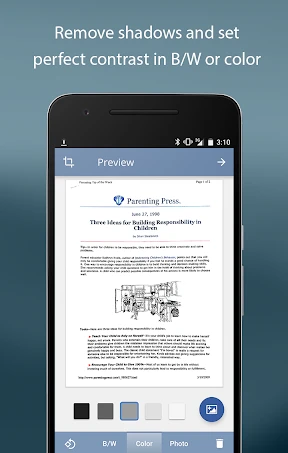
The primary value proposition of TurboScan™ Pro lies in its ability to deliver scanner-quality results with the convenience of a mobile phone, effectively replacing bulky hardware. Its key advantage is the sophisticated image processing engine that ensures scans are not just photos but are straightened, cleaned of shadows and glare, and rendered as if produced by a flatbed scanner. This results in professional-looking documents that enhance credibility in business and academic submissions. The inclusion of OCR technology adds significant value by making the text within scans searchable and editable, unlocking greater utility for document retrieval and data reuse. The app's efficiency is another major benefit; it drastically reduces the time and effort required to digitize paperwork, facilitating instant sharing and backup. Compared to basic scanning apps or free alternatives, TurboScan™ Pro offers superior output consistency, batch processing for multi-page documents, and a more robust set of export and organization features without intrusive advertisements. It represents a one-time investment that pays off by boosting personal productivity, aiding in organization, and supporting paperless initiatives. The reliability and polished user experience make it a trusted tool for critical tasks where document quality is paramount.
Chapter 3: Scenarios
TurboScan™ Pro is ideally suited for a wide range of users across professional, academic, and personal contexts. Business professionals frequently use it to digitize contracts, invoices, and business cards during meetings or while traveling, enabling instant emailing to colleagues or clients and efficient record-keeping. Students and researchers find it invaluable for scanning library book pages, lecture notes, and handwritten study materials to create organized digital archives. Administrative workers and home organizers utilize the app to manage receipts for expense reports, warranties, and important household documents, reducing physical clutter. Furthermore, individuals involved in real estate, legal, or consulting fields use it to capture and share on-site documents, whiteboard brainstorming sessions, or large-format plans with ease. In everyday use, a freelancer might scan a signed contract immediately after a client meeting; a student might compile scanned textbook chapters into a single PDF for study on a tablet; and a parent might digitize their child's artwork or school notices for long-term preservation. The app addresses the universal need for quick, reliable, and high-quality document digitization in any location.
Uninstall Instructions
For step-by-step guidance on how to safely remove this application from your device, please refer to our 《Uninstall Instructions》 document.
Pros
- converts paper docs to searchable PDFs instantly
- batch scan mode handles multi-page documents efficiently
- edge detection works accurately under uneven lighting
- offline OCR preserves privacy for sensitive documents
- cloud sync excludes mainstream platforms for niche security
Cons
- advanced OCR limited to five languages only
- batch export requires in-app purchase after three docs
- no built-in collaboration tools for team editing
- complex layouts sometimes misread by auto-crop
- high-res scans consume significant local storage
Frequently Asked Questions
What is TurboScan™ Pro and what does it do?
TurboScan™ Pro is a mobile document scanning application for iOS and Android. Its core function is to use your device's camera to quickly capture and digitize physical documents, receipts, whiteboards, or photos into high-quality, multi-page PDF or JPEG files. It positions itself as a professional-grade tool for creating clear, scannable digital copies with features like automatic edge detection, perspective correction, and image enhancement.
Is TurboScan™ Pro free to use or does it require payment?
TurboScan™ Pro is a paid application. It requires a one-time purchase to download and use its full set of features. There is no free version of the 'Pro' app itself. Some app store listings may show a separate, limited free version called 'TurboScan'. The Pro version does not contain in-app purchases or subscriptions; all advanced features like multi-page PDF creation, cloud uploads, and enhanced image processing are unlocked upon purchase.
What devices and systems is the app compatible with?
TurboScan™ Pro is designed for both iOS and Android mobile platforms. It is optimized for smartphones and tablets. For iOS users, it requires iOS 12.0 or later and is compatible with iPhone, iPad, and iPod touch. For Android users, compatibility depends on the specific device and OS version, generally requiring a later version of Android. It does not require any additional external hardware, functioning solely through your mobile device's camera.
How does TurboScan Pro handle document quality and formatting?
The app uses several technical features to ensure document quality. It automatically detects edges, corrects perspective, and removes shadows. You can select between 'Black & White', 'Color', or 'Photo' modes to optimize the output. It also includes a 'Magic' filter to enhance text clarity. For formatting, it allows you to compile multiple scans into a single PDF, reorder pages, and choose between PDF or JPEG output formats suitable for printing, emailing, or archiving.
Can I share my scanned documents to cloud services directly?
Yes, TurboScan™ Pro integrates with various cloud storage and sharing services. After creating a document, you can export it directly to platforms such as Google Drive, Dropbox, OneDrive, Evernote, or iCloud Drive (on iOS). Files can also be shared via email, sent to a computer via Wi-Fi, or saved locally to your device's photo library or files app. The app does not store your documents on its own servers; all files remain under your control.
App Info
Technical Info
Recommended For You

delitoon
Comics

Messenger - Texting App
Communication

3D Modeling App: Sculpt & Draw
Art & Design

Marco Polo - Video Messenger
Communication

Yes Madam - Salon at Home
Beauty

Drivers Permit Practice
Auto & Vehicles

AI Art Generator: Photo, Draw
Art & Design

Remove Background From Video
Beauty

AARP SafeTrip™
Auto & Vehicles

Messenger - SMS Messages
Communication

Robokiller - Spam Call Blocker
Communication

Дром Авто
Auto & Vehicles

CastChat - Match & Voice Chat
Communication

Messenger Kids – The Messaging
Communication

Infinite Design
Art & Design

WorkJam
Business

DayComics
Comics

VIN Check Report for Used Cars
Auto & Vehicles
AR Drawing Sketch Paint
Art & Design

King James Bible (KJV)
Books & Reference