
3D Modeling App: Sculpt & Draw
Screenshots
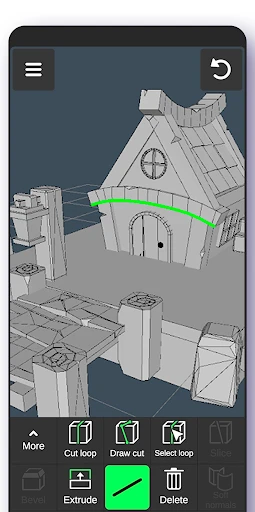
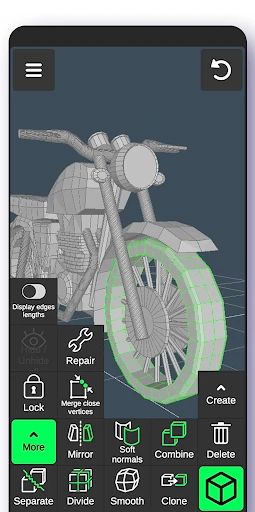
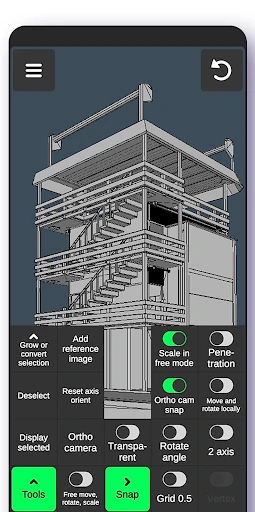
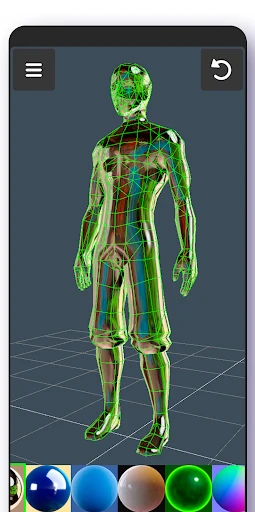
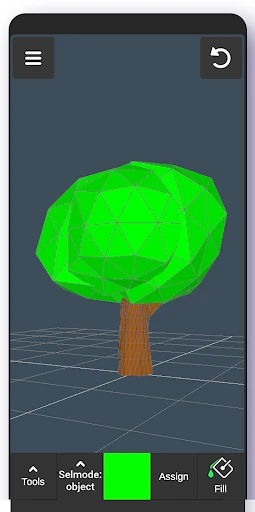
Description
About 3D Modeling App: Sculpt & Draw Features
3D Modeling App: Sculpt & Draw is a powerful and intuitive mobile application designed to bring professional-grade 3D sculpting and modeling tools to artists, hobbyists, and creators on the go. It transforms tablets and smartphones into portable digital studios, enabling users to craft detailed 3D models from scratch using a touch-centric interface. The app bridges the gap between complex desktop software and accessible creative expression, offering a robust set of features for modeling, texturing, and rendering. It serves as an ideal platform for conceptualizing ideas, creating assets for games, or simply exploring the vast possibilities of three-dimensional art, all within a user-friendly environment tailored for mobile devices.
Chapter 1: Function
The core functionality of 3D Modeling App: Sculpt & Draw centers on direct, hands-on creation. Users start with basic primitives like spheres, cubes, or a digital clay ball. The app provides a comprehensive suite of sculpting brushes for pushing, pulling, smoothing, pinching, and flattening the mesh to shape organic or hard-surface models. Layer-based workflows allow for non-destructive editing, where different details can be isolated and adjusted independently. Key features include dynamic tessellation for adding detail where needed, a full material and painting system for applying colors and textures directly onto the model, and essential tools for retopology to optimize mesh flow. The environment supports multiple lighting setups and offers basic rendering capabilities to showcase finished work. Project files can be exported in common formats for use in other software or 3D printing, completing a full, self-contained creation pipeline on a single device.
Chapter 2: Value
The primary value proposition of 3D Modeling App: Sculpt & Draw lies in its democratization of 3D artistry. It delivers professional-caliber tools in an affordable and highly accessible mobile package, eliminating the need for expensive desktop hardware and software for entry-level to intermediate projects. Its key advantage is an interface meticulously optimized for touch and stylus input, making the act of sculpting feel natural and immediate, akin to working with physical clay or drawing on paper. This tactile experience significantly lowers the learning curve compared to traditional software reliant on complex keyboard and mouse shortcuts. Furthermore, the app's portability unlocks unprecedented creative flexibility; artists can sketch concepts anywhere, turning idle moments into productive sessions. For educators and students, it serves as a perfect introductory tool to 3D concepts. For professionals, it acts as a powerful digital sketchbook for rapid prototyping. The app also fosters a community by allowing easy sharing of creations, providing continuous inspiration. Regular updates introducing new brushes, features, and stability improvements ensure the tool evolves with its user base, offering long-term value and making advanced digital creation a truly mobile and personal endeavor.
Chapter 3: Scenarios
This app primarily targets digital artists, illustrators, and 3D hobbyists seeking a portable solution for their craft. It is immensely valuable for concept artists who need to quickly visualize characters, creatures, or objects in three dimensions while away from their primary workstation. Game developers and indie creators can use it to prototype assets directly on a tablet, streamlining early development stages. Educators and students in art or design courses find it an excellent, cost-effective tool for learning the fundamentals of 3D form, volume, and digital sculpture. Additionally, tabletop gamers and miniature enthusiasts can design custom pieces for 3D printing. In everyday use, an artist might use the app during a commute to refine a character's facial features, a designer could sketch a product concept in a coffee shop, or a teacher might demonstrate sculpting techniques live in a classroom. It is also ideal for freelance creators who need a lightweight yet capable tool for client work while traveling. Essentially, any scenario where immediacy, portability, and creative power intersect defines the perfect use case for this versatile 3D modeling application.
Uninstall Instructions
For step-by-step guidance on how to safely remove this application from your device, please refer to our 《Uninstall Instructions》 document.
Pros
- directly sculpts 3d models with intuitive finger gestures
- exports high-poly models for professional 3d printing
- voxel and mesh tools in one mobile-optimized interface
- real-time dynamic topology for organic shape creation
- layer-based sculpting mimics traditional clay workflow
Cons
- high-poly sculpting drains battery rapidly
- advanced retopology requires separate desktop software
- complex scenes cause lag on older mobile gpus
- steep learning curve for digital sculpting beginners
- limited texturing tools compared to pc counterparts
Frequently Asked Questions
What is Sculpt & Draw and what can I do with it?
Sculpt & Draw is a mobile 3D modeling and digital sculpting application. Its core function is to allow users to create, sculpt, and paint detailed 3D models directly on their devices. It is positioned as an accessible tool for both hobbyists and professionals to sketch ideas, create characters, or design objects. Unique features include intuitive touch-based sculpting tools, dynamic tessellation, and layer-based painting.
Is the app free to use or does it have in-app purchases?
The app operates on a freemium model. You can download and use a basic set of sculpting and drawing tools for free. Advanced features, such as exporting in high-resolution formats, accessing premium brushes, and removing watermarks, are typically unlocked through one-time purchases or subscription plans within the app. No additional physical equipment is required.
What devices and operating systems are supported?
Sculpt & Draw is primarily designed for modern tablets and smartphones. It is available on both iOS (via the App Store) and Android (via Google Play). For optimal performance, especially with complex models, devices with higher RAM and processor capabilities are recommended. It is generally suitable for users aged 4+ and adapts its interface for different screen sizes.
How does the sculpting feature work on a touchscreen?
The app uses multi-touch gestures and pressure-sensitive stylus support (where available) to simulate real sculpting. You can pinch to zoom, use fingers or a stylus to push, pull, and smooth the digital clay. It employs dynamic mesh subdivision, allowing you to add detail only where needed. Technical characteristics include real-time rendering and support for PBR (Physically Based Rendering) materials for realistic surfaces.
Can I export my models for printing or use in other software?
Yes, you can export your creations. Common export formats include OBJ and STL, which are compatible with most 3D printers and professional software like Blender or Maya. Exporting in standard formats is usually a core function, but exporting without a watermark or in certain high-resolution formats may require a premium version. Always check the specific export options within your current app version.
App Info
Technical Info
Recommended For You

Car Scanner ELM OBD2
Auto & Vehicles

Face scan - How old do I look
Beauty

O'Reilly Pro
Business

clickworker
Business

Thunderbird: Free Your Inbox
Communication

Inbox Homescreen
Communication

Daily Bible: Holy Bible KJV
Books & Reference

Toonsutra: Webtoon & Comics
Comics

inCarDoc Pro | OBD2
Auto & Vehicles

AI Image Generator - Dali
Art & Design

AI Art Generator: Photo, Draw
Art & Design

Chevron
Auto & Vehicles

Google Pixel Watch
Communication

Chirp Audiobooks
Books & Reference

Calibre Sync
Books & Reference

CDisplayEx Comic Reader
Comics

Groundwire: VoIP SIP Softphone
Communication

Chrome Dev
Communication

Pixelcut AI Photo Editor
Art & Design

Pi Browser
Communication