
Messenger SMS & MMS
Screenshots



Description
About Messenger SMS & MMS Feature
Messenger SMS & MMS is a comprehensive messaging application designed to seamlessly integrate traditional text messaging with modern chat features. It serves as a unified inbox for all SMS and MMS conversations while offering enhanced functionality, customization, and a user-friendly interface. The app positions itself as a powerful replacement for the default messaging app on Android devices, aiming to streamline communication by bringing together the reliability of carrier-based texting with the rich experience of contemporary messaging platforms.
Chapter 1: Function
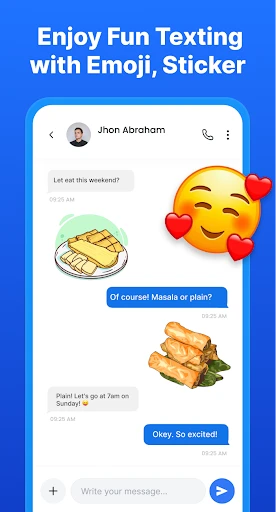
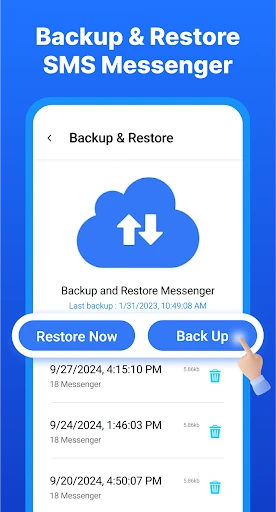
The core function of Messenger SMS & MMS is to send, receive, and manage standard SMS and MMS messages. It provides a clean, intuitive interface for viewing conversation threads, organizing contacts, and handling multimedia content like photos and videos within messages. Beyond basic texting, the app incorporates features such as message scheduling, allowing users to compose texts and set a future time for automatic sending. It supports group messaging, delivery reports, and the ability to block unwanted numbers. The app also includes customization options for chat bubbles, themes, and notification sounds, enabling users to personalize their messaging experience. Furthermore, it can back up and restore message history, ensuring that important conversations are not lost.
Chapter 2: Value
The primary value proposition of Messenger SMS & MMS lies in its ability to modernize and enhance the fundamental SMS/MMS experience without requiring recipients to install the same app. Its key advantage is offering advanced features typically found in over-the-top messaging apps but applied to universal carrier messaging. Users gain significant control and convenience through tools like message scheduling, which is invaluable for reminders, birthday wishes, or timed business communications. The extensive customization empowers users to tailor the visual design and alerts to their preference, making daily use more enjoyable. The integrated backup functionality provides peace of mind, safeguarding message history against device loss or change. For users who rely heavily on standard texting due to contact preferences or areas with poor data connectivity, this app elevates a basic utility into a more powerful, organized, and personalized communication hub. It consolidates functionality that might otherwise require multiple apps or complex workarounds, delivering a cohesive and efficient messaging solution that respects the universality of SMS while pushing its practical boundaries.
Chapter 3: Scenarios
The primary target users are Android smartphone owners dissatisfied with their device's default messaging app who seek more features and customization. It is highly valuable for individuals who frequently use SMS and MMS for daily communication, including professionals managing work-related texts who benefit from scheduling and organization tools. Parents coordinating family logistics via group MMS find the enhanced group chat and media management useful. Tech-savvy users who enjoy personalizing their device's aesthetics will appreciate the theme and bubble customization options. It is also ideal for anyone concerned about preserving message history, as the backup feature is crucial during phone upgrades. Everyday use cases include scheduling a text reminder for a future meeting, creating a customized visual theme for different contacts, easily blocking spam messages, and securely backing up important conversations containing addresses or codes. The app serves as a daily driver for all texting needs, bridging the gap between simple carrier messaging and a feature-rich personal communication center.
Uninstall Instructions
For step-by-step guidance on how to safely remove this application from your device, please refer to our 《Uninstall Instructions》 document.
Pros
- seamlessly merges SMS with messenger chats in one unified inbox
- offers customizable chat bubbles for multitasking during messaging
- provides end-to-end encryption for secure private conversations
- sends large files via MMS without significant compression loss
- allows scheduling SMS messages for future delivery automatically
Cons
- requires significant storage for high-quality media in MMS history
- custom chat bubbles may not be supported on all device models
- encrypted chats are limited to app users
- not standard SMS recipients
- scheduled messaging depends on the app running in background
- unified inbox can feel cluttered with high volumes of mixed message types
Frequently Asked Questions
What is Messenger SMS & MMS and what does it do?
Messenger SMS & MMS is a messaging application for Android that replaces your default SMS/MMS inbox. Its core function is to send and receive text and multimedia messages. It provides a clean, customizable interface with features like scheduled messages, privacy options for locking conversations, and various theme choices to personalize your messaging experience.
Is Messenger SMS & MMS free to use with no ads?
Yes, the core SMS/MMS functionality of Messenger SMS & MMS is completely free to use. The app does not contain advertisements. It operates as a standard messaging client using your device's existing cellular or data plan for messaging. There are no subscription fees required for basic texting and picture messaging services.
What devices and Android versions are compatible with this app?
This app is designed for Android devices. It requires an Android operating system, typically supporting a wide range of versions, though specific minimum requirements should be checked on the Google Play Store listing. It functions as a default SMS app and does not require special additional hardware.
How does the app handle SMS, MMS, and group messaging?
The app handles standard SMS and MMS for individual and group chats. It uses your phone's native messaging capabilities, so carrier rates for SMS/MMS may apply. For a seamless experience, ensure it is set as your default messaging application in your phone's settings to properly send, receive, and manage all message types.
Can I back up or restore my messages with this application?
The app includes options to back up and restore your SMS/MMS messages to your device's local storage. This allows you to save your message history and restore it if you reinstall the app or switch devices. The backup process is managed within the app's settings menu. For cloud backups, you would need to use your device's system-level backup services.
App Info
Technical Info
Recommended For You

Whoscall - Caller ID & Block
Communication

Manga Renta
Comics

My Collection: Comic Scanner
Comics

inCarDoc Pro | OBD2
Auto & Vehicles

Inbox Homescreen
Communication

OBDocker - OBD2 Car Scanner
Auto & Vehicles

Security Camera Mod Minecraft
Books & Reference

Storytel - Audiobooks & Books
Books & Reference

WEBTOON: Manga, Comics, Manhwa
Comics

زخرفة الكتابة بكل انواع الخطوط
Beauty

Workvivo
Business

HerBible--Verses&Prayer
Books & Reference

True Talk - Global Wifi Calls
Communication

Skincare and Face Care Routine
Beauty

مانجا للصغار
Comics

CreArt - AI Image Generator
Art & Design

Beauty Plus Princess Camera
Beauty

BambooHR
Business

5 Calls: Contact Your Congress
Books & Reference

Bible (King James Version)
Books & Reference