
Plus Messenger
Screenshots

Description
About Plus Messenger Feature - Overview
Plus Messenger is a powerful third-party client application for the Telegram messaging platform, built upon Telegram's official API. It retains all core functionalities of Telegram while introducing a wealth of additional customization options, enhanced features, and user interface improvements. Primarily designed for Android devices, it caters to users seeking greater control over their messaging experience, offering deeper personalization and utility beyond the standard Telegram app. As an unofficial client, it requires users to log in with their existing Telegram account, ensuring seamless synchronization of chats and data while providing a significantly upgraded interface and toolset.
Chapter 1: Function
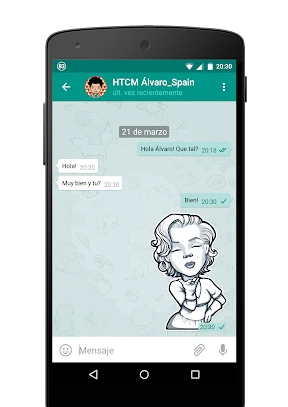
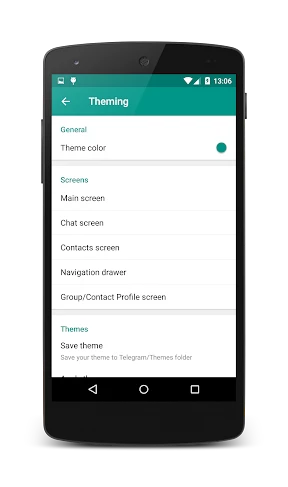
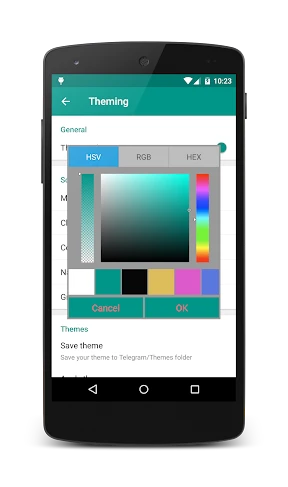
Plus Messenger encompasses all fundamental features of Telegram, including sending messages, making voice and video calls, creating groups and channels, and sharing files of various types and sizes. Its core functional enhancement lies in extensive customization. Users can modify virtually every visual aspect of the interface, such as themes, colors, chat bubble styles, and icon sets. It offers advanced chat management tools like pinning multiple chats, hiding specific chats or contacts, and applying custom notifications per chat. The app includes additional messaging features like scheduling messages, recalling sent messages without a time limit, and saving messages. It also provides improved media handling, download managers, and options to change the app's icon and name on the home screen for discretion.
Chapter 2: Value
The primary value proposition of Plus Messenger is delivering a superior, tailor-made user experience for Telegram enthusiasts. Its key advantage is the unprecedented level of customization it offers, allowing users to design an interface that perfectly matches their personal aesthetic and workflow preferences, something the official app does not permit. This transforms the app from a mere communication tool into a personalized digital space. Secondly, it introduces practical utilities that enhance productivity and control, such as message scheduling and unlimited message recall, which are invaluable for both personal and professional communication. The advanced chat management and organization features help users declutter their inbox and prioritize important conversations efficiently. Furthermore, it maintains a lightweight performance profile despite its added features, ensuring smooth operation. For power users, the ability to hide chats or disguise the app icon adds a layer of privacy. Crucially, it does this while fully leveraging Telegram's robust security infrastructure, including end-to-end encryption for secret chats and cloud synchronization, meaning users do not sacrifice security for functionality. It represents a significant upgrade for any user who finds the official Telegram client limiting, effectively unlocking the full potential of the Telegram ecosystem through a more flexible and powerful interface.
Chapter 3: Scenarios
Plus Messenger primarily targets advanced Telegram users and enthusiasts who are dissatisfied with the limited customization options in the official client. Its user base includes individuals who spend considerable time on Telegram for various purposes and desire a more efficient, visually pleasing, and organized messaging environment. Key usage scenarios are diverse. For social power users and community administrators managing large groups or channels, features like advanced pinning, custom notifications, and robust download managers are essential for handling high-volume communication. Professionals and freelancers who use Telegram for work-related conversations benefit greatly from message scheduling, which allows for timely communication across time zones, and the unlimited recall function for correcting errors. Tech-savvy users and theming enthusiasts enjoy the deep customization to create a unique look and feel. Individuals valuing privacy appreciate the ability to hide specific chats or disguise the app icon on their device. Students and project teams can use the enhanced file management and organized chat lists to keep collaborative discussions streamlined. Essentially, any user seeking to elevate their standard Telegram experience with more control, personalization, and utility will find Plus Messenger a compelling solution for everyday use.
Uninstall Instructions
For step-by-step guidance on how to safely remove this application from your device, please refer to our 《Uninstall Instructions》 document.
Pros
- extends Telegram's core with extensive UI customization
- offers unique app-level password lock for privacy
- enables direct message scheduling without bots
- includes built-in translation for diverse chats
- provides granular notification controls per contact
Cons
- requires existing Telegram account for login
- larger APK size due to added feature modules
- update cycle lags behind official Telegram releases
- some advanced settings have a learning curve
- occasional interface lag on older Android devices
Frequently Asked Questions
What is Plus Messenger and its main purpose?
Plus Messenger is an unofficial third-party client application for the Telegram messaging platform. It is categorized as a communication tool. Its core function is to provide all standard Telegram messaging features while adding extensive customization options and interface enhancements not available in the official client.
Is Plus Messenger free to use with any hidden costs?
Plus Messenger is a free application to download and use. It does not have in-app purchases or subscription fees. However, as it is built upon the Telegram platform, standard data charges from your internet provider may apply. The app itself does not impose any hidden costs for its enhanced features.
On which devices and platforms does Plus Messenger work?
Plus Messenger is primarily available for Android devices. It is not officially available for iOS, Windows, or macOS. It requires an Android operating system and functions as a front-end client, meaning it connects to Telegram's existing infrastructure, so it works wherever Telegram is accessible.
How does Plus Messenger differ from the official Telegram app?
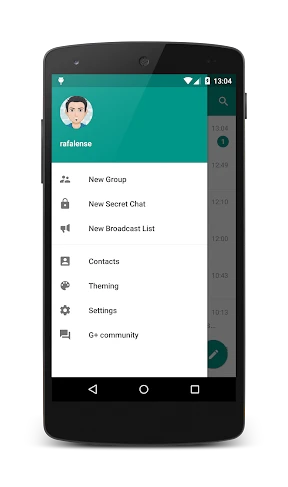
Plus Messenger differentiates itself through deep customization. Key unique features include the ability to change the app's theme extensively, alter chat bubble styles, customize tabs and the navigation drawer, and access additional privacy settings. It retains all core Telegram functions like chats, groups, and channels.
Can I use Plus Messenger without a Telegram account?
No, you cannot. Plus Messenger is a client application that requires an existing Telegram account to function. It is not a standalone messaging service. You must first register a phone number with Telegram's official service. This app then acts as an alternative interface to access and manage that account.
App Info
Technical Info
Recommended For You

ThinkDiag+
Auto & Vehicles

Rain Instant Pay
Business

Madison Reed App - Hair Color
Beauty

AR Drawing Paint Sketch Trace
Art & Design

Picture Editor
Beauty

Pashto short stories پښتو قیصی
Comics

Storytel - Audiobooks & Books
Books & Reference

CCW – Concealed Carry 50 State
Books & Reference

GroupMe
Communication

Threema. The Secure Messenger
Communication

AR Draw Sketch: Trace & Paint
Art & Design

eBay Motors: Parts, Cars, more
Auto & Vehicles

Handy Art Reference Tool
Comics

Obd Mary – Car Scanner for ELM
Auto & Vehicles

ReadEra Premium – ebook reader
Books & Reference

Manobook - Los Besos de Jacob
Books & Reference

AGE-R medicube Digital clinic
Beauty

Bazaart AI Photo Editor Design
Art & Design

Merlin Bird ID by Cornell Lab
Books & Reference

My Best Colors
Beauty