
Shopify Point of Sale (POS)
Screenshots




Description
About Shopify Point of Sale (POS) Feature – Seamless Commerce Everywhere
Shopify Point of Sale (POS) is a comprehensive retail solution that bridges online and in-person sales. It transforms any mobile device or terminal into a powerful checkout system, deeply integrated with the broader Shopify e-commerce platform. Designed for modern retailers, it enables businesses to sell anywhere, manage inventory in real-time, and unify customer data across all channels. From pop-up shops and market stalls to brick-and-mortar stores, Shopify POS provides the tools necessary to deliver a consistent and efficient shopping experience, making it a central hub for omnichannel commerce.
Chapter 1: Function
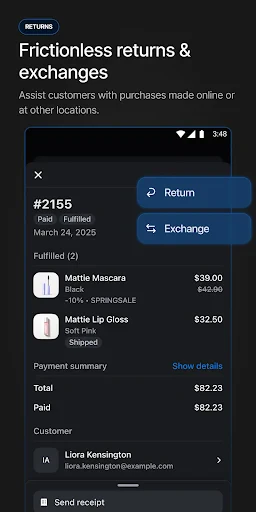
Shopify POS serves as the operational core for in-person sales. Its primary function is to process transactions securely through a streamlined checkout interface on iOS, Android, or dedicated hardware. It accepts various payment methods, including cash, credit/debit cards, and digital wallets. Beyond the sale, the app synchronizes inventory automatically; when an item is sold in-store, the online stock level updates instantly to prevent overselling. It also manages customer profiles, tracking purchase history across online and offline channels. Staff can use it to create custom discounts, issue gift cards, and generate detailed sales reports. Furthermore, it supports full retail operations like managing buy online, pick up in-store (BOPIS) orders, processing returns, and printing receipts, all from a single, unified system.
Chapter 2: Value
The paramount value of Shopify POS lies in its deep integration, creating a true single view of the business. Unlike standalone systems, it eradicates data silos by syncing every transaction, inventory change, and customer interaction with the merchant's central Shopify admin. This unification saves immense time, eliminates manual reconciliation errors, and provides holistic analytics for better decision-making. Its key advantages include exceptional flexibility and scalability. Businesses can start with just a smartphone and a card reader, then expand to sophisticated setups with barcode scanners, receipt printers, and cash drawers. The unified customer profiles enable personalized service, such as accessing a client's online wishlist in-store or applying loyalty discounts automatically. For merchants, the robust backend offers insightful reports that break down performance by channel, staff member, or product, highlighting trends and opportunities. The value extends to cost-effectiveness, as it consolidates multiple tools into one subscription, reducing the need for disparate software. Ultimately, it future-proofs a retail business by providing a cohesive platform that adapts to evolving consumer behaviors, ensuring a seamless brand experience whether the customer shops on a screen or in person.
Chapter 3: Scenarios
Shopify POS is ideally suited for a diverse range of merchants who operate both online and offline. Primary users include boutique retail store owners, pop-up shop vendors, and makers selling at craft fairs or farmers' markets. It is equally powerful for established brick-and-mortar businesses looking to modernize their operations and integrate an online storefront. Everyday use cases are varied. A clothing store associate can use an iPad to check inventory for a specific size, process the sale, and email a receipt, all while the customer is in the fitting room. During a busy market day, a jewelry seller can quickly tap-to-sell using a smartphone and a mobile card reader, confident that their best-selling items' stock levels are accurate across all sales channels. A home goods store can effortlessly fulfill a customer's online order for in-store pickup, updating the order status instantly. For managers, the app is used at the start and end of the day to track cash flow, review staff performance via individual PINs, and generate daily sales summaries to understand what's driving revenue.
Uninstall Instructions
For step-by-step guidance on how to safely remove this application from your device, please refer to our 《Uninstall Instructions》 document.
Pros
- seamlessly syncs online and in-person sales data
- offline mode ensures transactions without internet
- integrates hardware like card readers and barcode scanners
- unified inventory management across all sales channels
- detailed sales analytics and customer purchase history
Cons
- requires subscription to Shopify plan for full features
- hardware compatibility limited to approved devices
- offline mode has reduced functionality for complex tasks
- initial setup can be complex for non-tech-savvy users
- advanced reporting needs higher-tier pricing plans
Frequently Asked Questions
What is Shopify POS and what does it do?
Shopify POS is a point-of-sale application designed for retail businesses to sell products in person. It integrates seamlessly with your online Shopify store, syncing inventory, customer data, and sales across all channels. Its core functions include processing transactions, managing products, tracking customer purchases, and generating sales reports. It is primarily used by brick-and-mortar stores, pop-up shops, and merchants at markets or trade shows.
Is Shopify POS free to use, and what are the costs?
The Shopify POS app itself is free to download. However, to use it, you must have an active Shopify subscription plan (e.g., Basic, Shopify, Advanced). Transaction fees apply for credit card payments processed through Shopify Payments, with rates varying by plan. Additional hardware like card readers, receipt printers, or barcode scanners is sold separately. There are no in-app purchases within the app itself.
What devices and systems does Shopify POS support?
Shopify POS is compatible with iOS and Android mobile devices, including smartphones and tablets. For a dedicated checkout experience, it is optimized for iPad. The app can also be used on a computer via a web browser. It supports Bluetooth connectivity for pairing compatible hardware like card readers and receipt printers. The system requires a stable internet connection for full functionality.
How does Shopify POS handle offline sales?
Shopify POS has an offline mode that allows you to accept cash and take credit card payments when internet connectivity is lost. The app stores the transaction data locally on the device. Once the connection is restored, it automatically syncs the sales, updates inventory, and processes the captured credit card payments. This ensures business continuity at markets or in areas with poor network coverage.
Where can I get support for hardware or app issues?
Support is provided through the Shopify Help Center, which includes extensive guides and a community forum. For direct assistance, you can contact Shopify's 24/7 customer support via email, live chat, or callback from your admin account. Hardware purchased from Shopify is supported by Shopify. For third-party hardware, you should contact the manufacturer's support team for specific troubleshooting.
App Info
Technical Info
Recommended For You

Magic Beauty Makeup Camera
Beauty

Nice Miner: Bitcoin Miner Hash
Business

DayComics
Comics

StyleSeat: Book Hair & Beauty
Beauty

JusTalk - Video Chat & Calls
Communication

Holy Quran - Deeper journey
Books & Reference

GlossGenius
Beauty

Paint
Art & Design

Workforce Tools
Business

PCGS CoinFacts - U.S. Coin Val
Books & Reference

WebNovel
Books & Reference

FAX App: Send Faxes from Phone
Business

Amazon Seller
Business

iSharing: GPS Location Tracker
Communication

Билеты ПДД 2025 и Экзамен ПДД
Auto & Vehicles

WAMR: Reveal deleted messages!
Communication

Pokepix Color By Number
Art & Design

Bible Hub
Books & Reference

Solo: Your Gig Business App
Business

WhatsApp Messenger
Communication