
Cvent Events
Screenshots


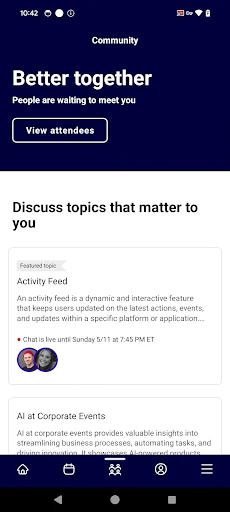


Description
About Cvent Events App Features
Cvent Events is a comprehensive mobile application designed to enhance the experience of attendees, organizers, and exhibitors at conferences, trade shows, and corporate meetings. As the official event companion, it centralizes all essential event information, networking opportunities, and logistical tools into a single, user-friendly platform. The app bridges the gap between physical and virtual participation, offering features that streamline navigation, foster engagement, and provide valuable insights, making it an indispensable tool for modern event management and attendance.
Chapter 1: Function
The Cvent Events app serves as a digital hub for event activities. Its core functions begin with personalized agenda management, allowing users to browse sessions, create custom schedules, and receive reminders. It provides detailed event maps for venue navigation and real-time updates on schedule changes or announcements. The app facilitates networking through integrated attendee directories with searchable profiles and direct messaging capabilities. For interactive engagement, it supports features like live polling, Q&A during sessions, and gamification elements. Additionally, it acts as a resource repository for accessing speaker bios, session materials, and sponsor information. For organizers, embedded tools enable check-in, badge printing, and attendance tracking.
Chapter 2: Value
The primary value of the Cvent Events app lies in its ability to maximize return on investment for all event stakeholders by driving efficiency, engagement, and connectivity. For attendees, it eliminates confusion and saves time through centralized information and personalized planning, leading to a more productive and enjoyable experience. The networking tools break down barriers, enabling meaningful connections that extend the event's value beyond its duration. For event organizers and hosts, the app delivers critical advantages. It significantly reduces administrative burdens associated with registration and information dissemination while providing powerful data analytics on attendee behavior and session popularity. This data-driven insight allows for real-time adjustments and informs future event planning. The app also enhances sponsor and exhibitor visibility through targeted profiles and lead retrieval integrations, improving their ROI. By supporting both in-person and hybrid events seamlessly, it future-proofs events against changing participation models. Ultimately, Cvent Events transforms passive attendance into an active, connected, and measurable experience, elevating the overall quality and impact of any event.
Chapter 3: Scenarios
The Cvent Events app is tailored for a diverse range of users within the event ecosystem. Primary user groups include corporate attendees and professionals visiting industry trade shows or large conferences. For them, the app is a daily companion for navigating complex agendas, finding relevant sessions, and connecting with potential clients or partners. Event organizers and planning committees rely on it as a management dashboard to monitor attendance, push critical communications, and gauge event momentum. Exhibitors and sponsors utilize the app to maximize their presence, scan leads, and schedule meetings with prospects. Academic and association conference participants also benefit from its structured approach to multi-track sessions and poster presentations. In everyday use, a user might open the app upon arrival to check into the event, review their morning schedule, receive a notification about a room change, use the map to locate a breakout session, participate in a live poll during a keynote, message a contact met at lunch to arrange a coffee meeting, and finally, download presentation slides from attended sessions—all within a single, integrated platform.
Uninstall Instructions
For step-by-step guidance on how to safely remove this application from your device, please refer to our 《Uninstall Instructions》 document.
Pros
- centralizes event planning and attendee management in one platform
- robust on-site check-in via QR code scanning and badge printing
- integrates registration with hotel booking and travel coordination
- offers detailed post-event analytics on engagement and ROI
- supports complex
- multi-session
- hybrid event agendas
Cons
- steep learning curve for new users due to extensive features
- higher pricing tier focused on enterprise-level organizations
- mobile app functionality is more limited than the web dashboard
- custom reporting requires familiarity with the data schema
- initial setup for large events can be time-consuming
Frequently Asked Questions
What is Cvent Events and what does it do?
Cvent Events is a mobile app for event management and attendee engagement. It allows attendees to access event agendas, session details, speaker bios, venue maps, and networking tools. The app is designed to enhance the on-site or virtual event experience by centralizing information and facilitating interaction. Its core function is to serve as a digital companion for conferences, trade shows, and corporate meetings.
Is the Cvent Events app free to use?
Yes, the Cvent Events app is free to download and use for attendees. However, event organizers must use Cvent's paid event management platform to create and publish events to the app. Attendees do not face any in-app purchases within the standard app functionality. Access to a specific event's content requires an event registration or an access code provided by the organizer.
What devices and systems does the app support?
The Cvent Events app is available for both iOS and Android devices. It can be downloaded from the Apple App Store and Google Play Store. The app is optimized for smartphones and tablets. For the most current information on supported OS versions, please check the app's listing in the respective store, as requirements may update over time.
How do I join or find my event in the app?
After downloading the app, you can search for your event by name or use a direct link, QR code, or unique access code provided by your event organizer. You typically need to register for the event through the organizer's official channel first. The app itself does not handle event registration or ticketing; it is a tool for accessing information for events already set up by an organizer using Cvent's platform.
What should I do if the app is not working correctly?
First, ensure you have a stable internet connection and the latest app version installed. For event-specific issues, such as incorrect agenda details or login problems, contact the event organizer directly, as they manage the event content. For general app technical support, you can visit the 'Help' section within the app or Cvent's official support website for troubleshooting guides and contact options.
App Info
Technical Info
Recommended For You

Vivaldi Color Analysis
Beauty

AAWireless for Android Auto™
Auto & Vehicles

Getcontact
Communication

Canva: AI Photo & Video Editor
Art & Design

Jewelry Women Jewellery Photo
Beauty

Readink - Read Good Web Novel
Books & Reference

CVTz50
Auto & Vehicles

HD Camera for Android: 4K Cam
Beauty

KeyConnect Digital Car Key
Auto & Vehicles

Hairstyles step by step
Beauty

GoodNovel - Web Novel, Fiction
Books & Reference

AI Dress up-Try Clothes Design
Beauty

Vault - Hide Pics, App Lock
Business

AutoScout24: Buy & sell cars
Auto & Vehicles

Concepts: Sketch, Note, Draw
Art & Design

Outlined Watch Face
Art & Design

BikeWale- Bikes & Two Wheelers
Auto & Vehicles

FPS Shooting Gun Games Offline
Comics

GIF Sticker & WAsticker
Communication

Workforce Tools
Business