Animation Creator: Flipbook 2D
Screenshots
Description
About Animation Creator: Flipbook 2D Features – A Gateway to Handcrafted Frame-by-Frame Animation
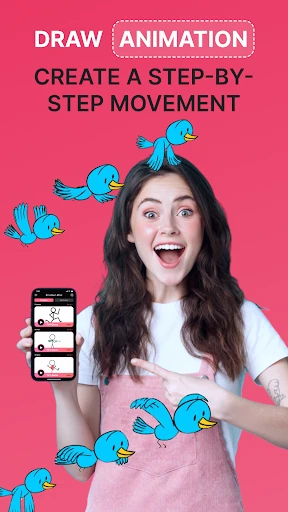
Animation Creator: Flipbook 2D is a professional-grade mobile application designed to bring the timeless art of traditional hand-drawn animation to modern digital creators. It transforms your smartphone or tablet into a portable animation studio, enabling users to create fluid 2D animations using the fundamental flipbook principle. The app emphasizes intuitive, frame-by-frame drawing, offering a suite of tools that balance simplicity with depth, making it suitable for both animation novices exploring the basics and seasoned artists seeking a convenient sketchbook for ideas. By focusing on the core animation process without overwhelming complexity, it serves as a direct and engaging bridge between creative thought and animated reality.
Chapter 1: Function
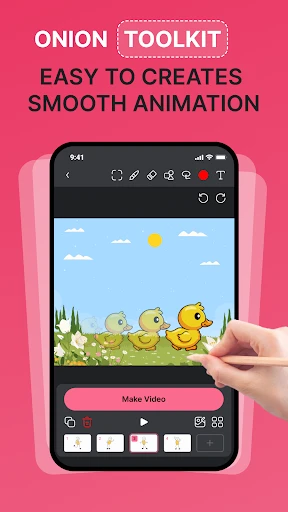
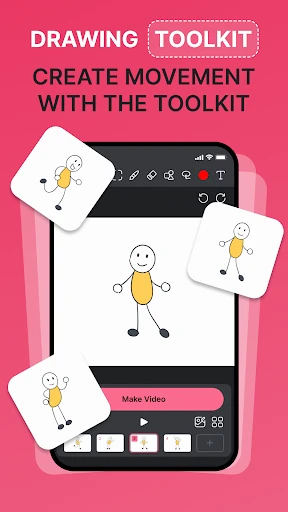
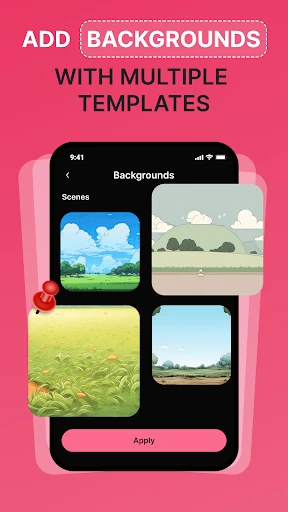
At its heart, Animation Creator: Flipbook 2D operates on the classic onion skinning technique, allowing artists to see several previous and subsequent frames as translucent overlays. This is crucial for achieving smooth motion and maintaining consistency. The core drawing toolkit includes customizable brushes, an eraser, a fill tool, and a color picker, all operable with finger or stylus input. Users can manage the frame rate to control animation speed, add or delete frames seamlessly, and organize their work into manageable layers for complex scenes. The app supports import of images or videos as background guides and allows export of finished animations in popular formats like MP4 or GIF for easy sharing on social platforms or integration into other projects. The timeline interface provides clear control over the sequence, making the animation process logical and visual.
Chapter 2: Value
The primary value of Animation Creator: Flipbook 2D lies in its democratization of animation. It lowers the technical barrier to entry, providing an affordable and accessible platform for anyone to learn and practice the principles of animation—such as squash and stretch, anticipation, and timing—without expensive software or hardware. Its key advantage is the focus on the essential, hands-on skill of frame-by-frame creation, which fosters a deeper understanding of movement and storytelling compared to automated tweening tools. For professionals, the app offers immense value as a digital replacement for paper flipbooks, serving as a perfect tool for brainstorming, storyboarding, and creating quick animatics or character tests on the go. The direct tactile experience of drawing each frame preserves the artist's personal style and organic feel, often lost in more rigid animation software. Furthermore, its portability means inspiration can be captured and developed anywhere, turning idle moments into productive creative sessions. The export functionality ensures that creations made on the app are not siloed but can be part of a larger production pipeline, adding practical utility to its creative freedom.
Chapter 3: Scenarios
This app is ideally suited for a diverse range of users. Animation students and hobbyists form a core group, using it as an educational tool to grasp foundational concepts in a practical, engaging manner. Independent artists and illustrators can leverage it to add simple animated sequences to their digital portfolios, social media content, or client presentations, enhancing their static artwork with motion. Educators find it valuable for teaching basic animation principles in classroom settings due to its straightforward interface. Furthermore, content creators, such as YouTubers or social media influencers, can use it to produce unique, hand-drawn animated intros, outros, or explanatory segments that stand out from template-driven content. In everyday use, a teacher might create a short animated diagram to explain a scientific process; a marketer might draft a playful animated logo concept; or a storyteller might bring a children's book character to life in a looping GIF. It serves any scenario where personal, expressive, and crafted motion is desired over generic animation effects.
Uninstall Instructions
For step-by-step guidance on how to safely remove this application from your device, please refer to our 《Uninstall Instructions》 document.
Pros
- intuitive onion skinning for smooth frame-by-frame drawing
- exports animations directly as GIFs or video files
- supports pressure-sensitive stylus input on tablets
- simple timeline editor for easy frame management
- lightweight app with minimal interface clutter
Cons
- limited to 2D vector and bitmap tools only
- no built-in sound syncing or voice-over features
- advanced tweening and rigging functions absent
- sharing options lack direct social platform integration
- project layer count restricted in free version
Frequently Asked Questions
What is Animation Creator: Flipbook 2D?
Animation Creator: Flipbook 2D is a mobile application designed for creating traditional hand-drawn frame-by-frame 2D animations. It simulates the classic flipbook experience digitally, allowing users to sketch, sequence, and play back animations. Core functions include drawing on layers, onion skinning for smooth motion, timeline editing, and exporting creations as video files. It is positioned as an accessible tool for hobbyists, students, and aspiring animators to learn and practice animation fundamentals.
Is the app free to use or does it have in-app purchases?
The app typically operates on a freemium model. It can be downloaded for free with access to basic drawing and animation tools. Advanced features such as additional brushes, export options without watermarks, more layers, and advanced editing tools are usually unlocked via one-time purchase or subscription. Specific pricing and available plans are subject to the current version on the App Store or Google Play. No additional physical equipment is required.
What devices and systems is this animation app compatible with?
Animation Creator: Flipbook 2D is primarily designed for mobile devices. It is commonly available for both iOS (iPhone/iPad) and Android smartphones and tablets. For an optimal experience, especially for detailed drawing, a device with a larger screen and support for stylus input (like Apple Pencil or compatible stylus) is recommended. The specific minimum OS version required (e.g., iOS 13.0 or Android 8.0) is detailed on the app's official store page.
How does the onion skinning feature help in animation?
Onion skinning is a core technical feature that displays semi-transparent traces of previous and upcoming frames on the current drawing canvas. This allows animators to see the movement trajectory and precisely align the positions of objects across frames, ensuring smoother and more consistent motion. It effectively replaces the need for physical lightboxes used in traditional animation, making the digital frame-by-frame creation process more intuitive and accurate within the app.
Can I export my animations to share on other platforms?
Yes, the app allows you to export your completed animations. Typically, you can render your project as a standard video file (like MP4) or sometimes as a GIF. The free version may include a watermark or have resolution limitations. Exporting is done directly to your device's gallery or file system, from where you can share it on social media, video platforms, or import it into other editing software. Specific export formats and quality settings are available within the app's export menu.
App Info
Technical Info
Recommended For You

AlfaOBD
Auto & Vehicles

Beauty Camera & Makeup Camera
Beauty

Minicraft Crafting Building
Comics

Buenovela - Webnovel & Stories
Books & Reference

dēzl™
Auto & Vehicles

Hallow: Prayer & Meditation
Books & Reference

Advent Magnificat 2024
Books & Reference

Telegram
Communication

Vector Ink: SVG, Illustrator
Art & Design

Weargram
Communication

Workday
Business

LinkedIn: Jobs & Business News
Business

Photoleap: AI Photo Generator
Art & Design

VIN Check Report for Used Cars
Auto & Vehicles

Amazon Kindle
Books & Reference

Online chat, calls - Gem Space
Communication

Police Radar - Camera Detector
Auto & Vehicles
AR Drawing Sketch Paint
Art & Design

Cvent Events
Business

Duo Call - Dual Global Calling
Communication