
Smarty Men Jacket Photo Editor
Screenshots




Description
About Smarty Men Jacket Photo Editor Features
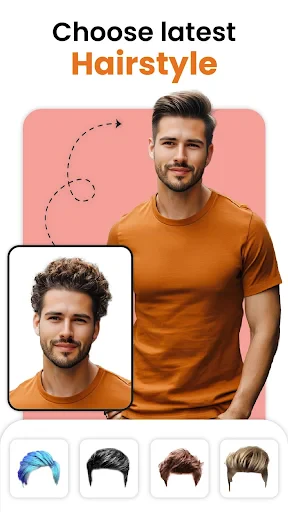
Smarty Men Jacket Photo Editor is a specialized mobile application designed for photo enhancement, focusing on digitally adding stylish jackets and outerwear to portraits. It caters primarily to users looking to experiment with fashion and transform their photos with a virtual wardrobe. The app utilizes intuitive editing tools and a library of realistic jacket graphics, allowing for quick and creative image modifications without the need for professional skills. Its core appeal lies in offering a fun and accessible way to visualize different styles, update profile pictures, or create engaging content for social media platforms, all through a straightforward, user-friendly interface.
Chapter 1: Function
The app's core functionality centers on its robust photo editing toolkit specifically tailored for adding and customizing jacket overlays. Users begin by selecting a photo from their gallery or taking a new picture. The primary tool is an extensive catalog of digital jackets, ranging from formal blazers and leather biker jackets to casual denim and winter coats. Once a jacket is selected, advanced editing features allow for precise adjustments: users can resize, rotate, and position the overlay to fit their photo subject naturally. Additional tools include eraser and blending options to seamlessly merge the jacket with the original image, ensuring edges and body contours look authentic. The app also provides basic photo editing capabilities like background changes, filters, and lighting adjustments to complement the main jacket-editing feature, resulting in a cohesive and polished final image.
Chapter 2: Value
The primary value proposition of Smarty Men Jacket Photo Editor is its delivery of instant, cost-free fashion experimentation and creative expression. It eliminates the physical and financial barriers of trying on multiple jackets, offering a virtual try-on experience that is both entertaining and practical. A key advantage is its vast and regularly updated library of trendy and classic jacket designs, which keeps the app relevant for diverse style preferences. The editing process is designed for simplicity, with automated fitting suggestions and intuitive controls that make professional-looking edits achievable for amateurs, thereby saving significant time and effort compared to complex editing software. Furthermore, the app empowers users to enhance their digital persona; it is particularly valuable for individuals seeking to refresh their social media profiles with eye-catching, stylish images that project a desired aesthetic. By providing a specialized, focused tool rather than a generic editor, it delivers superior results in its niche, ensuring higher satisfaction for users looking specifically for wardrobe augmentation in their photos. This targeted approach, combined with offline functionality for many features, solidifies its utility as a convenient and creative mobile resource.
Chapter 3: Scenarios
The app primarily targets male users interested in fashion, social media engagement, and personal photo enhancement. Key user groups include young adults and teenagers who frequently update their social media profiles on platforms like Instagram, Facebook, and dating apps, using the app to create standout pictures that showcase varied styles. It is also useful for online shoppers who wish to visualize how a certain jacket type might look before making a purchase. Everyday use cases are diverse: an individual might use it to add a sophisticated blazer to a casual photo for a professional LinkedIn profile picture, or a user could playfully superimpose a leather jacket onto a vacation photo for a cooler aesthetic. Content creators and influencers may utilize it to quickly generate themed visuals for their posts without organizing a physical photoshoot. In personal scenarios, friends might use the app for fun, editing group photos with matching jackets for a cohesive look. Essentially, any situation requiring a quick, impressive transformation of a portrait's style falls within this app's effective scope.
Uninstall Instructions
For step-by-step guidance on how to safely remove this application from your device, please refer to our 《Uninstall Instructions》 document.
Pros
- automatically fits jacket graphics to diverse body poses
- offers a specialized library of smart casual and formal jackets
- one-tap background replacement for realistic outfit previews
- uses pose detection to adjust garment wrinkles and lighting
- saves time versus manual Photoshop editing for clothing mockups
Cons
- limited to upper-body edits
- not full-outfit styling
- requires clear front-facing photos for accurate auto-fitting
- jacket designs may appear pixelated on low-resolution uploads
- premium jacket styles require separate in-app purchases
- occasional misalignment with complex arm poses or shadows
Frequently Asked Questions
What is Smarty Men Jacket Photo Editor?
Smarty Men Jacket Photo Editor is a photo editing application focused on virtual fashion try-ons. Its core function allows users to digitally superimpose various styles of men's jackets onto photos of people, enabling them to visualize how different outerwear would look. The app provides a library of jacket images and basic editing tools to adjust the fit and blend the virtual garment with the original photo for a realistic effect.
Is the app free to use or does it have in-app purchases?
The app is typically free to download and use with basic features. However, it commonly includes in-app purchases to unlock the full catalog of jacket styles, remove watermarks from saved images, or access premium editing tools. Some versions may also display advertisements. The specific pricing and subscription models for premium content can vary and should be checked within the app's current store listing.
What devices and systems is this app compatible with?
Smarty Men Jacket Photo Editor is primarily designed for mobile devices. It is available on the Google Play Store for Android smartphones and tablets. Compatibility with specific Android versions (e.g., Android 8.0 and up) and device models can vary. There is no official information regarding availability for iOS (iPhone/iPad), Windows, or macOS systems. Users should confirm compatibility on their device's app store.
How can I make the edited jacket photo look more realistic?
For a realistic result, start with a clear, well-lit front-facing photo where the person's posture matches the jacket's orientation. Use the app's editing tools to carefully adjust the jacket's size, position, and rotation to align with the body. Utilize blending features like transparency, eraser, or edge softening to merge the jacket seamlessly with the original clothing and skin tones. Paying attention to shadows and proportions is key.
Can I use my own jacket images in this editor?
No, the app does not support uploading custom jacket images. The functionality is based on its pre-loaded library of jacket graphics and templates. Users can only select from the collection provided within the app. The available styles are curated by the developers, and expanding this library usually requires downloading additional content packs, which may be part of free updates or offered through in-app purchases.
App Info
Technical Info
Recommended For You

AI Face Swap Video App-Swapme
Art & Design

Messenger
Communication

Barnes & Noble NOOK
Books & Reference

Autowini
Auto & Vehicles

WebNovel
Books & Reference

Perfectme: AI Photo Enhancer
Beauty

Messages
Communication

Learn how to draw - ArtWorkout
Art & Design

FIXD OBD2 Scanner
Auto & Vehicles

Scentbird Monthly Perfume Box
Beauty

Weargram
Communication

PayPal Business
Business

My SafeLink
Communication

HiHello: Digital Business Card
Business

10-4 by WEX
Auto & Vehicles

King James Bible - KJV Offline
Books & Reference
Beauty Camera -AI Photo Editor
Beauty

StyleSeat: Book Hair & Beauty
Beauty

SMS Auto Reply - Autoresponder
Communication

Ice Princess Makeup Salon
Comics