
Messages: SMS Message Text App
Screenshots


Description
About Messages: SMS Message Text App Features
Messages: SMS Message Text App is a streamlined and efficient messaging application designed for the Android platform, serving as a robust replacement for the default SMS/MMS texting service. It focuses on delivering a clean, user-friendly interface combined with essential organizational tools and customization options. The app prioritizes reliable message delivery, clear conversation management, and a personalized user experience without unnecessary bloat. It integrates seamlessly with your phone's existing messaging capabilities, handling standard text messages and multimedia messages while providing a more polished and controllable environment for daily communication.
Chapter 1: Function
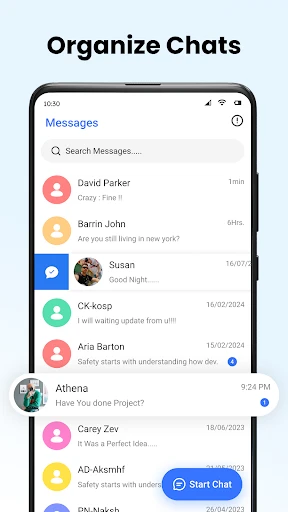
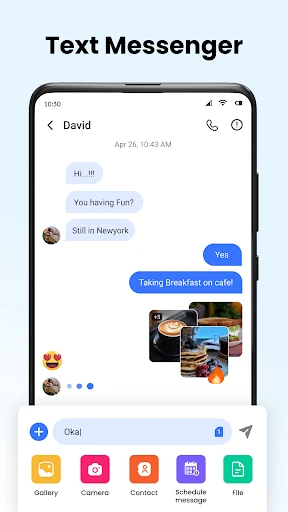
The core function of the Messages app is to serve as a comprehensive SMS and MMS client. It enables users to send and receive standard text messages, group texts, and multimedia messages containing photos, videos, and audio clips. The application organizes conversations in a familiar threaded view, allowing for easy tracking of discussions. Key functional features include message search to find past conversations quickly, message scheduling for sending texts at a predetermined time, and the ability to block unwanted numbers to reduce spam. It also supports delivery reports and read receipts where available through carrier services. The app manages contact integration, displaying names and photos from your address book, and provides basic customization for conversation bubbles and backgrounds. Furthermore, it handles automated verification code detection, offering a convenient copy-paste shortcut for one-time passwords received via SMS.
Chapter 2: Value
The primary value proposition of Messages: SMS Message Text App lies in its combination of simplicity, reliability, and enhanced control over the fundamental texting experience. Unlike many default manufacturer apps cluttered with advertisements or excessive features, this app offers a focused and clean interface that is intuitive for users of all technical levels. Its key advantages start with organizational efficiency; the powerful search function and well-structured conversation threads make retrieving information effortless, turning your message history into a easily navigable archive. The scheduling feature adds significant value for planning communications, ensuring important messages are sent at optimal times without relying on memory. Privacy and peace of mind are bolstered by the robust blocking and spam protection tools, giving users direct authority over who can contact them. The app's design philosophy avoids performance-draining extras, resulting in a lightweight application that operates swiftly and reliably, ensuring messages are sent and received without delay. The customization options, while not overwhelming, allow for a degree of personalization that makes the daily use more enjoyable. Crucially, it maintains full compatibility with the universal SMS/MMS standards, guaranteeing it works across all carriers and with all contacts, regardless of their device. This universality, paired with its thoughtful features, positions it as a dependable daily driver for text-based communication, enhancing a core phone function without complicating it.
Chapter 3: Scenarios
The Messages app is ideally suited for a broad spectrum of users who prioritize straightforward and efficient text messaging. Its primary target groups include individuals seeking an alternative to their phone's pre-installed, often unchangeable, messaging application, especially those who find their default app lacking in features or cluttered with unwanted elements. It is highly valuable for professionals and busy individuals who benefit from message scheduling to coordinate with clients, colleagues, or across time zones, and who need reliable search to find specific details like addresses or reference numbers from past texts. The app also serves users concerned with communication management, such as parents who wish to monitor and control their children's contacts through easy blocking features, or anyone frequently bothered by promotional spam. Everyday use cases are centered on core texting activities: maintaining clear group chats for family events or project teams, sharing moments through quick photo and video messages, and securely managing the influx of verification codes for online services with the auto-detection feature. It is the go-to tool for anyone who views SMS as a vital, dependable fallback when internet-based messaging apps are unavailable, ensuring they always have a stable and enhanced channel for essential communication.
Uninstall Instructions
For step-by-step guidance on how to safely remove this application from your device, please refer to our 《Uninstall Instructions》 document.
Pros
- automatically organizes messages into categorized cards
- built-in search finds specific details within messages instantly
- one-tap actions for reminders and payments from texts
- clean
- card-based interface reduces visual clutter
- local on-device processing for enhanced message privacy
Cons
- card organization logic can't be manually adjusted
- advanced features require latest Android versions
- no direct support for scheduling messages to send later
- limited theme customization beyond light/dark modes
- occasional delays in categorizing new types of messages
Frequently Asked Questions
What is the core function of Messages?
Messages is an SMS and MMS messaging app that serves as a replacement for your phone's default texting application. Its core function is to send, receive, and organize your text messages. It provides a clean, customizable interface and focuses on reliable, fast communication without requiring an internet connection, as it uses your cellular carrier's standard SMS/MMS service.
Is the Messages app free to use?
Yes, the Messages app is free to download and use for standard SMS and MMS messaging. It does not require a subscription for its basic texting functions. The app may contain optional in-app purchases for premium themes, customization packs, or additional features like enhanced scheduled messaging or cloud backup, but core messaging remains completely free.
How does Messages protect my privacy?
Messages requests standard SMS/MMS permissions to read, send, and manage your texts. It operates locally on your device for core functions. The app's privacy policy should detail any data collection. For security, it does not inherently provide end-to-end encryption for SMS, as that is a carrier protocol limitation. Users should review the app's specific privacy settings and permissions within the app and their device settings.
Can I use Messages on my tablet or PC?
The Messages app is primarily designed for Android smartphones. It typically cannot sync messages to tablets or PCs by itself, as it uses your phone's SIM card for SMS. For multi-device use, you would need to rely on carrier-provided services or third-party bridging apps, which are not this app's core functionality. It adapts to different Android versions as specified on the Google Play Store.
What should I do if messages fail to send?
First, ensure you have a stable cellular network signal, as SMS requires this, not Wi-Fi. Verify the recipient's number is correct and your phone's message center settings are proper. Check if you have sufficient credit or an active messaging plan with your carrier. Restarting the app or your device can resolve temporary glitches. For persistent issues, contact your mobile carrier, as the problem may be with the network, not the app.
App Info
Technical Info
Recommended For You

kungfu city fighting game
Comics

Whoscall - Caller ID & Block
Communication

Messages: SMS Text Messenger
Communication

Zoom Rooms Controller
Business

Auto Sync for Android/Car Play
Auto & Vehicles

CaptionCall
Communication

ThriftBooks: New & Used Books
Books & Reference

AI Image Generator: ImagineArt
Art & Design

AutoTempest - Car search
Auto & Vehicles

TCA Plus (TCA 2024)
Books & Reference

Virtual Hair Style Changer
Beauty

Papercopy - Tracer
Art & Design

How To Draw Comics
Comics

King James Bible Study KJV
Books & Reference

MERO - Programări Online
Beauty

Mangamo Manga & Comics
Comics

Fuelio: gas log & gas prices
Auto & Vehicles

delitoon
Comics

Psiphon: Fast and Secure VPN
Communication

Proton Mail: Encrypted Email
Communication