
Bolt for Tesla - Tasker Plugin
Screenshots

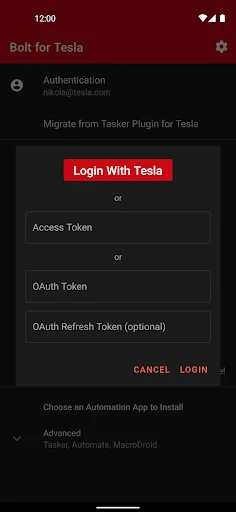


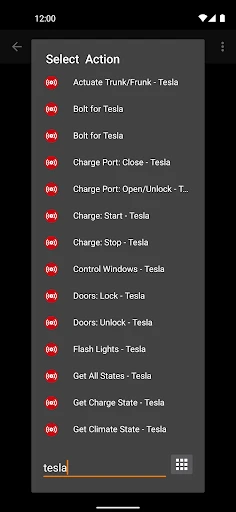
Description
About Bolt for Tesla - Tasker Plugin Feature
Bolt for Tesla - Tasker Plugin is a powerful automation bridge application designed specifically for Tesla vehicle owners. It seamlessly integrates the advanced capabilities of the Tasker automation app for Android with the connected features of a Tesla car. This plugin acts as a sophisticated intermediary, allowing users to create custom automated tasks and triggers that interact directly with their vehicle's API. By unlocking a new layer of programmable control, it transforms the Tesla from a smart car into a deeply integrated component of a user's digital ecosystem. The app empowers owners to go beyond the standard mobile app, enabling personalized, conditional, and location-based automations that enhance convenience, efficiency, and the overall ownership experience.
Chapter 1: Function
The core function of Bolt for Tesla is to provide a secure and robust link between Tasker and the user's Tesla vehicle. It does not operate as a standalone app but functions as a plugin, exposing a comprehensive set of vehicle controls as actionable tasks within the Tasker environment. Users can create profiles in Tasker that, based on specific contexts like time, location, or device state, execute automated actions on their Tesla. These actions include, but are not limited to, locking or unlocking the doors, starting climate control, opening the trunk or frunk, honking the horn, flashing the lights, and checking vehicle status such as charge level or door lock state. The plugin handles the secure authentication with Tesla's servers, ensuring that commands are transmitted reliably and safely to the vehicle, all orchestrated through the user's custom-built Tasker routines.
Chapter 2: Value
The primary value proposition of Bolt for Tesla lies in its unparalleled ability to deliver hyper-personalized automation, elevating the concept of a connected car to new heights. Its key advantage is the liberation of the vehicle's functionality from the confines of manual app control or basic Tesla schedules. By leveraging Tasker's immense flexibility, users can craft automations that are uniquely tailored to their lifestyle. For instance, the plugin can automatically precondition the cabin when the phone disconnects from the home Wi-Fi on a weekday morning, or vent the windows when the phone's ambient light sensor detects a sunny day and the car is at home. It enables complex conditional logic, such as only charging the vehicle to 80% unless the calendar shows a long trip the next day. This deep integration fosters significant gains in daily convenience and efficiency, eliminating repetitive manual tasks. Furthermore, it can enhance vehicle security by creating automated alerts based on location or status changes. For tech-savvy owners, it represents the ultimate tool for customization, turning their Tesla into a responsive entity within their smart home and digital life, a level of integration not offered by the manufacturer's official software.
Chapter 3: Scenarios
Bolt for Tesla is primarily targeted at Android-using Tesla owners who are enthusiasts of automation, productivity, and custom technology solutions. Its ideal user is familiar with or willing to learn Tasker's framework to build advanced automations. Key usage scenarios are abundant. A commuting professional can set an automation that, upon leaving the workplace (detected by phone's GPS), starts climate control and sets the seat heater for the drive home. A parent can create a shortcut on their phone's home screen to quickly open the trunk when their hands are full with groceries. Home automation enthusiasts can integrate their Tesla with smart home systems via Tasker, perhaps turning on the driveway lights when the car arrives home after dark. Users concerned with battery health can automate charging limits based on time of day or upcoming calendar events. It is also invaluable for creating accessibility-focused triggers, allowing control of vehicle functions through alternative inputs configured within Tasker. Essentially, any Tesla owner seeking to save time, add contextual intelligence to their vehicle interactions, or deeply integrate their car into a personalized automated workflow will find immense practical application for this plugin.
Uninstall Instructions
For step-by-step guidance on how to safely remove this application from your device, please refer to our 《Uninstall Instructions》 document.
Pros
- automates vehicle climate and charging via phone location
- integrates complex car controls into android automation workflows
- enables custom triggers like low battery alerts for pre-conditioning
- operates locally without relying on tesla's official server
- allows scheduling for off-peak charging using utility rates
Cons
- requires tasker app purchase and setup for full functionality
- steep learning curve for non-technical android users
- limited to android platform
- excluding ios users entirely
- potential delay in location-based trigger execution
- lacks official support
- relying on community for troubleshooting
Frequently Asked Questions
What is Bolt for Tesla - Tasker Plugin?
Bolt for Tesla is an Android automation plugin that integrates your Tesla vehicle with the Tasker app. It allows you to create custom automated tasks and triggers based on your car's data and states, such as battery level, location, or climate status. This enables advanced personal automation beyond the official Tesla app, like automatically sending charging notifications or adjusting settings based on specific conditions.
Is Bolt for Tesla free to use?
Bolt for Tesla is a paid plugin. It requires a one-time purchase. Please note that it also requires the separate 'Tasker' app, which is a paid application on the Google Play Store. There are no subscription fees or in-app purchases within Bolt itself after the initial purchase. The official Tesla app must also be installed for authentication.
What devices and systems are compatible with this app?
This app is exclusively for Android devices, as it is a plugin for the Android automation app 'Tasker'. It is not available for iOS or iPhone. Compatibility depends on your device's ability to run the required Tasker app and the official Tesla app. It works with most Tesla models that are supported by the official Tesla mobile app.
How does Bolt for Tesla access my car data?
Bolt for Tesla uses the official Tesla Owner API through your authenticated Tesla account. It acts as a secure bridge between Tasker and Tesla's servers. You must log in with your Tesla credentials within the plugin. The app only uses the permissions necessary to read vehicle data and send commands, similar to the official app. Your credentials are not stored by the developer.
Can I control my Tesla remotely with this plugin?
Bolt for Tesla primarily enables reading vehicle data (state, battery, location) and sending commands (like climate start/unlock) as triggers or actions within automated Tasker profiles. It is not a standalone remote control app. Direct, manual remote control is best done through the official Tesla app. This plugin's core function is automation based on conditions you set in Tasker.
App Info
Technical Info
Recommended For You

AR Drawing Paint Sketch Trace
Art & Design

MangaToon: Comic & Manga
Comics

Flowt Wear
Auto & Vehicles

BimmerCode for BMW and MINI
Auto & Vehicles

WhatsApp Messenger
Communication

Azar: 1 on 1 Video Chat Online
Communication

PENUP – Drawing-sharing SNS
Art & Design

MyHeritage: Family Tree & DNA
Books & Reference

ESV Bible
Books & Reference

FolderSync Pro
Communication

WoAD
Communication

OBD Auto Doctor: OBD2 Scanner
Auto & Vehicles

Flashlight : SMS & Call Alert
Communication

Standup Wireless
Communication

TeamViewer Remote Control
Business

Animation Creator: Flipbook 2D
Art & Design

Stickman: draw animation maker
Art & Design

کتابراه: کتاب الکترونیک و صوتی
Books & Reference

АЗС Татнефть
Auto & Vehicles

Dreame-Read Romance Stories
Books & Reference