
Fax.Plus - Send Fax from Phone
Screenshots



Description
About Fax.Plus Feature – Modern Faxing Redefined
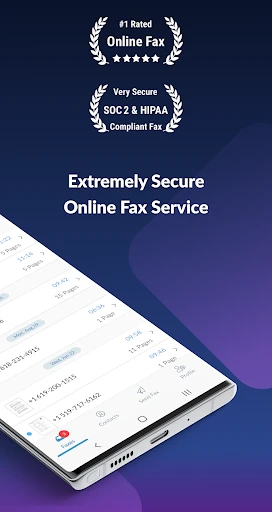
Fax.Plus is a leading mobile and web application designed to revolutionize the traditional faxing process. It enables users to send, receive, and manage fax documents directly from their smartphones or computers, eliminating the need for physical fax machines, dedicated phone lines, and paper. By digitizing fax communication, Fax.Plus bridges the gap between legacy document transmission methods and modern digital workflows. It serves as a vital tool for individuals and businesses that occasionally or regularly need to handle faxes but prefer the convenience, security, and efficiency of a cloud-based platform. The app integrates seamlessly into daily operations, offering a reliable and accessible solution for on-the-go document handling.
Chapter 1: Function
Fax.Plus provides a comprehensive suite of core functions centered around digital fax management. Primarily, it allows users to send faxes to any fax number worldwide by uploading documents directly from their device, cloud storage services like Google Drive and Dropbox, or by capturing them with the phone's camera. The app supports a wide range of file formats including PDF, Word, Excel, and image files. Users can also receive faxes, which are delivered as digital files to their in-app inbox or via email notification. The platform includes features for organizing sent and received faxes, managing contacts, adding electronic signatures to documents before sending, and scheduling faxes for later delivery. For administrative control, it offers team management tools, allowing the assignment of dedicated fax numbers and tracking of usage among team members.
Chapter 2: Value
The value proposition of Fax.Pplus lies in its ability to transform a cumbersome, outdated process into a streamlined, cost-effective, and secure digital service. Its key advantages are multifaceted. First, it offers significant convenience and mobility; users can handle critical fax documents from anywhere, at any time, using just their mobile device, which is indispensable for professionals on the move, remote workers, and small businesses without office hardware. Second, it enhances security and privacy. Fax.Plus employs end-to-end encryption for document transmission and storage, ensuring sensitive information like legal contracts, medical records, or financial statements is protected more reliably than with traditional fax lines susceptible to interception. Third, it promotes efficiency and organization. The digital inbox eliminates paper clutter, provides instant searchability of past faxes, and integrates with cloud ecosystems, creating a seamless document management flow. Fourth, it is economically advantageous, removing the upfront costs of fax machines, maintenance, ink, paper, and dedicated phone lines, operating instead on transparent subscription or pay-as-you-go plans. Finally, its global reach and reliability ensure high-quality delivery to international numbers, making it a robust tool for global business communications. This combination of accessibility, security, and efficiency delivers unparalleled value in a niche yet essential communication domain.
Chapter 3: Scenarios
Fax.Plus primarily targets user groups and scenarios where formal document transmission via fax remains a regulatory, professional, or customary requirement. Key users include small to medium-sized business owners and their employees, especially in industries like healthcare, legal, real estate, and finance, where signed documents, prescriptions, contracts, and application forms often require faxing due to compliance standards or client preferences. Freelancers and remote workers who need to submit paperwork to corporate offices or government agencies while away from a traditional office setup also benefit greatly. Additionally, individuals dealing with personal administrative tasks, such as sending tax documents, insurance claims, or school records, find the app exceptionally useful. Everyday use cases involve a real estate agent e-signing and instantly faxing a purchase agreement from an open house, a healthcare provider securely sending a patient referral from a clinic, a lawyer dispatching a signed legal brief while traveling, or an individual submitting a signed application form to a government office from home. In all these scenarios, Fax.Plus replaces a physical, location-bound machine with a swift, secure, and mobile digital alternative.
Uninstall Instructions
For step-by-step guidance on how to safely remove this application from your device, please refer to our 《Uninstall Instructions》 document.
Pros
- sends faxes directly from a mobile device without hardware
- integrates cloud storage services for document access
- offers a unique
- searchable fax history log
- provides electronic signatures for faxed documents
- supports scheduling faxes for off-peak transmission
Cons
- free tier includes prominent ad-generated cover sheets
- high-volume users face steep per-page pricing tiers
- requires stable internet
- unlike traditional fax lines
- international faxing incurs separate
- higher costs
- ocr text recognition accuracy varies by document quality
Frequently Asked Questions
What is Fax.Plus and what does it do?
Fax.Plus is a mobile application that allows you to send and receive fax documents directly from your smartphone or tablet. It digitizes the traditional faxing process, enabling you to fax PDFs, images, and other file types using your mobile device as a virtual fax machine. The app also provides a dedicated fax number for receiving documents and offers cloud storage for sent and received faxes.
Is Fax.Plus free to use, or are there in-app purchases?
Fax.Plus operates on a freemium model. It offers a free tier with limited pages per month and basic features. For higher volume or advanced features like a personal fax number, team management, or HIPAA compliance, paid subscription plans are available as in-app purchases. These plans are billed monthly or annually and offer varying page allowances and capabilities.
What devices and operating systems does Fax.Plus support?
Fax.Plus is available for both iOS and Android mobile devices through their respective app stores. It is optimized for smartphones and tablets. Additionally, the service can be accessed via a web browser on desktop or laptop computers, providing flexibility across platforms. A stable internet connection is required for all devices.
How do I send a fax using the Fax.Plus app?
To send a fax, open the app and tap the 'Send Fax' button. You can then select a document from your device's storage, cloud services like Google Drive or Dropbox, or take a photo directly. Enter the recipient's fax number, add a cover page if needed, and send. The app will process the transmission and notify you of its status. The interface is designed to be straightforward for first-time users.
What happens if my fax fails to send, or I need support?
If a fax fails, the app typically provides a status notification. You can retry sending it from the 'Outbox' section. For technical issues or account inquiries, Fax.Plus offers customer support primarily through an in-app help center and email. Support channels and specific service level agreements may vary depending on your subscription plan. There is no information about phone-based support.
App Info
Technical Info
Recommended For You

Kiwi Browser - Fast & Quiet
Communication

OBD Fusion (Car Diagnostics)
Communication

My Mitsubishi Connect
Auto & Vehicles

Nomad Sculpt
Art & Design

Infinite Painter
Art & Design

Lyft Driver
Business

طاقچه؛ کتاب الکترونیکی و صوتی
Books & Reference

TracFone My Account
Communication

Dwell: Audio Bible
Books & Reference

Cat Maker: Cat Emoji Sticker
Art & Design
Car play/Android Auto Sync
Auto & Vehicles

Al Quran Kareem: القران الكريم
Books & Reference

XBrowser - Mini & Super fast
Communication

Messages : SMS & Private Chat
Communication

Fiverr - Freelance Service
Business

Samsung Internet Browser
Communication

Repixel: AI Photo Enhancer
Art & Design

AR Draw Sketch: Trace & Paint
Art & Design

Pixl - Face Retouch & Blemish
Beauty

kungfu city fighting game
Comics