
My Mitsubishi Connect
Screenshots


Description
About My Mitsubishi Connect Features - Remote Vehicle Management and Connected Services
My Mitsubishi Connect is the official connected car application for Mitsubishi vehicle owners, designed to bridge the gap between the driver and their vehicle through advanced telematics. This app leverages built-in vehicle connectivity to provide a suite of remote control, monitoring, and informational services directly to the user's smartphone. It serves as a digital companion that enhances convenience, safety, and peace of mind, transforming the ownership experience by putting essential vehicle functions and status updates at the user's fingertips, regardless of physical proximity to the car.
Chapter 1: Function
My Mitsubishi Connect delivers core remote management functions centered on vehicle control and status monitoring. Users can remotely lock and unlock their vehicle doors, a crucial feature for confirming security or granting access. The app provides remote engine start and climate control activation, allowing the cabin to be heated or cooled before entry. It includes a vehicle finder function using GPS to locate the car in crowded parking areas. Furthermore, the app displays vital status information such as fuel level, estimated driving range, and odometer reading. It also manages vehicle health alerts and maintenance schedules, sending notifications for service intervals or system warnings. These functions are accessible through a centralized dashboard, offering direct interaction with the vehicle's key systems.
Chapter 2: Value
The primary value proposition of My Mitsubishi Connect lies in its enhancement of convenience, security, and proactive vehicle management. Its key advantage is the significant time-saving and comfort provided by remote climate control and engine start, ensuring a pleasant cabin environment in extreme weather. For security, the ability to verify door lock status and locate the vehicle offers substantial peace of mind, deterring theft and reducing parking lot frustration. The app adds tangible safety value through features like roadside assistance activation and the ability to check if doors are locked from anywhere. From a maintenance perspective, it transitions vehicle care from a reactive to a proactive model. By aggregating diagnostic data and providing tailored service reminders, it helps prevent major repairs, promotes vehicle longevity, and protects the owner's investment. This integrated approach to connectivity fosters a more informed, efficient, and relaxed ownership experience, strengthening the bond between the driver and the Mitsubishi brand by delivering practical digital utility that aligns with modern, mobile-centric lifestyles.
Chapter 3: Scenarios
The primary target users for My Mitsubishi Connect are owners of newer Mitsubishi models equipped with the required telematics hardware. It is particularly valuable for professionals and commuters in urban or suburban settings who benefit from pre-conditioning their car before daily drives. Families find utility in remotely checking if the vehicle is locked after school drop-offs or managing cabin temperature for children and pets. Frequent travelers or individuals using large parking facilities, such as airports or shopping malls, heavily rely on the vehicle locator function to save time. The app also serves safety-conscious drivers and those living in regions with harsh winters or hot summers, where remote start and climate control are not just conveniences but necessities. Additionally, users who prefer digital organization and proactive planning appreciate the centralized maintenance tracking and alerts, which streamline vehicle upkeep. Essentially, the app caters to any Mitsubishi owner seeking to integrate their vehicle seamlessly into their connected digital life for enhanced daily convenience and control.
Uninstall Instructions
For step-by-step guidance on how to safely remove this application from your device, please refer to our 《Uninstall Instructions》 document.
Pros
- real-time vehicle status monitoring via smartphone
- remote door lock/unlock and climate control activation
- integrates vehicle health reports and service scheduling
- provides trip history and eco-driving score feedback
- sends security alerts for unauthorized vehicle entry
Cons
- requires a compatible Mitsubishi model and subscription
- app interface and features vary by region and model year
- remote functions depend on stable cellular network connection
- diagnostic data may require dealer interpretation for issues
- limited third-party smart home or ecosystem integration
Frequently Asked Questions
What is My Mitsubishi Connect and what does it do?
My Mitsubishi Connect is a telematics app for remote vehicle management. It allows owners of compatible Mitsubishi vehicles to remotely lock/unlock doors, start the engine, check fuel level and tire pressure, locate the vehicle on a map, and receive maintenance alerts. The app connects to your vehicle via an embedded cellular module, providing control and status updates from your smartphone.
Is My Mitsubishi Connect free to use, or are there fees?
The app itself is free to download. However, its core remote services require an active subscription plan after an initial trial period (if offered). Subscription fees vary by region and service package. Some basic features like owner's manual access may remain available without a subscription. Please check the app or Mitsubishi's official website for current pricing in your market.
Which Mitsubishi vehicles and phones are compatible?
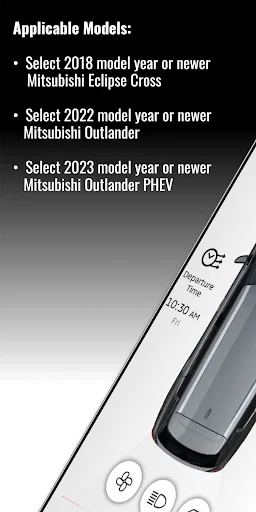
The app works with newer Mitsubishi models equipped with the required telematics hardware, typically from recent model years. Compatibility must be verified by entering your VIN on Mitsubishi's official site. The mobile app requires a smartphone running iOS or Android with a current OS version. Specific version requirements are listed on the Apple App Store or Google Play Store pages.
How do I troubleshoot connection or login problems?
First, ensure your phone has internet access and the app is updated. For vehicle connection failures, verify the vehicle is in an area with cellular reception and its telematics system is active. If login fails, use the password reset function. For persistent issues, contact Mitsubishi Connect customer support via the phone number listed in the app or your owner's materials. Account or subscription status may also affect connectivity.
Can I use all features while traveling outside my home country?
Remote features depend on cellular network availability and roaming agreements for your vehicle's embedded SIM. Some functions may be limited or unavailable outside the primary service region. It is recommended to test functionality before travel. Location tracking and remote commands may not work internationally. Contact customer support to confirm service coverage for your specific destination and vehicle model.
App Info
Technical Info
Recommended For You

Coloring games: speed drawing
Art & Design

AARP SafeTrip™
Auto & Vehicles

Rebtel: Recharges And Calls
Communication

Truecaller: Caller ID Blocker
Communication

GigSmart Get Gigs
Business

Literie-Endless Stories Await
Books & Reference

Drivers Permit Practice
Auto & Vehicles

Discount Tire
Auto & Vehicles

PAeDocket
Books & Reference

Package Tracker - pkge Mobile
Business

Beauty Camera: Sweet Camera
Beauty

OBD Scanner ELM327: GaragePro
Auto & Vehicles

Bible App by Olive Tree
Books & Reference

Recover Deleted Messages App
Communication

CaptionCall
Communication

Hush: Android Auto Audio Fix
Auto & Vehicles

My Bible - Verse+Audio
Books & Reference

aiMail - Al Email Accounts
Communication

Shiftsmart - Find Work
Business

Solo: Your Gig Business App
Business