
Messages : SMS & Private Chat
Screenshots



Description
About Messages : SMS & Private Chat Features - Secure and Intelligent Messaging
Messages : SMS & Private Chat is a comprehensive messaging application designed to replace the default SMS app on Android devices while integrating enhanced privacy and organizational features. It serves as a unified hub for both traditional SMS/MMS communication and private, encrypted chats, offering users a streamlined and secure messaging experience. The app emphasizes user control over data, intelligent message management, and a clean, ad-free interface, making it a robust alternative for everyday communication needs.
Chapter 1: Function
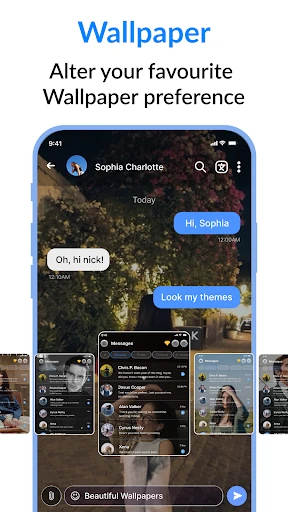
The core functionality of Messages : SMS & Private Chat centers on managing all forms of text-based communication. Primarily, it handles standard SMS and MMS messages, allowing users to send and receive texts, group messages, and multimedia with contacts. Beyond this, the app introduces a 'Private Chat' feature, which creates a password or PIN-protected space within the app for sensitive conversations, shielding them from prying eyes. It also includes practical tools for organizing messages, such as the ability to schedule SMS for future delivery, back up and restore chat histories, and block unwanted numbers and spam. The interface typically supports customization options like themes and chat bubbles, providing a personalized user experience while maintaining essential messaging operations.
Chapter 2: Value
The primary value proposition of Messages : SMS & Private Chat lies in its dual commitment to enhanced privacy and superior message management, all within a user-friendly package. Unlike many default messaging apps, it places a strong emphasis on user data security. The dedicated Private Chat function acts as a secure vault, ensuring that confidential conversations remain inaccessible without authentication, addressing a common concern for users sharing devices or seeking discrete communication. Furthermore, the app delivers significant organizational value through features like scheduled messaging, which allows users to compose texts to be sent at an optimal time, and reliable backup options that prevent data loss. The absence of intrusive ads and a clean, intuitive interface contribute to a frictionless experience. By consolidating robust SMS capabilities with added privacy layers and productivity tools, the app offers tangible advantages over basic system apps, providing users with greater control, peace of mind, and efficiency in their daily digital communications without requiring a shift to an entirely new messaging platform.
Chapter 3: Scenarios
This app is ideally suited for Android users who prioritize privacy and seek more control over their messaging experience. A key target group includes professionals and individuals who share their devices with family members or colleagues and require a secure space for confidential conversations, such as discussing work details or private matters. It is also highly valuable for users who rely heavily on SMS for authentication codes, appointment reminders, or communicating with contacts not on popular OTT platforms, as the app's organization and backup features prevent important texts from getting lost. Additionally, planners and busy individuals benefit from the scheduling function, allowing them to prepare birthday greetings or reminder messages in advance. Everyday use cases involve seamlessly managing all incoming and outgoing SMS in a unified inbox, quickly moving select conversations to the Private Chat vault for added security, and efficiently blocking spam numbers to declutter the message list. It serves as a versatile daily driver for anyone looking to enhance their standard texting app with meaningful privacy and utility features.
Uninstall Instructions
For step-by-step guidance on how to safely remove this application from your device, please refer to our 《Uninstall Instructions》 document.
Pros
- integrates sms and encrypted chat in unified inbox
- offers self-destructing messages for private conversations
- applies e2e encryption to both sms and chat modes
- allows custom themes per contact for visual sorting
- blocks spam by analyzing sms sender patterns
Cons
- requires contact adoption for full encrypted chat benefits
- dual protocol handling can complicate message threading
- advanced encryption features drain battery faster
- theme customization relies on manual per-contact setup
- spam filter needs initial training period to be effective
Frequently Asked Questions
What is Messages: SMS & Private Chat?
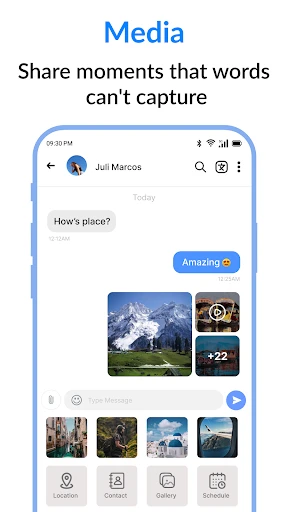
Messages: SMS & Private Chat is a messaging application for Android that primarily functions as an alternative SMS/MMS client for sending and receiving standard text messages. Its core positioning includes enhanced privacy features, such as private chat lockers and message encryption, alongside standard messaging functionalities like group chats and media sharing. It operates as a replacement for your device's default SMS app.
Is this app free to use, or are there in-app purchases?
The app is free to download and use for basic SMS/MMS messaging. However, it offers premium features, such as advanced privacy locks, themes, and ad removal, which are unlocked through in-app purchases. The app may display advertisements in the free version. No additional physical equipment is required beyond a standard Android smartphone with cellular service.
What devices and Android versions are supported?
Messages: SMS & Private Chat is designed for Android devices. Specific version requirements can vary; typically, it supports a wide range of Android OS versions (e.g., Android 5.0 and above). It is not available for iOS (iPhone), Windows, or macOS. It functions as a standard SMS client, so compatibility also depends on your mobile carrier's support for SMS/MMS.
How does the private chat or locker feature work?
The private chat feature allows you to hide specific conversations behind a PIN, pattern, or fingerprint lock. When enabled, these selected chats are moved to a secured vault within the app and are not visible in the main inbox. This is a local security measure on your device. Note that standard SMS themselves are not end-to-end encrypted by default, unlike some internet-based messaging apps.
Can I use this app as my default SMS application?
Yes, this app is designed to be set as your device's default SMS application. Upon first launch or through your phone's settings, you will be prompted to grant SMS permissions and set it as the default. This is required for it to send, receive, and store your text messages. You can change the default app back to another at any time in your Android system settings.
App Info
Technical Info
Recommended For You

TeslaMirror
Auto & Vehicles

Remodel AI - Home Renovation
Art & Design

Hair Color Changer: Change you
Beauty

CarGurus: Used & New Cars
Auto & Vehicles

CARFAX - Shop New & Used Cars
Auto & Vehicles

Ficbook: Read Fictions Anytime
Comics

CarMax: Used Cars for Sale
Auto & Vehicles

Filtre for Selfie
Beauty

VIZ Manga
Comics

myAudi
Auto & Vehicles

Mangamo Manga & Comics
Comics

DC UNIVERSE INFINITE
Comics

BikeWale- Bikes & Two Wheelers
Auto & Vehicles

ThinkDiag+
Auto & Vehicles

GetCode - Virtual Number SMS
Business

BeautifyX - AI Makeover Studio
Beauty

Bookshelf-Your virtual library
Books & Reference

JusTalk Kids - Safe Messenger
Communication

POCKET COMICS: Premium Webtoon
Comics

Knots 3D
Books & Reference