
X Launcher Pro
Screenshots
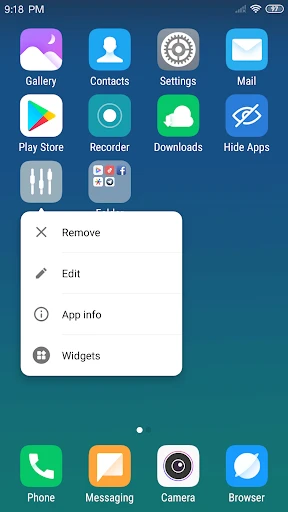

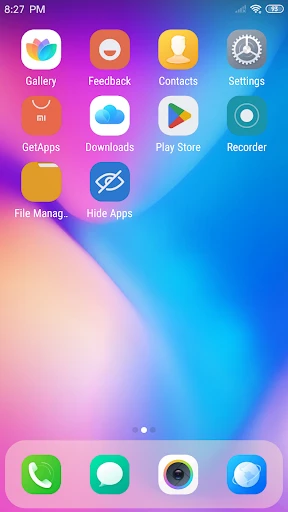


Description
About X Launcher Pro Feature - The Ultimate Customization Engine for Your Android Device
X Launcher Pro is a powerful and highly customizable Android launcher application designed to transform the user interface and interaction experience of mobile devices. It moves beyond the static layouts of stock launchers, offering users deep control over their home screen's aesthetics, organization, and functionality. The app is built on the principle of personalization, enabling users to tailor virtually every visual and operational element to match their style and usage habits. From intricate icon packs and dynamic widgets to sophisticated gesture controls and performance optimization tools, X Launcher Pro serves as a comprehensive platform for users who view their smartphone's home screen not just as a utility, but as a personal canvas and a productivity hub. It strikes a balance between offering extensive advanced features and maintaining a smooth, intuitive user experience suitable for both customization enthusiasts and general users seeking a fresher, more efficient interface.
Chapter 1: Function
X Launcher Pro's core functionality revolves around providing exhaustive customization and enhanced control over the Android home screen. It allows users to completely alter the visual theme, including applying icon packs, changing icon shapes and sizes, and customizing app drawer transparency and animation effects. The launcher features powerful grid size adjustments for precise placement of widgets and icons. Functionally, it supports a wide array of gestures, such as double-tap to lock screen, swipe up/down for specific actions, and pinch gestures to trigger predefined functions, streamlining navigation. It includes a robust search tool for quickly locating apps and contacts. Performance-wise, the app offers memory cleaning and cache clearing tools to optimize device speed. Furthermore, it provides extensive widget integration, allowing users to place informative and interactive widgets for weather, calendar, system info, and more directly on the home screen, creating a highly personalized and information-rich starting point for device interaction.
Chapter 2: Value
The primary value proposition of X Launcher Pro lies in its empowerment of the user, transforming a generic device interface into a uniquely personal and highly efficient command center. Its key advantage is the unparalleled depth of customization it offers without requiring root access, making advanced theming accessible to a broader audience. Unlike many launchers that focus solely on aesthetics, X Launcher Pro integrates meaningful utility features. Its gesture control system is a significant productivity booster, enabling users to perform common actions faster than through traditional tapping. The integrated performance tools add tangible value by helping maintain device responsiveness, a concern for users with older phones. The launcher is also notably lightweight and optimized, ensuring that the rich feature set does not come at the cost of battery drain or system lag. For power users, the ability to create multiple, distinct home screen profiles for different scenarios (like work, travel, or leisure) is a standout feature. Ultimately, X Launcher Pro delivers value by saving users time through efficient navigation, expressing their personal style through design, and extending the functional life and utility of their Android device through optimization, all within a single, cohesive application.
Chapter 3: Scenarios
X Launcher Pro primarily targets Android users dissatisfied with the monotony and limitations of their device's default interface. Its core user groups include tech enthusiasts and customization aficionados who enjoy meticulously crafting their digital environment to reflect their personality and workflow. It is equally valuable for productivity-focused professionals and students who benefit from gesture shortcuts, efficient app organization, and widget-based at-a-glance information, allowing them to access critical tools and data swiftly. Everyday users who simply desire a fresher, more visually appealing look for their phone without complexity will find its theme application straightforward. The app is particularly useful for users with older or mid-range Android devices, as its optimization features can help improve perceived performance. Common use cases involve a user spending an initial setup period personalizing themes, icons, and layouts. Daily use then revolves around leveraging gestures—like swiping down on the home screen to check notifications or double-tapping to sleep—to interact with the device more fluidly. Another frequent scenario is using the integrated search to launch apps instead of scrolling, or checking a consolidated widget for calendar events, weather, and system stats first thing in the morning, making the home screen a true daily dashboard.
Uninstall Instructions
For step-by-step guidance on how to safely remove this application from your device, please refer to our 《Uninstall Instructions》 document.
Pros
- provides extensive home screen grid and icon customization
- integrated smart search bar aggregates app and web results
- lightweight design ensures minimal impact on battery life
- gesture controls allow app launches from any screen
- dynamic calendar icon updates date without widgets
Cons
- advanced gesture setup requires a learning period
- smart search depends heavily on stable network connectivity
- limited support for third-party icon pack auto-apply
- backup and restore function lacks cloud sync option
- minimalist design reduces at-a-glance information density
Frequently Asked Questions
What is X Launcher Pro and what does it do?
X Launcher Pro is an Android home screen replacement app. Its core functions include highly customizable icon packs, grid layouts, and transition animations. It allows users to personalize their device's interface beyond the manufacturer's default launcher. The app positions itself as a tool for advanced theming and efficient home screen management.
Is X Launcher Pro free to use or are there in-app purchases?
X Launcher Pro operates on a freemium model. The base app is free to download and use with core launcher functionality. It offers optional in-app purchases, typically for premium icon packs, advanced themes, and exclusive customization features. There are no mandatory subscriptions, but certain aesthetic elements require separate purchase.
What devices and Android versions are compatible with this app?
The app is designed for Android devices. It generally supports Android 8.0 (Oreo) and later versions for full functionality. Compatibility can vary with device manufacturers that heavily modify the Android system. It does not require any additional hardware and is not available for iOS or other operating systems.
How does the app handle privacy and what permissions does it need?
X Launcher Pro requires standard launcher permissions to function, such as internet access for fetching online themes and storage access to apply icons/wallpapers. The developer's privacy policy states that personal data collection is minimal, primarily for app analytics. User-created layouts are stored locally on the device by default.
Can I back up and restore my custom home screen layouts?
Yes, the app includes a backup and restore feature for your home screen setups. You can export your layout, icon choices, and widget placements to a local file. This file can later be imported to restore the setup on the same device or transfer it to a new one, provided the same icon packs are installed. Cloud backup is not a native feature.
App Info
Technical Info
Recommended For You

UKG Ready
Business

MangaToon: Comic & Manga
Comics

Krita
Art & Design

Bolt for Tesla - Tasker Plugin
Auto & Vehicles

NavRadio+
Auto & Vehicles

Second Phone Number - 2Number
Communication

Skincare Routine
Beauty

Daily Bible: Holy Bible KJV
Books & Reference

Smarty Men Jacket Photo Editor
Beauty

Remove Background From Video
Beauty

Conversations (Jabber / XMPP)
Communication

Galatea: Books & Audiobooks
Books & Reference

Avatar Maker - Avatar Creator
Comics

Phone Dialer - Contacts
Communication

Uber - Driver: Drive & Deliver
Business

DSLR HD Camera : 4K HD Camera
Beauty

Picify: AI Art Editor
Art & Design

Abyss Reader
Comics

Al Quran Sharif for Muslim
Books & Reference

ComiQuest - Comic Reader
Comics