
BuildCalc
Screenshots

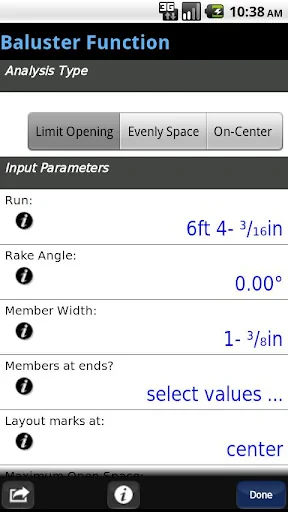


Description
About BuildCalc Construction Calculator Feature
BuildCalc is a professional-grade construction calculator application designed for contractors, carpenters, remodelers, and DIY enthusiasts. It transcends the capabilities of a standard calculator by integrating industry-specific functions, unit conversions, and material calculations essential for building and construction tasks. The app serves as a digital companion on the job site, replacing multiple traditional tools like pocket construction calculators, paper manuals, and complex spreadsheets. With an intuitive interface tailored for field use, BuildCalc empowers users to perform accurate and rapid calculations, reducing errors, saving time, and improving overall project efficiency from initial estimates to final execution.
Chapter 1: Function
BuildCalc's core functionality revolves around providing a comprehensive suite of calculation tools tailored for construction mathematics. It performs fundamental arithmetic while excelling in specialized calculations such as stair layout, roof pitch and rafter length, circle area and circumference, and concrete volume for slabs, footings, and columns. The app features robust unit conversion across imperial and metric systems for length, area, volume, and weight. Key tools include a built-in right-angle solver for precise measurements, board foot and lumber calculations for material estimation, and drywall and paint estimators. Its intuitive input allows for entering dimensions in feet-inches-fractions format directly, mirroring how professionals think and measure on site. The interface is designed for quick access to these functions, often presenting results with clear diagrams and step-by-step solutions where applicable.
Chapter 2: Value
The primary value proposition of BuildCalc lies in its ability to enhance accuracy, speed, and professionalism in construction-related calculations. Its key advantage is the consolidation of numerous specialized calculation needs into a single, portable device—the user's smartphone or tablet. This eliminates the need for carrying multiple reference books or switching between different apps, thereby streamlining the workflow directly on the job site. The app significantly reduces calculation errors that can lead to costly material waste and project delays. By providing instant conversions and precise material estimates, it aids in creating more accurate bids and budgets. Furthermore, BuildCalc's learning curve is minimal for those familiar with construction math; its interface is logically organized, making complex calculations accessible. The time saved on manual computations allows professionals to focus more on the physical work and project management. For the investment, it offers substantial return by preventing over-ordering materials, minimizing rework, and improving client confidence through demonstrable precision. It acts not just as a calculator, but as a critical decision-support tool that contributes directly to project profitability and successful completion.
Chapter 3: Scenarios
BuildCalc is primarily targeted at professionals and serious hobbyists within the building trades. Its core user groups include general contractors, carpenters and framers, roofers, concrete specialists, landscapers, and interior remodelers. DIY homeowners undertaking significant renovation projects also find immense value in its capabilities. Typical use cases are abundant on any job site: a carpenter uses the stair calculator to determine precise rise, run, and stringer layout before cutting. A roofer employs the pitch function to calculate rafter lengths and area for shingle orders. A concrete contractor quickly figures the cubic yards needed for a foundation pour using the volume calculator. A project manager uses the unit converter to seamlessly switch between metric and imperial plans when ordering materials. An estimator leverages the lumber calculator to determine board feet required for framing, generating a quick material list for suppliers. In everyday scenarios, from calculating the number of tiles for a bathroom floor to determining the correct angle for a miter cut on crown molding, BuildCalc provides the instant, reliable answers that keep projects moving forward accurately and efficiently.
Uninstall Instructions
For step-by-step guidance on how to safely remove this application from your device, please refer to our 《Uninstall Instructions》 document.
Pros
- instantly calculates material quantities for complex construction cuts
- integrates stair and roof framing math in one tool
- offers precise rafter and stud length solutions on-site
- saves time with built-in geometric and trig functions
- reduces manual errors in key construction calculations
Cons
- steep learning curve for non-professional users
- interface feels technical and less visually intuitive
- lacks real-time collaboration or project sharing features
- requires manual input without blueprint import capability
- limited to specific framing tasks
- not full project management
Frequently Asked Questions
What is BuildCalc and what does it do?
BuildCalc is a specialized construction calculator app designed for professionals and DIY enthusiasts. Its core function is to perform complex material and layout calculations common in building projects, such as stair stringers, roofing, concrete volume, and framing. It automates tedious math, reducing errors and saving time on-site. The app positions itself as a precise, on-the-go tool that replaces manual calculations and physical reference books.
Is BuildCalc free to use, or does it have in-app purchases?
BuildCalc is not a free app. It requires a one-time purchase to download. There are no subscription fees. Some versions or advanced features within the app ecosystem may be offered as separate purchases. The app does not contain third-party advertisements. Please check the current listing on your device's app store for the most accurate and up-to-date pricing information.
What devices and systems is BuildCalc compatible with?
BuildCalc is primarily available for iOS devices (iPhone and iPad). It requires a specific version of iOS or later, which is detailed on its App Store page. The app is optimized for both phone and tablet screens. There is no official version for Android, Windows, or macOS. It is designed for use in the United States and other countries, utilizing imperial (feet-inches) units as the primary measurement system.
How does BuildCalc handle unit conversions and complex shapes?
BuildCalc's technical core is its ability to calculate in feet, inches, and fractions natively, eliminating decimal conversion errors. For complex shapes like roofs or arches, it uses geometric formulas and user-input dimensions (like pitch, span, rise) to compute lengths, areas, and material quantities. It provides step-by-step entry fields for each variable needed for a specific calculation type, ensuring all necessary parameters are defined for an accurate result.
Can I use BuildCalc offline and how do I get support?
Yes, BuildCalc is a fully functional offline tool once downloaded. All calculations are performed locally on your device without needing an internet connection. For after-sales support, including usage questions or technical issues, you should contact the developer directly through the support links provided on the app's official App Store page or within the app's settings/info section. There is no information about in-person or phone-based customer service.
App Info
Technical Info
Recommended For You

Calls Blacklist PRO - Blocker
Communication

Inkitt: Books, Novels, Stories
Books & Reference

Merlin Bird ID by Cornell Lab
Books & Reference

EPUB Reader for all books
Books & Reference

MyNISSAN®
Auto & Vehicles

Hexa AI: Logo & Design Creator
Art & Design

Bible Homescreen - Read Now
Books & Reference

Drawing Apps: Draw, Sketch Pad
Art & Design

QuickBooks Online Accounting
Business

Kelley Blue Book: We Know Cars
Auto & Vehicles

Draw Cartoons 2 PRO
Art & Design

JOB TODAY: Hire & Find Jobs
Business

Email - Fast and Smart Mail
Communication

Beauty Makeup Editor & Camera
Beauty

Bible (King James Version)
Books & Reference

Learn to Draw Anime by Steps
Art & Design

AppBarber: Cliente
Beauty

Barber Chop
Beauty

Kling AI: AI Image&Video Maker
Art & Design

Email for Outlook, Hotmail
Communication