
Car Launcher
Screenshots


Description
About Car Launcher Feature
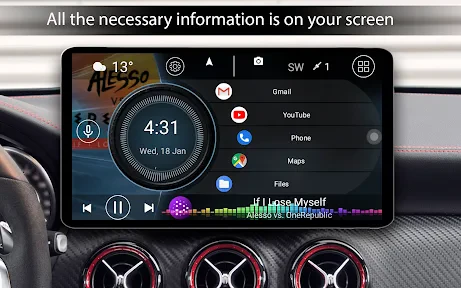
Car Launcher is a specialized Android application designed to transform a vehicle's infotainment system or an in-car mounted Android device into a safer, more intuitive, and driver-centric interface. It replaces the standard home screen with a simplified, high-visibility layout featuring large widgets and easy-to-tap buttons, minimizing distraction while driving. The app prioritizes essential driving information and quick access to navigation, music, communication, and car status functions, all through a clean, customizable dashboard. By optimizing the user experience for the unique environment of a moving vehicle, Car Launcher enhances both convenience and safety, making it a popular choice for users who frequently utilize their Android devices for in-car connectivity and entertainment.
Chapter 1: Function
Car Launcher's core functionality revolves around providing a dedicated driving interface. Upon activation, it overrides the default Android launcher to present a simplified home screen dominated by large, glanceable widgets. Key functions include one-touch access to essential apps like Google Maps, Waze, Spotify, and phone dialer. It integrates real-time information displays such as speed, time, weather, and battery status. The app often supports voice command shortcuts for hands-free operation, allowing drivers to initiate navigation or play music by voice. It manages media playback directly from the home screen with oversized controls. Furthermore, it can automatically launch upon connecting to a specific Bluetooth device or car power, and switch back to the normal launcher when disconnected, ensuring a seamless transition between driving and regular phone use. Customization is a central function, enabling users to rearrange widgets, choose themes, and set which apps appear on the driving dashboard.
Chapter 2: Value
The primary value proposition of Car Launcher lies in its significant enhancement of driver safety and situational awareness. By decluttering the interface and enlarging critical touch targets, it drastically reduces the time and visual attention a driver must divert from the road to interact with their device. This focused design directly mitigates the risks associated with distracted driving. Beyond safety, the app delivers substantial convenience and efficiency. It consolidates all driving-relevant controls and information into a single, always-accessible view, eliminating the need to fumble through multiple standard apps while driving. The automation features, like auto-launch with Bluetooth connection, provide a seamless and intelligent user experience that requires minimal manual setup for each trip. For users with Android head units or dedicated in-car tablets, Car Launcher transforms generic hardware into a cohesive, car-optimized system, increasing the value of their hardware investment. Its high degree of customization ensures it can adapt to different user preferences, vehicle layouts, and regional needs, making it a versatile tool rather than a one-size-fits-all solution. Compared to using a standard phone interface in the car, Car Launcher offers a purpose-built environment that is objectively superior for the task, delivering peace of mind, streamlined control, and a more integrated in-car tech experience.
Chapter 3: Scenarios
Car Launcher's primary target users are drivers who regularly use an Android smartphone or an Android-based infotainment system for navigation, communication, and entertainment while on the road. This includes daily commuters, rideshare and delivery drivers, sales representatives, and long-distance travelers. For commuters, the app simplifies the routine of starting navigation and music playback at the beginning of each trip. Rideshare and delivery drivers, who are constantly interacting with their devices for job apps and GPS, benefit immensely from the large, easy-to-use buttons and reduced on-screen complexity, allowing them to operate more safely and efficiently. Enthusiasts who have installed aftermarket Android head units in their vehicles find Car Launcher essential for creating a polished, factory-like interface that unifies their car's functions. It is also highly valuable for families using a dedicated Android tablet mounted in the car for long journeys, providing children with easy access to media controls while giving the driver a clear view of navigation. Essentially, any scenario involving an Android device inside a moving vehicle where safety, quick access, and minimal distraction are priorities represents an ideal use case for Car Launcher.
Uninstall Instructions
For step-by-step guidance on how to safely remove this application from your device, please refer to our 《Uninstall Instructions》 document.
Pros
- customizable widget-based driving dashboard
- one-touch access to navigation and music apps
- optimized for visibility with large
- glare-resistant buttons
- integrates with vehicle's OBD-II for real-time diagnostics
- minimalist interface reduces driver distraction
Cons
- steep learning curve for widget customization
- requires OBD-II adapter for full feature use
- occasional lag on older Android head units
- limited theme options compared to competitors
- high battery drain when used on smartphones
Frequently Asked Questions
What is Car Launcher and what does it do?
Car Launcher is an Android app designed to create a simplified, driver-friendly interface for your car's infotainment system or head unit. It replaces your standard home screen with large, touch-optimized widgets for navigation, music, phone calls, and car diagnostics. Its core positioning is to minimize distraction by providing essential driving information and controls in a clear, accessible layout while you are on the road.
Is Car Launcher free to use or does it have in-app purchases?
Car Launcher typically operates on a freemium model. You can download and use a basic version of the app for free, which includes core launcher functions and essential widgets. However, to unlock advanced features such as additional widget packs, more extensive customization options, themes, or premium support, the app usually requires a one-time purchase or a subscription through in-app purchases. Check the current listing on the Google Play Store for precise pricing.
What devices and Android versions are compatible with Car Launcher?
Car Launcher is specifically designed for Android-based car stereos, head units, and tablets. It generally requires Android 5.0 (Lollipop) or higher. It is optimized for devices with screen resolutions common in car displays and supports both touchscreen and hardware button control. It may not function correctly on standard smartphones or devices without a persistent power source, as it's tailored for the in-vehicle environment.
How customizable is the Car Launcher interface?
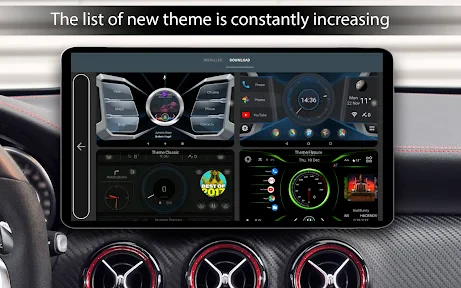
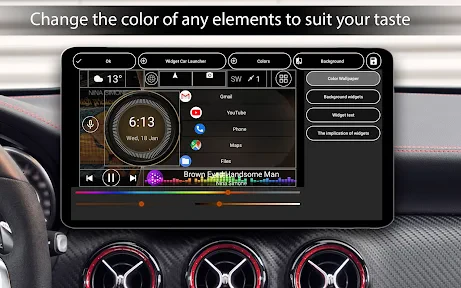
The app offers significant customization to fit different car interiors and user preferences. You can change themes, widget sizes and positions, icon packs, and layout grids. It allows you to assign specific applications to quick-launch buttons and configure what information is displayed on the home screen, such as speed, time, or media info. This flexibility lets you create a personalized dashboard that shows only the data you need while driving.
Does Car Launcher require special permissions or OBD2 hardware?
Car Launcher requires standard Android permissions for its core functions, such as storage (for wallpapers), phone (for calls), and location (for navigation widgets). For displaying advanced car diagnostics like engine RPM, coolant temperature, and fault codes, the app needs to connect to an external OBD2 adapter (hardware dongle) via Bluetooth or WiFi. This OBD2 adapter is not included and must be purchased separately, then paired with your Android device for those specific features to work.
App Info
Technical Info
Recommended For You

Virtual Hair Style Changer
Beauty

Discord - Talk, Play, Hang Out
Communication

TeamSpeak 3 - Voice Chat
Communication

Microsoft Designer
Art & Design

Instawork: Be your own boss
Business

Hush: Android Auto Audio Fix
Auto & Vehicles

Driver Pulse by Tenstreet
Business

ReadEra Premium – ebook reader
Books & Reference
Watch Sync App - BT Notifier
Communication

My crochet designer
Art & Design

AutoZone Auto Parts & Repair
Auto & Vehicles

مانجا بلاير - Manga Player
Comics

TCA Plus (TCA 2024)
Books & Reference

Google Voice
Communication

Scentbird Monthly Perfume Box
Beauty

Webex
Business

Hicut:Face Swap AI Video App
Art & Design

Shopify Point of Sale (POS)
Business

Pi Browser
Communication

Ficbook: Read Fictions Anytime
Comics