
BimmerCode for BMW and MINI
Screenshots

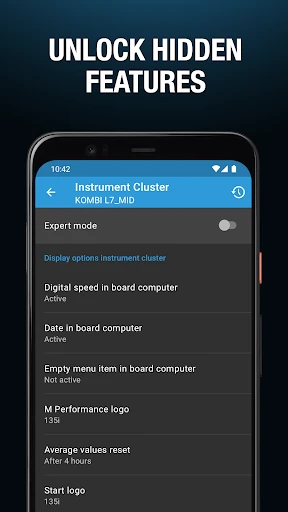


Description
About BimmerCode for BMW and MINI Feature
BimmerCode is a specialized mobile application designed to empower owners of BMW and MINI vehicles by enabling deep customization of their car's electronic control units. It serves as a bridge between the user and the vehicle's hidden settings, allowing for personalization and feature activation that go far beyond the standard dealership options. By connecting a compatible OBD2 adapter to the car's diagnostic port and linking it to the app via Bluetooth or Wi-Fi, users can safely modify various coding parameters. The app supports a wide range of models, making advanced vehicle customization accessible to enthusiasts who wish to tailor their driving experience without requiring expert-level programming knowledge.
Chapter 1: Function
BimmerCode's core function is to provide a user-friendly interface for coding and personalizing BMW and MINI vehicles. The app connects to the car via an OBD2 adapter, allowing it to read and modify the code within various electronic control modules. Key functional areas include customizing lighting behaviors such as turning off welcome lights or enabling rear daytime running lights, adjusting comfort features like auto-start-stop memory or mirror folding on lock, and personalizing multimedia settings. It also allows for instrument cluster modifications, such as changing the startup animation or enabling additional display information. The app categorizes options by vehicle modules, clearly indicating the level of coding expertise required and the potential risks, ensuring users can make informed changes. It essentially unlocks a menu of factory-level adjustments that are not readily available through the standard iDrive system.
Chapter 2: Value
The primary value proposition of BimmerCode lies in democratizing vehicle customization, putting control back into the hands of the owner. Its key advantage is providing a safe, structured, and relatively simple platform for accessing and modifying deep-seated vehicle settings that were previously the domain of professional coders or dealerships. This empowers users to personalize their car to their exact preferences, enhancing the ownership experience and making the vehicle feel truly unique. Compared to generic OBD2 scanners, BimmerCode offers model-specific coding options with detailed descriptions and safety warnings, significantly reducing the risk of causing errors. The app's value is further amplified by its regular updates that add support for new models and features, ensuring long-term utility. For enthusiasts, it eliminates the need for costly aftermarket hardware for some features, as many desired functions are already built into the car's software, just disabled. It transforms the vehicle from a mass-produced item into a personalized tool, increasing user satisfaction and engagement with their car's technology. The app strikes an excellent balance between powerful functionality and user-accessible design.
Chapter 3: Scenarios
BimmerCode primarily targets BMW and MINI owners who are tech-savvy enthusiasts, DIYers, and individuals dissatisfied with their vehicle's default factory settings. A key user group includes owners who wish to disable the auto-start-stop function permanently for a smoother driving experience. It is also invaluable for those wanting to enable practical features like video-in-motion playback for passengers, or to code their North American vehicle for European-style amber rear turn signals. Everyday use cases range from simple personalization, such as changing the ambient lighting color options or adding a digital speedometer to the cluster, to more functional adjustments like enabling full-screen Apple CarPlay or memorizing the last driving mode. The app is frequently used by owners of newer models to unlock features that are software-locked by the manufacturer, as well as by owners of older models to modernize certain aspects of their vehicle's behavior. It serves as an essential tool in enthusiast communities for preparing cars for meets or simply tailoring the daily driving experience to be more comfortable, convenient, and aligned with personal taste.
Uninstall Instructions
For step-by-step guidance on how to safely remove this application from your device, please refer to our 《Uninstall Instructions》 document.
Pros
- enables deep customization of hidden vehicle features
- user-friendly interface with clear coding categories
- supports a wide range of BMW and MINI models/years
- works with affordable generic OBD2 adapters
- allows one-touch backup of original vehicle coding
Cons
- requires a compatible OBD2 adapter for functionality
- complex coding options may overwhelm novice users
- premium features locked behind in-app purchases
- coding changes may void factory warranty coverage
- real-time coding requires a stable Bluetooth connection
Frequently Asked Questions
What is BimmerCode and what can it do?
BimmerCode is a specialized diagnostic and coding app for BMW and MINI vehicles. Its core function is to enable users to customize various factory settings in their cars, known as coding. This allows you to activate hidden features, personalize vehicle behavior, and modify default settings that are not accessible through the standard iDrive menu, all via a compatible OBD2 adapter.
What equipment do I need to use BimmerCode?
To use BimmerCode, you need the app installed on your iOS or Android device and a compatible Bluetooth or Wi-Fi OBD2 adapter that supports your specific car model. The app itself is a one-time purchase, but the adapter is sold separately. You must connect this adapter to your vehicle's OBD2 port, typically located under the dashboard.
Is BimmerCode safe for my vehicle's warranty?
Coding changes made with BimmerCode are generally reversible, and you can restore original settings. However, modifying electronic control units (ECUs) could potentially void your vehicle's warranty if a problem is directly linked to a coding change. It is recommended to consult your dealership's policy and always create a backup of your original coding before making modifications.
What are some common features I can code with this app?
Common codable features include enabling video-in-motion, changing ambient light colors, disabling start-stop function, adjusting angel eye brightness, customizing welcome lights, enabling enhanced Bluetooth features, and personalizing instrument cluster displays. Available options depend heavily on your specific vehicle model, year, and equipment.
How do I restore my car's original factory coding?
BimmerCode provides a straightforward restoration process. Before any coding session, the app automatically creates a backup of the relevant control unit's original data. You can revert to these saved original settings at any time within the app by selecting the 'Restore' function for the specific module you modified, ensuring you can undo changes if needed.
App Info
Technical Info
Recommended For You

Talk & Translate - Translator
Books & Reference

2nd Phone Number - Call & Text
Communication

Ink AI – Tattoo design maker
Art & Design

AutoScout24: Buy & sell cars
Auto & Vehicles

MM-Calendar
Books & Reference

Moon+ Reader Pro
Books & Reference

Phone Call App & WiFi Call Any
Communication

JOB TODAY: Hire & Find Jobs
Business

Plus Messenger
Communication

Cover Hunter - 3v3 Team Battle
Comics

English-Myanmar Dictionary
Books & Reference

Cheogram (Jabber, Call, Text)
Communication

AutoTempest - Car search
Auto & Vehicles

Mirror - Fullscreen Mirror App
Beauty

Avast SecureLine VPN & Privacy
Communication

Samsung Internet Browser
Communication

Barnes & Noble NOOK
Books & Reference

Perfect Viewer Donation
Comics

AutoZone Auto Parts & Repair
Auto & Vehicles

Stickman: draw animation maker
Art & Design