
Messages - Text SMS App
Screenshots

Description
About Messages - Text SMS App Features
Messages is the default text messaging application pre-installed on most Android devices, designed to handle SMS and MMS communication. It serves as a central hub for personal and group conversations, integrating seamlessly with the mobile carrier's standard messaging services. While its core function revolves around sending and receiving texts, pictures, and videos, modern iterations often incorporate enhanced features like Rich Communication Services (RCS) where supported, providing a more interactive chat experience similar to popular instant messaging platforms. The app prioritizes simplicity and reliability, offering a clean, intuitive interface that makes staying connected through traditional cellular messaging straightforward and efficient for users of all technical levels.
Chapter 1: Function
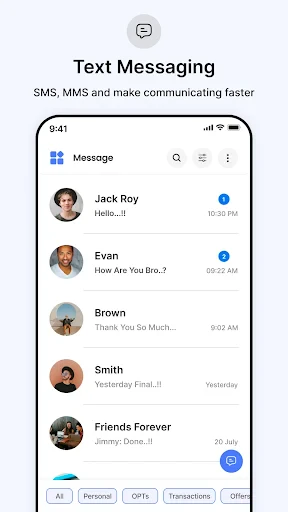
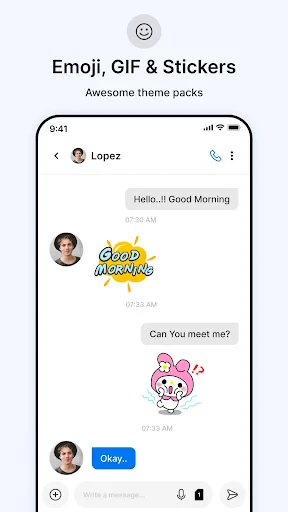
The Messages app's primary function is to facilitate text-based communication via SMS (Short Message Service) and MMS (Multimedia Messaging Service). It allows users to send and receive individual or group messages containing text, emojis, photos, videos, audio files, and contact cards. The app organizes conversations into a clear chronological thread, enabling users to easily follow dialogue history. Core functionalities include message drafting, editing, sending, and deleting, as well as managing contacts directly from within the chat interface. It supports delivery reports, read receipts (when using RCS), and typing indicators. Furthermore, the app provides essential tools for conversation management, such as archiving old threads, blocking unwanted numbers, setting up automated spam protection, and pinning important conversations for quick access. It also handles critical system messages, like verification codes for two-factor authentication, with clarity and security.
Chapter 2: Value
The value of the Messages app lies in its universality, reliability, and deepening feature set. As a default application, it requires no additional downloads for basic use and works on any mobile device with cellular service, ensuring communication even without internet access—a crucial advantage over internet-dependent messengers in areas with poor data connectivity. Its integration with the Android ecosystem and carrier networks guarantees high reliability for critical communications. A key value proposition is its adoption of the RCS protocol, which, where available, upgrades traditional texting to include features like high-resolution media sharing, read receipts, Wi-Fi messaging, and enhanced group chats, bridging the gap between SMS and modern IP-based messaging without forcing users to switch apps. The app's design emphasizes user privacy and control, with robust spam detection powered by Google and clear options for blocking contacts. Its clean, ad-free interface minimizes distractions, focusing purely on communication. For users invested in the Google ecosystem, it offers convenient integration with features like Google Assistant for smart replies and suggested actions, and the ability to message from a linked computer via Messages for Web. This combination of widespread accessibility, evolving advanced features, and a commitment to a clean, secure user experience solidifies its value as an essential communication tool.
Chapter 3: Scenarios
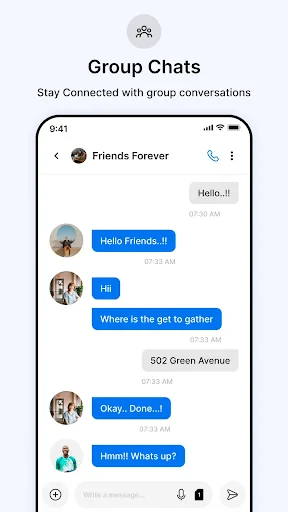
The Messages app is indispensable for a broad spectrum of users, primarily targeting anyone with an Android smartphone who needs reliable, standard cellular-based communication. Key user groups include individuals in regions with unstable or expensive mobile data, for whom SMS remains the most dependable and cost-effective way to stay in touch. It is also vital for professionals and everyday users who receive important automated alerts, appointment reminders, bank transaction notifications, and especially one-time passwords for two-factor authentication, where delivery certainty is paramount. In everyday use, a parent might use it to quickly coordinate pick-up times with family members in a group chat, sharing a photo of the meeting spot via MMS. A traveler with limited internet access can rely on SMS to confirm hotel bookings or communicate locally. Friends planning an outing can use an RCS-enabled group chat to share live reactions and high-quality videos of potential venues. Furthermore, individuals managing appointments or service calls appreciate the ability to easily text businesses and receive confirmations directly in their organized message threads. Essentially, the Messages app serves as the foundational, always-available communication channel for both critical informational exchanges and casual personal conversations.
Uninstall Instructions
For step-by-step guidance on how to safely remove this application from your device, please refer to our 《Uninstall Instructions》 document.
Pros
- automatically categorizes messages into personal
- transactions
- and promotions
- one-tap copy for OTPs and tracking numbers from notifications
- search function includes text within images from messages
- scheduled sms sending and reminders directly from the app
- blocks spam without needing phone number permissions
Cons
- message backup requires manual export as a file
- no built-in call function or dialer integration
- rich text formatting not supported in message composer
- group messaging lacks advanced management like naming
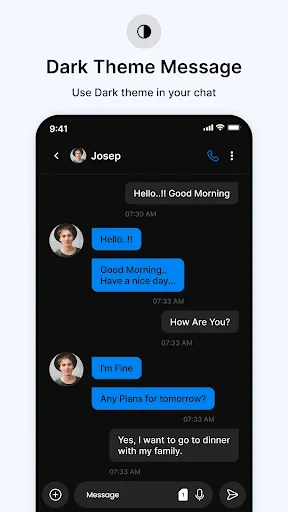
- customization limited to themes
- no font changes
Frequently Asked Questions
What is the core function of Messages - Text SMS App?
Messages is a default SMS/MMS messaging application pre-installed on many Android devices. Its core function is to send and receive traditional text messages and multimedia messages using your cellular carrier's network. It serves as a central hub for SMS-based communication, supporting group chats, message scheduling, and basic organization features like archiving. It does not rely on internet-based messaging protocols like many third-party apps.
Is this app free to use, and are there in-app purchases?
The Messages app is typically free and pre-installed on supported Android devices. There are no in-app purchases or subscription fees for the core messaging functionality. However, standard carrier rates for SMS and MMS may apply based on your mobile plan. Some device manufacturers or carriers may include optional, value-added services, but the fundamental app does not require payment.
What devices and systems is the Messages app compatible with?
Messages is designed for Android devices. Its availability and specific version are dependent on the device manufacturer and the Android OS version. It is commonly found on phones from Google, Samsung, Motorola, and others. It is not natively available on iOS or desktop operating systems, though some integration may be possible via manufacturer-specific companion software or Google's web-based services for certain devices.
How does this SMS app differ from internet-based messengers?
Unlike WhatsApp or Messenger, Messages uses your phone number and cellular network for SMS/MMS, not an internet data connection. This allows communication with any mobile number, regardless of the recipient's app choices. Key features often include RCS (Rich Communication Services) for enhanced chat over data where supported, spam protection, and seamless integration with your device's contact list. It lacks cross-platform group features inherent to internet-only apps.
Can I recover deleted text messages within this app?
The Messages app itself does not have a built-in 'undo' function for deleted texts. Once a message thread is deleted from the app's main interface, it is typically removed from the device. Recovery is not guaranteed and may depend on whether you have prior backups enabled (e.g., via Google Drive or your device manufacturer's backup solution). For data recovery, you would need to restore from such a backup, not through the app directly.
App Info
Technical Info
Recommended For You

ESV Bible
Books & Reference

Dashtoon: Comics & Manga
Comics

القرآن الكريم كامل بدون انترنت
Books & Reference

BlueDriver OBD2 Scan Tool
Auto & Vehicles

Roadie Driver
Business

MTS Urent
Auto & Vehicles

Yolla: International Calling
Communication

مانجا بلاير - Manga Player
Comics
CL Theme Card
Auto & Vehicles

Blue Yonder Workforce
Business

ヘア&ビューティーサロン検索/ホットペッパービューティー
Beauty

Cartoon Photo Editor ・Toon AI
Art & Design

PixAI: AI Anime Art Generator
Art & Design

imo video calls and chat HD
Communication

Gocrypto: Crypto Trading
Business

Fragrantica Perfumes
Beauty

Job Hai - Search Job, Vacancy
Business

Hiya: Spam Blocker & Caller ID
Communication

FantacyStory: novels, fictions
Books & Reference

OBDeleven VAG car diagnostics
Auto & Vehicles