
Arch - AI Home Design
Screenshots



Description
About Arch - AI Home Design Features
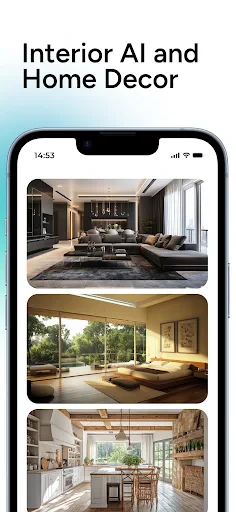
Arch - AI Home Design is an innovative mobile application that leverages artificial intelligence to revolutionize interior and exterior home design. It empowers users, from homeowners to design enthusiasts, to visualize, plan, and execute design projects with professional-grade tools in a simple, intuitive interface. By transforming ideas into realistic 3D models and renderings instantly, the app bridges the gap between inspiration and reality, making sophisticated design accessible to everyone.
Chapter 1: Function
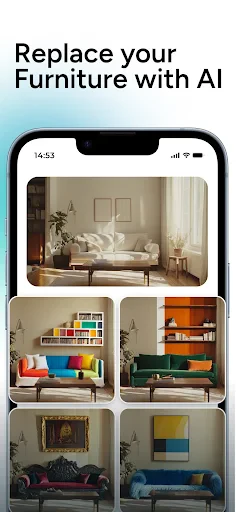
Arch - AI Home Design operates as a comprehensive virtual design assistant. Its core functionality centers on AI-powered space analysis and automated design generation. Users begin by uploading a photo of their room or specifying room dimensions. The app's AI then recognizes architectural elements like walls, windows, and doors. The primary function allows users to apply various design styles—from modern minimalist to rustic farmhouse—with a single tap, instantly redecorating the space in the app. Furthermore, it features a robust 3D modeling engine where users can manually adjust layouts, choose from a vast catalog of real furniture and decor items, and experiment with different color palettes and materials. The app also generates high-quality, photorealistic 3D renderings and panoramic views, providing a clear vision of the final design. Additional tools include AR viewing to place virtual furniture in real space via the camera, and detailed project management for budgeting and sourcing.
Chapter 2: Value
The value proposition of Arch - AI Home Design lies in its democratization of professional design tools through AI efficiency and user-centric innovation. Its foremost advantage is immense time and cost savings; it eliminates the need for expensive, time-consuming consultations in the early ideation phase, allowing for unlimited experimentation risk-free. The AI acts as an instant creative partner, offering intelligent suggestions for layout optimization and style cohesion that educate and inspire users. The app's extensive, ever-updated library of branded furniture and materials provides practical value, linking visualization directly to purchasable products. For professionals, it serves as a powerful client presentation tool, enabling rapid prototyping and clear communication. The high accuracy of its renderings builds confidence in design decisions, reducing costly mistakes. Unlike standard CAD software, its intuitive, gesture-based controls require no technical training, lowering the barrier to entry. The integration of AR for real-world previews adds tangible value by enhancing decision-making. Ultimately, the app delivers significant emotional value by empowering users to confidently create beautiful, personalized spaces, turning the often-overwhelming process of home design into an engaging, creative, and satisfying journey.
Chapter 3: Scenarios
Arch - AI Home Design primarily targets homeowners and renters looking to renovate, redecorate, or furnish their living spaces. It is ideal for individuals or families planning a move, allowing them to pre-plan furniture placement and design for a new home. DIY enthusiasts and interior design hobbyists form another core group, using the app as a creative outlet to experiment with styles and develop their design skills. Real estate agents and property stagers utilize the app to virtually stage empty properties, enhancing listing presentations to attract potential buyers or tenants. Additionally, small business owners, such as cafe or boutique shop proprietors, can leverage it to design commercial interiors on a budget. In everyday use, a user might employ the app to solve a specific dilemma—like visualizing a new sofa in their living room via AR before purchasing. Another common scenario is planning a full kitchen remodel, where the user tests different cabinet colors and countertop materials in the 3D model. During a renovation, contractors and clients can use shared project files from the app to align visions and track selections, ensuring a smooth execution from concept to completion.
Uninstall Instructions
For step-by-step guidance on how to safely remove this application from your device, please refer to our 《Uninstall Instructions》 document.
Pros
- generates complete home floor plans from text prompts
- offers real-time 3D walkthroughs of AI-designed spaces
- integrates furniture from real brands for direct purchasing
- allows style fusion (e.g.
- 'mid-century modern with rustic')
- one-click redesign function for rapid style iteration
Cons
- requires precise text descriptions for optimal results
- high-fidelity renders limited to pro subscription tier
- furniture catalog primarily features premium brands
- complex renovations need manual parameter adjustment
- no direct integration with architectural CAD software
Frequently Asked Questions
What is Arch - AI Home Design and what does it do?
Arch - AI Home Design is an interior design application that uses artificial intelligence to help users visualize and plan home decor and renovations. Its core function is to generate realistic interior design concepts from photos of a room. Users can experiment with different styles, furniture layouts, and color schemes. The app positions itself as a tool for homeowners, renters, and DIY enthusiasts to preview design ideas before making physical changes.
Is Arch - AI Home Design free to use, or does it have in-app purchases?
Arch - AI Home Design typically operates on a freemium model. The app can be downloaded for free, offering basic AI design generations and a limited library of furniture. Access to advanced features, such as high-resolution exports, a full furniture catalog, or unlimited AI renders, usually requires a subscription or one-time in-app purchase. No additional physical equipment is needed beyond a compatible smartphone.
What devices and systems is the Arch - AI Home Design app compatible with?
Arch - AI Home Design is primarily designed for mobile devices. It is available for both iOS and Android operating systems. For an optimal experience, a device with a relatively recent OS version, a good-quality camera for uploading room photos, and sufficient processing power is recommended. The app is tailored for individual consumers rather than professional architectural CAD work.
How accurate and realistic are the AI-generated design suggestions?
The AI-generated designs provide a conceptual visualization based on the uploaded photo and selected parameters. While the renders can be highly realistic in style, they are approximations and may not reflect exact dimensions, lighting physics, or the precise availability of suggested items. It is a tool for inspiration and rough planning, not a precise technical blueprint. Users should verify measurements and product details separately.
What should I do if the AI misinterprets my room photo or produces poor results?
For best results, ensure your photo is well-lit, taken from a corner to show walls, and uncluttered. The app usually includes editing tools to manually adjust room boundaries or remove unwanted objects before processing. If issues persist, check the app's help center for tips or contact the developer's support through the app's settings. There is no information on in-person or phone-based technical support.
App Info
Technical Info
Recommended For You

Opera: Private Web Browser
Communication

Rebtel: Recharges And Calls
Communication

Yaelokre OC Maker
Art & Design

Member Tools
Books & Reference

Textra SMS
Communication

AI Clothes Try-On: DressTry
Beauty

pixivコミック - みんなのマンガアプリ
Comics

Indeed Job Search
Business

Bible For Women-Holy Bible App
Books & Reference

Whoscall - Caller ID & Block
Communication

Homebase: Employee Scheduling
Business

MySubaru
Auto & Vehicles

StyleKorean
Beauty

Simple Drawing - Sketchbook
Art & Design

Adobe Capture: Illustrator,Ps
Art & Design

LinkedIn: Jobs & Business News
Business

Vector Ink: SVG, Illustrator
Art & Design

Pi Browser
Communication

Talk & Translate - Translator
Books & Reference

CaptionCall
Communication