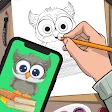
AR Drawing: Art, Trace, Sketch
Screenshots
Description
About AR Drawing: Art, Trace, Sketch Feature
AR Drawing: Art, Trace, Sketch is an innovative mobile application that revolutionizes the traditional drawing process by leveraging augmented reality technology. It serves as a digital bridge between inspiration and creation, allowing users to trace real-world images or references directly onto their physical drawing surface through their device's camera. The app is designed for a wide range of users, from absolute beginners seeking guidance to seasoned artists looking for efficient project sketching methods. By projecting a virtual image overlay onto paper or canvas, it simplifies complex drawing tasks, making art creation more accessible, accurate, and enjoyable. This tool transforms any space into a personal art studio where imagination can be precisely captured with ease.
Chapter 1: Function
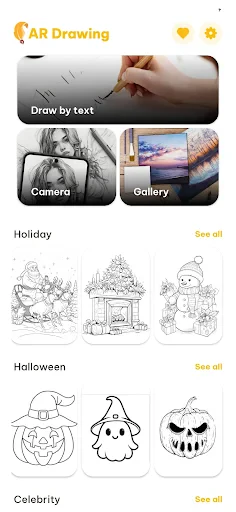
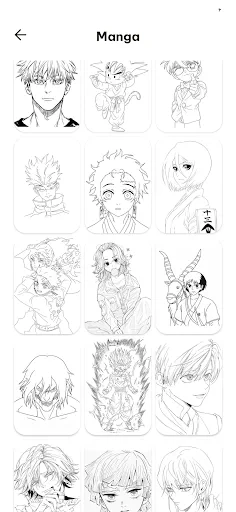
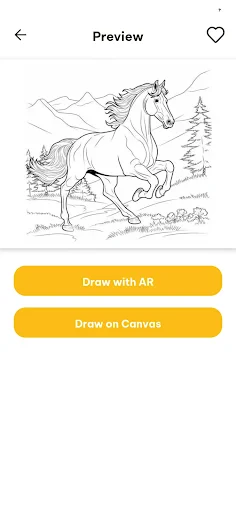
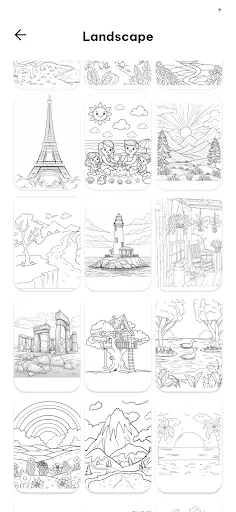
The core functionality of AR Drawing centers on its augmented reality tracing feature. Users begin by selecting or capturing a reference image from their gallery or camera. The app then utilizes the smartphone's display and camera to superimpose this image as a semi-transparent guide onto the live view of their drawing paper. By adjusting parameters like opacity, size, and orientation, artists can perfectly align the virtual projection with their physical canvas. The app provides essential drawing aids such as grid lines and stabilization tools to assist with line control. Furthermore, it includes a library of pre-made sketches and templates for practice, along with basic editing tools to prepare reference images. The primary function remains to act as a real-time, interactive tracing guide, effectively demystifying the initial sketch phase of any artwork.
Chapter 2: Value
The primary value proposition of AR Drawing lies in its democratization of artistic skill development and its significant reduction of the initial friction in creating art. For beginners, the app offers an unparalleled advantage by breaking down the intimidating barrier of starting from a blank page. It builds muscle memory and hand-eye coordination by allowing users to trace complex forms, thereby accelerating the learning curve for proportions, shapes, and outlines. This immediate success fosters confidence and encourages continued practice. For experienced artists and professionals, the app delivers immense practical value by saving time on the preliminary sketching stage for commissions, murals, or detailed illustrations, ensuring proportional accuracy without tedious manual measurements. Its key advantages include precision, portability, and a vast library of traceable content. Unlike static stencils or projectors, the AR overlay is fully adjustable and interactive. The app turns any environment into a viable workspace, eliminating the need for expensive light boxes or transfer paper. By merging digital convenience with tangible art creation, it enhances creativity rather than restricting it, allowing users to focus on shading, coloring, and personal style rather than being stalled by foundational sketches. It represents a cost-effective, powerful tool that supports artistic growth and professional efficiency.
Chapter 3: Scenarios
AR Drawing: Art, Trace, Sketch caters to a diverse spectrum of users across various everyday scenarios. The primary target group includes art enthusiasts and beginners who wish to learn drawing but feel hindered by a lack of foundational skills. They use the app for personal hobby projects, such as creating personalized greeting cards, sketching portraits from family photos, or practicing popular cartoon characters. Another significant user segment comprises students and educators in art classes, where the app serves as an effective teaching aid to demonstrate composition and form. Professional artists, illustrators, and crafters utilize the app for commercial scenarios, such as outlining designs for client tattoos, transferring large-scale murals onto walls, planning canvas paintings, or sketching patterns for DIY crafts and home decor. Parents find it valuable for engaging children in creative, screen-time activities that result in physical artwork. Common use cases also involve party planning, where users trace decorations or signs, and personal gift creation, adding a handmade touch. Essentially, any scenario requiring an accurate transfer of an image onto a physical medium—be it for learning, professional work, or casual creativity—is an ideal situation for this application.
Uninstall Instructions
For step-by-step guidance on how to safely remove this application from your device, please refer to our 《Uninstall Instructions》 document.
Pros
- projects complex reference images directly onto paper for tracing
- eliminates the need for a physical lightbox or transfer paper
- offers a vast library of traceable templates and line art
- allows adjustable opacity and locking for the AR guide
- serves as a portable
- all-in-one drawing aid tool
Cons
- requires a stable phone mount for hands-free tracing
- dependent on consistent lighting for clear AR projection
- premium template library requires a subscription
- battery drain from prolonged camera and screen use
- limited value for artists seeking freehand practice
Frequently Asked Questions
What is AR Drawing and what does it do?
AR Drawing: Art, Trace, Sketch is a creative utility app that helps users learn to draw. Its core function is to use augmented reality (AR) to project a reference image onto your physical paper, allowing you to trace over it. It positions itself as a tool for beginners and hobbyists to easily create sketches and artwork by following guided lines.
Is AR Drawing free to use or are there in-app purchases?
The app is free to download and use with basic functionality. It typically includes optional in-app purchases, such as subscriptions or one-time payments, to unlock premium features like a larger image library, advanced tracing tools, or removal of advertisements. No additional physical equipment is required beyond a compatible smartphone or tablet.
What devices and systems are compatible with AR Drawing?
AR Drawing requires a device with a camera and AR capabilities. It is primarily available for iOS and Android systems. Specific compatibility depends on the device's support for ARCore (Android) or ARKit (iOS). Generally, newer smartphone and tablet models from the last 3-4 years are supported. It is adapted for right-handed and left-handed users.
How does the AR tracing feature work?
The AR tracing feature uses your device's camera. You select an image from the app's gallery or your phone, then the app superimposes it as a semi-transparent overlay onto the live camera view of your drawing surface. You align your paper within the on-screen guide and physically trace the projected lines with your pencil or pen.
Can I save and export my drawings from the app?
Yes, you can save your drawings to your device's photo gallery. The app typically allows you to export your completed sketches as image files (like JPEG or PNG). Some versions may offer direct sharing to social media platforms. Saved work is stored locally on your device, and the app does not automatically back it up to cloud services unless you configure it separately.
App Info
Technical Info
Recommended For You

Keys simulator and cars sounds
Auto & Vehicles

Housecall Pro
Business

QuickBooks Online Accounting
Business

Taximeter
Auto & Vehicles

Books - Read and Download
Books & Reference

Fashion Design Sketches Book
Art & Design

Perfect Viewer
Comics

MySpot Driver
Auto & Vehicles

Boost Mobile
Communication

Vector Ink: SVG, Illustrator
Art & Design

Face scan - How old do I look
Beauty

Everand: Ebooks and audiobooks
Books & Reference

Pratilipi Comics
Comics

Mahjong Dots Elimination
Comics

Hiya: Spam Blocker & Caller ID
Communication

Sunoco: Pay fast & save
Auto & Vehicles

CVTz50
Auto & Vehicles

Universalis
Books & Reference

RepairSolutions2
Auto & Vehicles

Meeting - Video Conference
Business