
MM-Calendar
Screenshots
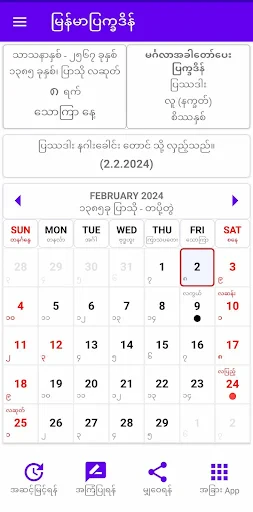


Description
About MM-Calendar Feature - A Modern Digital Calendar for Efficient Life Management
MM-Calendar is an intelligent mobile calendar application that integrates traditional date tracking with modern task management and personalized planning. It moves beyond basic date display by offering a comprehensive suite of tools designed to organize schedules, set reminders, manage goals, and synchronize events across platforms. The app provides a clean, visually appealing interface that allows users to view their time in daily, weekly, monthly, or agenda formats. It emphasizes intuitive operation and seamless integration with other productivity tools, positioning itself as a central hub for personal and professional time management. By combining reliability with advanced features, MM-Calendar aims to transform how individuals plan and perceive their time, making scheduling a more strategic and less burdensome activity.
Chapter 1: Function
MM-Calendar's core functionality revolves around robust schedule management and visual time planning. The app allows users to create and manage events with detailed attributes including title, time, location, participants, and recurring patterns. A central feature is its multi-view display system, offering daily, weekly, monthly, and list-based agenda overviews for flexible planning. Integrated task management enables users to create to-do lists, set deadlines, and link tasks directly to calendar entries. The app supports customizable alerts and notifications through multiple channels like push notifications and email to ensure no important commitment is missed. Furthermore, it includes calendar subscription capabilities, permitting users to follow public holidays, sports schedules, or shared family calendars. Data synchronization is a key function, enabling seamless updates across a user's devices and allowing for potential integration with other calendar services and productivity platforms to maintain a unified schedule.
Chapter 2: Value
The primary value proposition of MM-Calendar lies in its ability to consolidate disparate planning activities into a single, coherent, and intelligent system. Its key advantage is the significant reduction in cognitive load and administrative overhead associated with managing multiple commitments. By providing a unified view of events, tasks, and goals, the app prevents double-booking and helps users identify time conflicts or opportunities for focused work blocks. The intelligent reminder system goes beyond simple alarms, offering configurable pre-event notifications and follow-ups, which is invaluable for professionals and busy individuals. Another major advantage is its cross-platform synchronization, which ensures accessibility and consistency whether on a phone, tablet, or computer, fostering reliable planning anywhere. The app adds value through customization; users can color-code event types, set personal goal trackers, and tailor views to match their unique workflow, making time management a more personal and engaging process. For teams and families, its sharing and subscription features facilitate coordination, making it easier to align schedules without constant communication. Ultimately, MM-Calendar transforms the calendar from a passive record of dates into an active planning partner, promoting proactive life management, reducing stress from missed appointments, and freeing up mental space for more creative and productive pursuits by handling the logistics of time.
Chapter 3: Scenarios
MM-Calendar is ideally suited for a wide range of user groups whose daily efficiency depends on meticulous time management. Busy professionals, including executives, project managers, and freelancers, form a core user base. They rely on the app to juggle client meetings, project deadlines, and business travel, utilizing its sharing features to coordinate with colleagues and assistants. Students and academics represent another primary group, using the app to track class schedules, assignment due dates, exam periods, and study sessions, benefiting greatly from the task integration and reminder functions. Families and parents find immense value in MM-Calendar for organizing household activities, children's school events, medical appointments, and extracurricular schedules, often using shared family calendars to keep all members informed. Furthermore, individuals dedicated to personal development, such as fitness enthusiasts, hobbyists, and those managing side projects, use the app to block time for workouts, learning, and creative work, ensuring consistent progress toward personal goals. In everyday use, a user might start the day by reviewing the daily agenda, receive a smart reminder 15 minutes before a video conference, quickly add a new task from a colleague's email directly into the app, and in the evening, plan the next day's priorities while checking the shared family calendar for weekend plans. This makes MM-Calendar an indispensable tool for anyone seeking to bring order, foresight, and control to their personal and professional timelines.
Uninstall Instructions
For step-by-step guidance on how to safely remove this application from your device, please refer to our 《Uninstall Instructions》 document.
Pros
- displays moon phases and zodiac signs on event entries
- generates personalized lunar cycle-based activity suggestions
- offers offline lunar calendar conversion and calculations
- integrates solar and lunar calendars in a single minimalist view
- provides agricultural and fishing advisories by location
Cons
- requires location access for accurate tide and advisory data
- lunar event notifications lack customization for time zones
- no team collaboration features for shared lunar scheduling
- advanced astronomical data requires in-app purchases
- minimalist design omits common holiday databases
Frequently Asked Questions
What is MM-Calendar and what does it do?
MM-Calendar is a productivity app focused on lunar and solar calendar tracking. Its core function is to display traditional lunar dates, zodiac signs, and moon phases alongside the standard Gregorian calendar. It positions itself as a tool for cultural reference, event planning, and personal scheduling based on lunar cycles. Basic usage involves viewing dual calendar dates and setting reminders for significant days.
Is MM-Calendar free to use, or does it have in-app purchases?
MM-Calendar is a free-to-download application. It may offer optional in-app purchases for advanced features such as personalized astrology insights, ad-free experience, or exclusive calendar themes. The core calendar viewing functionality remains accessible without payment. No additional physical equipment is required, and basic permissions like notifications for reminders are needed.
On which devices and operating systems is MM-Calendar available?
MM-Calendar is primarily available as a mobile application. It is adapted for both iOS and Android operating systems. The app is designed for smartphones and tablets, ensuring compatibility with mainstream device models within supported OS versions. There is no information regarding a dedicated version for desktop computers or web browsers at this time.
How does the lunar calendar and festival reminder feature work?
The app automatically calculates and displays lunar dates corresponding to the solar calendar. It includes a database of traditional festivals, holidays, and auspicious days based on lunar calculations. Users can enable push notifications to receive reminders for upcoming events they mark or that are pre-loaded in the app's cultural database. This feature does not require manual date conversion.
Can I sync MM-Calendar with my other digital calendars?
MM-Calendar may offer calendar synchronization as a technical feature. It can potentially integrate with system calendars (like Google Calendar or Apple Calendar) to import or export events. The availability and method of this function depend on the specific version and device permissions. For detailed setup instructions and compatibility, please refer to the official support documentation within the app.
App Info
Technical Info
Recommended For You

CloudLibrary
Books & Reference

Christmas Photo Frames & Cards
Beauty

Meeting - Video Meeting
Communication

Pashto short stories پښتو قیصی
Comics

The Cepher
Books & Reference

Learn to Draw Cartoon
Comics

Zangi Private Messenger
Communication

AR Drawing: Sketch, Art, Paint
Art & Design

CreArt - AI Image Generator
Art & Design

Vector Ink: SVG, Illustrator
Art & Design

e.l.f. Cosmetics and Skincare
Beauty

DayComics
Comics

KeyConnect Digital Car Key
Auto & Vehicles

Staffmark WorkNOW
Business

Toomics - Read Premium Comics
Comics

Blue Yonder Workforce
Business

Tappytoon Manhwa & Novels
Comics

Webex Meetings
Business

Public Storage
Business

Sky Map
Books & Reference