
Google Ads
Screenshots
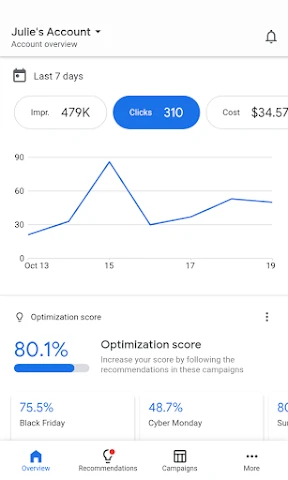


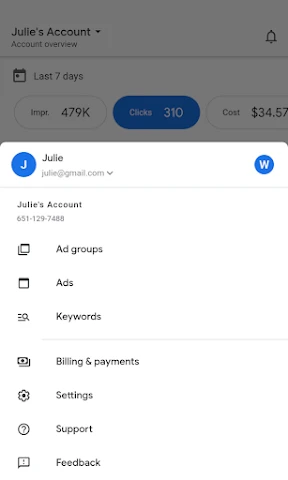
Description
About Google Ads App Feature – Overview
The Google Ads app is an official mobile application designed for advertisers and business owners to manage their Google Ads campaigns directly from their smartphones or tablets. It provides a streamlined, on-the-go interface for monitoring performance, making adjustments, and gaining insights into advertising efforts across Google's vast network, including Search, Display, YouTube, and more. The app empowers users to stay connected to their marketing investments anytime and anywhere, transforming complex advertising data into actionable, accessible information.
Chapter 1: Function
The Google Ads app delivers core campaign management functionalities in a mobile-optimized format. Users can monitor key performance metrics such as clicks, impressions, costs, and conversions in real-time through intuitive dashboards and charts. The app allows for direct campaign adjustments, including pausing or enabling campaigns and ad groups, updating budgets and bids, and reviewing ad strength. It provides alerts and notifications for significant account events, like campaign spending limits being reached or ad disapprovals. Furthermore, users can access performance suggestions and insights tailored by Google's AI, view detailed search term reports, and get a snapshot of how their ads are contributing to business goals such as calls, website visits, or sales.
Chapter 2: Value
The primary value proposition of the Google Ads app lies in its empowerment of advertisers through unparalleled convenience, real-time control, and intelligent insights. Its key advantage is the liberation of campaign management from the desktop, allowing business owners, marketers, and agencies to react instantly to performance trends and opportunities, thereby protecting their advertising investment and optimizing ROI dynamically. The app distills complex advertising data into clear, visual reports and actionable notifications, making sophisticated marketing accessible even to those with limited technical expertise. The integrated AI-powered recommendations and alerts serve as a virtual consultant, guiding users toward improvements in ad relevance, bid strategies, and keyword selection. This proactive guidance helps prevent wasted spend and enhances campaign effectiveness. By consolidating control over multiple campaigns in a single, secure mobile interface, the app saves significant time and operational overhead. It transforms idle moments into productive marketing sessions, ensuring that advertising strategies remain agile and responsive in a fast-paced digital landscape, ultimately driving more efficient growth and closer connection to campaign performance.
Chapter 3: Scenarios
The Google Ads app is ideally suited for small to medium business owners, digital marketing managers, freelancers, and agency professionals who need to oversee advertising activities outside of a traditional office setting. For a local cafe owner running search ads to attract lunchtime crowds, the app allows them to check daily performance, adjust the daily budget before a busy weekend, or pause ads if an item sells out. A marketing manager traveling for business can use the app to receive instant alerts on a high-performing campaign, approve budget increases, and review weekly reports during a commute. Freelancers managing multiple client accounts can swiftly switch between accounts to address urgent client inquiries or approve ad copy changes without needing a laptop. The app is also invaluable for entrepreneurs and solopreneurs who handle all aspects of their business, enabling them to maintain oversight of their crucial customer acquisition channel amidst a busy schedule, ensuring their ads are always live and performing optimally.
Uninstall Instructions
For step-by-step guidance on how to safely remove this application from your device, please refer to our 《Uninstall Instructions》 document.
Pros
- automated bidding uses real-time market signals
- seamless integration with youtube and google search
- granular audience targeting via google's user data
- performance max campaigns unify all google networks
- detailed conversion tracking ties to google analytics
Cons
- steep learning curve for non-google ecosystem users
- cost-per-click can be high in competitive sectors
- requires constant optimization for algorithm changes
- limited customer support for smaller ad budgets
- campaign setup complexity overwhelms beginners
Frequently Asked Questions
What is Google Ads and what is its primary function?
Google Ads is a digital advertising platform developed by Google. Its core function is to allow businesses to create and manage online ad campaigns that appear on Google's search results pages, partner websites, YouTube, and other platforms within the Google Display Network. It operates on a pay-per-click (PPC) model, helping advertisers reach potential customers based on keywords, interests, and demographics.
Is Google Ads free to use or does it require payment?
Google Ads operates on a pay-per-click (PPC) or cost-per-impression (CPM) model; it is not free to use. Advertisers set a budget and are charged when users interact with their ads (e.g., clicks or views). There is no upfront fee to create an account, but payment is required to fund the ad campaigns. The platform itself does not have a subscription cost—you only pay for the advertising you run.
What devices and systems does the Google Ads app support?
The Google Ads mobile app is available for both iOS and Android devices. It can be downloaded from the Apple App Store and Google Play Store. The app is designed for smartphones and tablets, allowing advertisers to monitor campaigns, check performance metrics, receive alerts, and make basic adjustments on the go. A stable internet connection is required for full functionality.
How does the keyword targeting feature work in Google Ads?
Keyword targeting allows advertisers to select specific words or phrases relevant to their products or services. When users search for these terms on Google, the ad may appear. Advertisers bid on keywords, and ad rank is determined by bid amount and quality score. This feature includes match types (broad, phrase, exact) to control how closely a search query must match the keyword to trigger the ad.
Can I get help or support if I encounter issues with my campaigns?
Yes, Google Ads provides several support channels. These include an in-app help center with articles and tutorials, community forums, and direct contact options like phone, email, or chat support, which may vary by region and account type. Support is available for billing, policy violations, and campaign optimization. Users can access help directly through the app's menu or the official Google Ads help website.
App Info
Technical Info
Recommended For You

BeenVerified Background Search
Communication

Learn how to draw - ArtWorkout
Art & Design

Smartsheet: Projects & Teams
Business

Scentbird Monthly Perfume Box
Beauty

BookTok- Read Good Novel
Books & Reference

Drawing Pad Pro - Sketchpad
Art & Design

StyleSeat: Book Hair & Beauty
Beauty

ibis Paint X
Art & Design

Fable: Books & TV
Books & Reference

Invitation Maker & Card Design
Art & Design

AutoZone Auto Parts & Repair
Auto & Vehicles

Magic Beauty Makeup Camera
Beauty

ThriftBooks: New & Used Books
Books & Reference

Comickey - AI Comic Maker
Comics

Adblock Browser: Fast & Secure
Communication

BuildCalc
Business

Yahoo Mail
Communication

Fonto - story font for IG
Art & Design

Pango Comics: cartoon for kids
Comics

Paint
Art & Design