
RoughAnimator - animation app
Screenshots
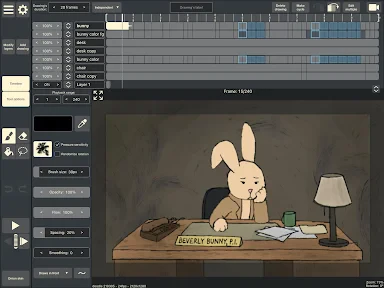


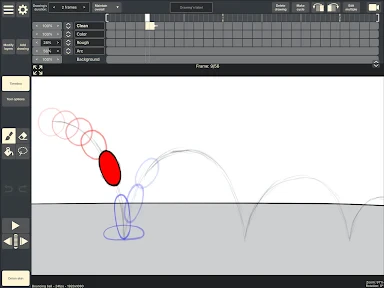
Description
About RoughAnimator Feature - A Desktop-Grade Animation Studio in Your Pocket
RoughAnimator is a powerful, intuitive 2D animation application designed for animators, illustrators, and content creators who seek professional-grade tools on a mobile or desktop platform. It bridges the gap between simple sketching apps and complex animation software, offering a robust set of features typically found in desktop studios within a streamlined, touch-friendly interface. Available on iOS, Android, and macOS, RoughAnimator empowers users to create traditional hand-drawn frame-by-frame animation, cut-out style animation, and storyboards directly on their devices. Its core philosophy centers on providing immediate, tactile control over the animation process, making it an ideal tool for both rapid prototyping and producing finished animated pieces. By focusing on the essential workflow of an animator—from sketching and timing to voice syncing and export—it delivers a focused and efficient creative environment.
Chapter 1: Function
RoughAnimator's functionality is built around a comprehensive, yet accessible, frame-by-frame animation workflow. At its heart is a traditional timeline with layers, allowing for precise control over each drawing. Users can create animations using onion skinning, which shows semi-transparent versions of previous and following frames as a guide. The app supports multiple brush types, customizable pressure sensitivity for stylus input, and color palettes. Key functional pillars include its versatile drawing tools, a flexible timeline for managing frames and layers, and advanced playback controls. It features audio import capabilities, enabling animators to sync their drawings to soundtracks or voice recordings frame-accurately. For efficiency, it offers tools like transform tools for scaling and rotating elements, copy-and-paste functions for frames, and the ability to create reusable symbols for cut-out animation. Finally, it provides robust export options in various formats including MP4, GIF, and image sequences, suitable for sharing on social media or importing into larger production pipelines.
Chapter 2: Value
The primary value of RoughAnimator lies in its exceptional balance of professional capability and approachable design. Unlike overly simplified apps, it offers features like unlimited layers, audio syncing, and a customizable brush engine, which are crucial for serious animation work. Conversely, it avoids the steep learning curve and clutter of high-end desktop software, presenting its tools in a logical, animator-centric workflow. This makes it a cost-effective and portable alternative to expensive software subscriptions. Its key advantages are multi-platform availability, allowing seamless work across phone, tablet, and computer; a one-time purchase model with no recurring fees; and a focus on direct, hands-on control that mimics the feel of drawing on paper. The app's performance is optimized for touch and Apple Pencil or stylus input, providing a responsive and natural drawing experience. For independent creators, students, and professionals on the go, RoughAnimator delivers tremendous value by removing technical and financial barriers to entry, enabling the creation of high-quality 2D animation anywhere, anytime. It transforms an iPad or Android tablet into a legitimate animation station, fostering creativity without compromise.
Chapter 3: Scenarios
RoughAnimator serves a diverse range of users across various creative scenarios. Its primary target groups include independent animators and freelance artists who need a portable, all-in-one solution for client projects, pitch videos, and personal shorts. It is equally valuable for students and educators in animation and illustration courses, providing an affordable tool for learning the principles of timing, squash and stretch, and walk cycles. Social media content creators and marketers use it to produce engaging, hand-drawn animated explainers, stickers, and promotional content quickly. Furthermore, storyboard artists in film, television, or game pre-production utilize RoughAnimator to create animatics by quickly sketching sequences and syncing them to dialogue. In everyday use, an animator might use it on a commute to sketch out a character cycle, a teacher might prepare a simple animated lesson diagram, or a designer might prototype an interface animation. It is ideal for brainstorming, where ideas can be immediately put into motion, and for finishing touches, where its export capabilities integrate the work into larger productions. Essentially, any scenario requiring expressive, frame-by-frame animation outside a fixed studio benefits from RoughAnimator's flexibility and power.
Uninstall Instructions
For step-by-step guidance on how to safely remove this application from your device, please refer to our 《Uninstall Instructions》 document.
Pros
- frame-by-frame animation with bitmap and vector layers
- onion skinning and audio scrubbing on a single timeline
- exports to multiple formats including GIF and video
- customizable brush engine for textured hand-drawn lines
- supports pressure-sensitive stylus input on tablets
Cons
- steep learning curve for traditional animation concepts
- no real-time vector tweening or automatic interpolation
- audio waveform display lacks detailed editing features
- limited text and shape toolset for graphic elements
- project management lacks advanced version control
Frequently Asked Questions
What is RoughAnimator and what can I do with it?
RoughAnimator is a professional-grade 2D hand-drawn animation application for mobile and desktop. Its core function is to provide a full-featured, frame-by-frame animation workspace. You can create traditional cartoons, motion graphics, or storyboards using drawing tools, onion skinning, audio syncing, and a timeline. It uniquely blends a tactile, rough-draft feel with professional export capabilities, positioning itself as a portable animation studio suitable for both beginners and experienced animators.
Is RoughAnimator free to use or does it have in-app purchases?
RoughAnimator is a paid app with a one-time purchase. There are no subscriptions or recurring fees. The initial download provides the full application with all core features. Please check your specific app store (iOS, Android, Mac, Windows) for the current price, as it may vary by platform. There are no in-app purchases to unlock essential tools, and the app does not contain advertisements.
What devices and operating systems does RoughAnimator support?
RoughAnimator is available on a wide range of devices. It supports iOS for iPad and iPhone, Android phones and tablets, macOS computers, and Windows PCs. This cross-platform availability allows users to start a project on one device and continue it on another. The app is optimized for use with finger drawing, stylus input (including Apple Pencil and compatible active pens), and even some graphics tablets on desktop versions.
How does RoughAnimator handle exporting and sharing animations?
RoughAnimator offers robust export options tailored for animators. You can export your projects as video files (MP4, MOV, GIF) or as image sequences (PNG, JPEG). Crucially, it also supports exporting the project file itself, which preserves all layers, frames, and audio for future editing. These files can be shared via standard device sharing menus, transferred to desktop software for further compositing, or directly uploaded to social media platforms.
Can I import audio and sync it to my animation frames?
Yes, RoughAnimator has dedicated audio features for synchronization. You can import audio files (like WAV or MP3) directly onto the timeline's audio layer. The timeline displays the waveform visually, allowing you to scrub through it and place keyframes accurately to match mouth movements or actions to the sound. This function is essential for creating lip-sync animation or timing motions to music and sound effects.
App Info
Technical Info
Recommended For You

Forex Trading for Beginners
Books & Reference

Card Maker for PKM (Poke Fan)
Comics

Gruveo - Video Conferencing
Communication

Job Hai - Search Job, Vacancy
Business

Pocket Toons
Comics

Chevron
Auto & Vehicles

Toomics - Read Premium Comics
Comics

FAB Adblocker Browser:Adblock
Communication

Flowt Wear
Auto & Vehicles

Numero: Travel eSIM & Numbers
Communication

VistaCreate: Graphic Design
Art & Design

Flowbird Parking
Auto & Vehicles

Glitter Beauty Coloring Pages
Art & Design

Zoom for Chromebook
Business

Whistle Express Car Wash
Auto & Vehicles

AI Drawing : Trace & Sketch
Art & Design

Al Quran Sharif for Muslim
Books & Reference

طاقچه؛ کتاب الکترونیکی و صوتی
Books & Reference

Mirror App - Makeup Mirror
Beauty

Books - Read and Download
Books & Reference