
PixShift: BackGround Changer
Screenshots

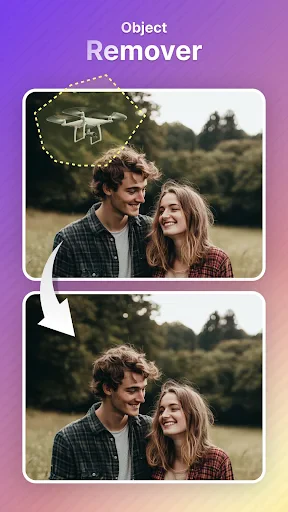
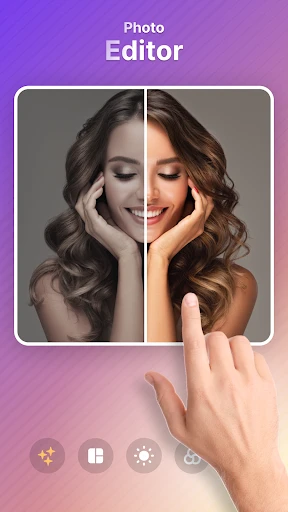

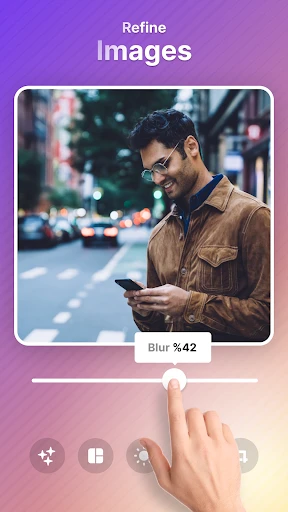
Description
About PixShift: BackGround Changer Feature
PixShift: BackGround Changer is a specialized mobile application designed for effortless and high-quality background editing in photographs. It leverages advanced artificial intelligence to empower users, from casual photo enthusiasts to content creators, to remove or replace backgrounds in images with remarkable precision and speed. The app stands out by transforming a traditionally complex task, often requiring desktop software expertise, into a simple, intuitive, and accessible process directly on a smartphone. By focusing on a single, powerful function, PixShift delivers a streamlined experience that prioritizes quality results and user convenience, making professional-grade photo manipulation available to everyone.
Chapter 1: Function
PixShift: BackGround Changer is built around one core function: intelligently separating the foreground subject from the background in any uploaded photo. The app utilizes sophisticated AI segmentation algorithms to automatically detect and outline people, objects, or pets with high accuracy. Once the subject is isolated, users can instantly remove the existing background to create a transparent PNG or replace it with a vast array of alternatives. These include solid colors, gradient fills, preset scenic images, or custom pictures from the user's own gallery. The editing process is highly automated, often requiring just a single tap to achieve a clean cutout. For finer control, the app provides manual refinement tools like brush and eraser to perfect the edges of the selection. The final edited image can then be saved in high resolution, shared directly to social platforms, or used in other creative projects.
Chapter 2: Value
The primary value of PixShift lies in its democratization of advanced photo editing, offering professional-level results through an exceptionally user-friendly interface. Its key advantage is the powerful and accurate AI engine, which drastically reduces the time and skill required for precise background removal compared to manual tools in conventional software. This efficiency is a significant productivity boost for users who need to edit multiple images. Furthermore, the app provides substantial creative freedom. With access to a rich library of templates, backgrounds, and editing tools, users can effortlessly create compelling visuals for diverse purposes, from crafting a perfect profile picture to designing marketing materials. The ability to create transparent PNGs is particularly valuable for e-commerce, graphic design, and content creation, allowing for seamless integration of products or subjects into various layouts. Unlike many all-in-one photo editors, PixShift's focused approach means it often performs its singular task faster and with better quality than the background editing modules within more complex applications. It delivers reliability, speed, and high-quality output, making it an indispensable tool for anyone regularly needing to alter image backgrounds without a desktop setup or steep learning curve.
Chapter 3: Scenarios
PixShift serves a wide range of target users across personal and professional contexts. Online sellers and small business owners form a core user group, utilizing the app to create clean, white-background product shots for their e-commerce listings or promotional content, which enhances product presentation and professionalism. Social media influencers and content creators frequently use it to generate eye-catching images for posts, stories, and advertisements, placing themselves or products in exotic or themed environments to increase engagement. Job seekers and professionals employ it to quickly edit portrait photos for resumes and professional networking profiles, ensuring a polished and consistent look. For everyday users, the app is perfect for personal photo fun, such as creating humorous composites for sharing with friends, improving vacation photos by replacing dull skies, or designing custom greeting cards and invitations. Students and educators may also find it useful for creating visually appealing presentations and project materials. Essentially, any individual or professional who needs to quickly isolate an object, remove distractions, or creatively alter a photo's context will find PixShift: BackGround Changer a practical and powerful solution for everyday visual tasks.
Uninstall Instructions
For step-by-step guidance on how to safely remove this application from your device, please refer to our 《Uninstall Instructions》 document.
Pros
- one-tap background replacement with ai precision
- preserves fine subject details like hair strands
- offers context-aware background suggestions
- local processing ensures no image upload delays
- batch processing for multiple photos simultaneously
Cons
- requires high-performance device for smooth operation
- limited creative controls compared to desktop editors
- free version watermarks high-resolution exports
- struggles with complex backgrounds like foliage
- no cloud sync for edits across devices
Frequently Asked Questions
What is PixShift and what does it do?
PixShift: BackGround Changer is a photo editing application focused on AI-powered background manipulation. Its core function is to allow users to remove or replace the background of any image automatically. You simply upload a photo, and the app uses AI to isolate the subject and generate a new background, which can be a solid color, a pattern, or a custom image from your gallery. It is designed for quick, one-touch edits without requiring professional skills.
Is PixShift free to use or does it have in-app purchases?
PixShift typically operates on a freemium model. The app can be downloaded for free, offering a limited number of background changes or basic features per day/week. For unlimited access, higher-resolution exports, advanced editing tools, or an ad-free experience, it requires a subscription or one-time in-app purchase. Specific pricing tiers and limits are detailed within the app's subscription settings.
What devices and systems is PixShift compatible with?
PixShift is primarily a mobile application available for both iOS and Android devices. It requires a relatively recent operating system version (e.g., iOS 14+ or Android 9+). The app is optimized for smartphones and may also be available on tablets. It does not require any additional external hardware. Performance is best on devices with sufficient RAM and processing power to handle AI image tasks efficiently.
How accurate is the AI background removal for complex subjects?
The AI handles common subjects like people, pets, and products with good accuracy, producing clean edges. However, with complex subjects featuring fine details (e.g., frizzy hair, translucent fabrics, or intricate edges), manual refinement may be needed for a perfect cutout. Results can vary based on original image quality and contrast between subject and background. The app may include tools like a brush to refine the selection area for challenging cases.
What happens to my photos after using the app?
According to the app's privacy policy, processed photos are typically stored temporarily on its servers to complete the AI task and are deleted shortly thereafter. The final edited image is saved only to your device's local gallery if you choose to export it. We recommend reviewing the app's official privacy policy for detailed data handling, retention practices, and whether any data is used for further AI model training. The app requires permissions to access your photo library.
App Info
Technical Info
Recommended For You

Enphase Enlighten
Business

GroupMe
Communication

RoughAnimator - animation app
Art & Design

English-Myanmar Dictionary
Books & Reference

Snapchat
Communication

GoTo
Business

Lyft Driver
Business

Power Apps
Business

Monster Job Search
Business

Superhero Flying speedster
Comics

XBrowser - Mini & Super fast
Communication

NovelBar-Your Reading Haven
Books & Reference
Animation Creator: Flipbook 2D
Art & Design

Video Call
Communication

Holafly eSIM Prepaid Card
Communication

Manobook - Los Besos de Jacob
Books & Reference

X Launcher Pro
Art & Design

Trace Drawing-Sketch and Paint
Art & Design

IPSY: Personalized Beauty
Beauty
AR Drawing : Trace Anything
Art & Design