
GroupMe
Screenshots

Description
About GroupMe Group Chat Feature
GroupMe is a versatile group messaging application developed by Microsoft, designed to simplify communication for various circles, from friends and family to colleagues and organizations. It operates seamlessly across iOS, Android, and web platforms, allowing users to stay connected regardless of their device. The app's core philosophy centers on creating dedicated spaces for different groups, enabling organized, persistent, and inclusive conversations. With its straightforward interface and robust feature set, GroupMe has established itself as a reliable tool for managing collective communication, blending the immediacy of chat with practical tools for coordination and sharing.
Chapter 1: Function
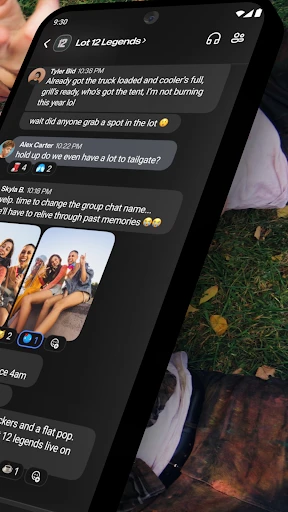
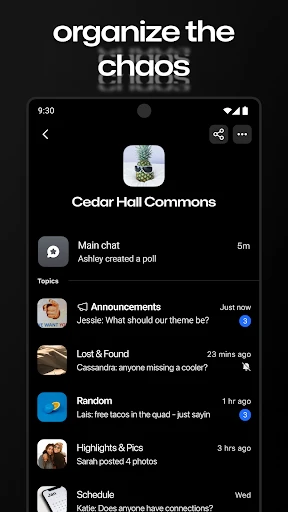
GroupMe's primary function is to facilitate effortless group messaging. Users can create groups, name them, and add participants via phone contacts or an invitation link. The chat interface supports text, photo, video, and document sharing. A standout feature is the ability to like individual messages with an emoji reaction for quick feedback. For event coordination, GroupMe includes a built-in calendar and poll creation tool, allowing members to vote on dates or options directly within the chat. It also offers direct messaging for private one-on-one conversations. Notably, the app provides SMS fallback, enabling members without smartphones or the app to participate in group conversations via standard text messaging, ensuring no one is left out of the discussion.
Chapter 2: Value
The value of GroupMe lies in its commitment to inclusive, low-friction, and organized group communication. Its key advantage is platform-agnostic accessibility; by bridging smartphone app users with SMS participants, it removes a significant barrier to entry, making it ideal for groups with diverse technical access, such as extended families or community organizations. Unlike many messaging apps tied to a single ecosystem, GroupMe works universally, fostering broader adoption. The integrated tools for polls and event planning consolidate functionality that often requires separate apps, keeping planning conversations actionable and within context. The persistent chat rooms ensure that history is always accessible, perfect for long-term projects or ongoing social circles. Furthermore, its association with Microsoft provides a layer of reliability and security, with data encryption in transit. The app is free, with no ads, offering a clean and focused user experience. This combination of accessibility, practical embedded tools, and a clutter-free environment positions GroupMe as a uniquely democratic and utilitarian choice in the crowded messaging landscape, prioritizing the group's cohesion over flashy individual features.
Chapter 3: Scenarios
GroupMe excels in scenarios centered around coordinated group activities. Its primary user groups include social circles like friends planning outings, trips, or regular gatherings, where the poll and calendar features are invaluable for decision-making. Families, especially those with members of varying tech-savviness, benefit from SMS integration, ensuring grandparents or relatives with basic phones remain included in important updates and daily chats. It is widely adopted by student organizations, study groups, and fraternities/sororities for organizing meetings, sharing notes, and coordinating events. In professional contexts, small project teams, volunteer committees, or hobbyist clubs use GroupMe as a lightweight, low-commitment alternative to formal workplace software for quick updates and file sharing. Everyday use cases range from coordinating a surprise party and sharing photos from a wedding to managing a neighborhood watch group or a recreational sports team's schedule. Essentially, any situation requiring clear, persistent, and inclusive communication among a defined set of people is an ideal scenario for GroupMe.
Uninstall Instructions
For step-by-step guidance on how to safely remove this application from your device, please refer to our 《Uninstall Instructions》 document.
Pros
- persistent group chats without requiring contacts
- broadcast messages to all members via group SMS
- dedicated group calendar for event coordination
- low-bandwidth friendly for areas with poor connectivity
- seamless cross-platform sync between web and mobile
Cons
- basic interface lacks modern messaging features
- file and media sharing capabilities are limited
- no end-to-end encryption for message privacy
- notification management can be cumbersome for large groups
- SMS fallback may incur carrier charges for users
Frequently Asked Questions
What is GroupMe and what does it do?
GroupMe is a free group messaging app. It allows users to create and participate in chat groups for various purposes, such as coordinating with friends, family, or coworkers. Its core positioning is simple, reliable group texting that works across different device types. Unique features include the ability to message via SMS without the app, a shared calendar for events, and integrated GIF and image sharing. It functions primarily as a persistent chat room for ongoing conversations.
Is GroupMe completely free to use?
Yes, the GroupMe app itself is free to download and use. There are no subscription fees or required in-app purchases for core messaging functionality. It generates revenue through optional features like custom emoji packs. Users should be aware of standard data charges from their mobile carrier when using the app over cellular data. No additional physical equipment is needed beyond a compatible smartphone, tablet, or computer with an internet connection.
What devices and systems does GroupMe support?
GroupMe has broad adaptation across platforms. It is available as a native app for iOS (iPhone/iPad) and Android devices. It also functions as a web application accessible through most desktop browsers (like Chrome, Safari, or Edge) at web.groupme.com. This cross-platform support ensures users on different operating systems can participate in the same groups seamlessly. The app is designed for general audiences, including casual users and organizational teams.
How does GroupMe handle privacy and notifications?
GroupMe allows group creators to set chats as public (findable via search) or private (invite-only). Members can mute specific group notifications, customize alerts, or leave a group at any time. For messaging via SMS, standard carrier rates may apply. The app requires permissions like contacts (to add people) and media access (to share photos). Users have control over their personal information visibility within the app settings, and no unrelated third-party advertising is displayed in chats.
Can I use GroupMe without a smartphone?
Yes. A smartphone is not strictly required. You can fully participate in GroupMe groups using the web browser version on a desktop or laptop computer. Furthermore, a key technical feature is SMS integration: members can choose to receive and send messages via standard text messaging without installing the app, though media and some features will be limited in this mode. This makes it accessible to users with basic mobile phones.
App Info
Technical Info
Recommended For You

Card Maker for PKM (Poke Fan)
Comics

Kelley Blue Book: We Know Cars
Auto & Vehicles

Watchgram for Telegram
Communication

СL Theme Line
Auto & Vehicles

FAX App: Send Faxes from Phone
Business

네이버 웹툰 - Naver Webtoon
Comics

Livensa: AI Video Maker
Art & Design

iFnovel - Books,Web Novel
Books & Reference

Planity
Beauty

My Best Colors
Beauty

Zoom Workplace
Business

Ulta Beauty: Makeup & Skincare
Beauty

Creati AI Photo Generator
Art & Design

AGE-R medicube Digital clinic
Beauty

Pocket Novel
Books & Reference

Adblock Browser: Fast & Secure
Communication

Wonolo
Business

Gruveo - Video Conferencing
Communication

Texture Maker for Minecraft PE
Art & Design

Easy hairstyles step by step
Beauty