
Time Clock: Easy Tracker
Screenshots

Description
About Time Clock: Easy Tracker Feature - An Essential Tool for Modern Workforce Management
Time Clock: Easy Tracker is a streamlined mobile application designed to simplify time tracking and attendance management for employees, freelancers, and small business teams. By transforming smartphones into intuitive digital time clocks, it eliminates the need for traditional punch cards or complex spreadsheets. The app focuses on providing a quick, accurate, and user-friendly method for logging work hours, breaks, and overtime with just a few taps. Its core appeal lies in bringing efficiency and transparency to the fundamental task of recording time, making it an indispensable utility for anyone who bills by the hour or needs to monitor team attendance effectively.
Chapter 1: Function
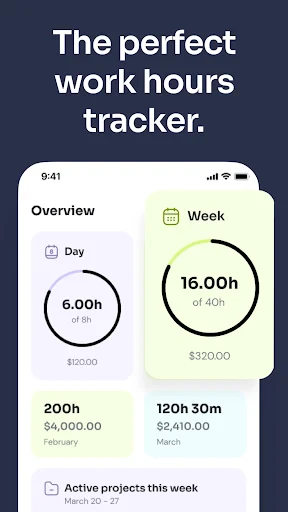
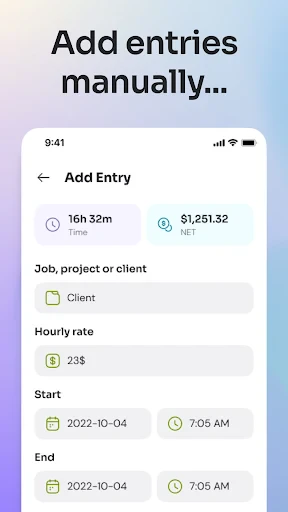
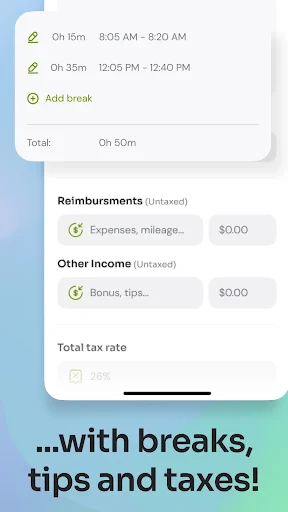
The core functionality of Time Clock: Easy Tracker centers on precise time logging and data organization. Upon launching the app, users are presented with a straightforward interface featuring prominent 'Clock In' and 'Clock Out' buttons, enabling instant start and stop recording of work sessions. The app automatically calculates the duration of each shift, total hours worked per day, and weekly summaries. It allows for the categorization of time entries with customizable tags or job codes, facilitating tracking across different projects or clients. Essential features include the ability to add manual entries for corrections, log break times, and view detailed timesheet reports. Data is stored locally on the device and can often be exported via email or cloud services in common formats like CSV for payroll processing. Notifications and reminders can be set to prompt users to clock in or out, ensuring no work hour goes unrecorded.
Chapter 2: Value
The primary value proposition of Time Clock: Easy Tracker is its ability to deliver professional-grade timekeeping simplicity and reliability directly on a personal device, completely free or at a very low cost. Its key advantage lies in replacing error-prone manual logging with automated, timestamped records, thereby reducing disputes and ensuring fair compensation for hours worked. For employees and freelancers, it provides a trustworthy personal log to verify hours against employer records, empowering them with data for invoicing and self-management. For employers and small business owners, it offers a lightweight, accessible solution to monitor team attendance without investing in expensive hardware systems. The app promotes accountability and transparency between all parties. Furthermore, by organizing all time data in one searchable, exportable location, it saves significant administrative time typically spent on calculating hours and compiling reports. The offline functionality ensures tracking continues regardless of internet connectivity, with data syncing once restored. This combination of accuracy, convenience, and cost-effectiveness makes it a high-value tool for improving productivity and financial clarity in work arrangements centered on hourly tracking.
Chapter 3: Scenarios
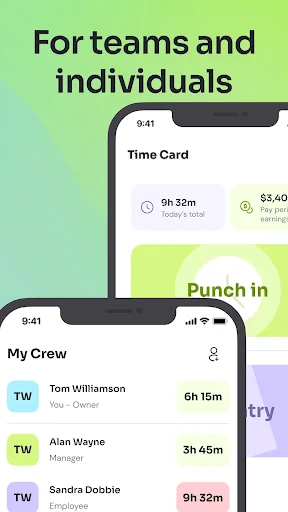
Time Clock: Easy Tracker primarily serves freelancers, remote workers, hourly employees, and managers of small teams or field service crews. Freelancers such as consultants, designers, or handymen use it to meticulously track time spent on different client projects to create accurate invoices. Remote employees, especially those with flexible schedules, utilize the app to maintain a disciplined record of their work hours for employer review and personal time management. Hourly workers in retail, hospitality, or construction can use it as a personal backup log to ensure their official timesheets are correct. Small business owners or team supervisors employ it to oversee the attendance of a handful of employees, particularly in roles where a centralized physical time clock is impractical, such as landscaping, cleaning services, or freelance collectives. Everyday use cases include clocking in at the start of a shift, pausing the timer for a lunch break, switching tags when moving to a different task, and reviewing the weekly summary every Friday to confirm total hours before submitting timesheets or processing payroll. It is also commonly used by students tracking study hours or individuals managing time for personal projects.
Uninstall Instructions
For step-by-step guidance on how to safely remove this application from your device, please refer to our 《Uninstall Instructions》 document.
Pros
- one-tap clock-in/out with customizable GPS or WiFi verification
- offline tracking syncs automatically when connection is restored
- generates detailed PDF timesheets for payroll integration
- minimalist interface reduces training time for field teams
- low battery consumption during all-day shift tracking
Cons
- geofencing requires precise location permissions always on
- PDF export formatting lacks customization for company templates
- no native team chat function
- relying on third-party apps
- WiFi-based clock-in fails in networks with captive portals
- admin dashboard limited to basic filtering
- no real-time analytics
Frequently Asked Questions
What is Time Clock: Easy Tracker?
Time Clock: Easy Tracker is a mobile application designed for employee time and attendance management. Its core function is to allow employees to clock in and out, track work hours, breaks, and overtime using their smartphones. It positions itself as a simple, digital replacement for traditional paper timesheets or physical punch clocks, primarily targeting small to medium-sized businesses and freelancers who need a straightforward way to monitor work time.
Is Time Clock: Easy Tracker free to use?
A core technical feature is GPS or Wi-Fi based location tracking for geofenced clock-ins. The app uses the device's location services. Managers can set specific work locations (geofences). For an accurate clock-in/out, the employee's device must be within this designated area. Users must grant the app location permissions. Accuracy depends on the device's GPS signal and the defined geofence radius.
What happens if I forget to clock out?
Time Clock: Easy Tracker typically operates on a freemium model. The basic app is free to download and use for individual time tracking. However, for business features like multi-employee management, payroll reporting, exporting data, or advanced scheduling, a subscription or in-app purchase is usually required. The app itself does not require additional hardware.
What devices and systems does this app support?
Time Clock: Easy Tracker is primarily available for iOS and Android mobile devices. It requires a smartphone or tablet with a stable internet connection (Wi-Fi or cellular data) for core functions like syncing data to the cloud. Some features may have limited functionality offline. It is generally adapted for use by both employees clocking in and managers or business owners overseeing the records.
How does the app ensure accurate location-based clock-ins?
The app may offer a manual edit feature for managers or users to correct missed punches, depending on the permissions set by the administrator. Some versions include push notification reminders to clock out. It is crucial to report any discrepancies to your manager or administrator promptly, as they typically control the final timesheet approval and export for payroll. For specific correction policies, consult your workplace administrator.
App Info
Technical Info
Recommended For You

Selfie Camera - Photo Effects
Beauty

CARFAX - Shop New & Used Cars
Auto & Vehicles

AI Face Swap Video App-Swapme
Art & Design

PDF Reader: Edit & Convert PDF
Business

Webex Meetings
Business

Barber Chop
Beauty

Marco Polo - Video Messenger
Communication

Color Analysis - Dressika
Beauty

PocketBook reader - any books
Books & Reference
Daily Bible Study: Audio, Plan
Books & Reference

Asana: Where work connects
Business

maxim — order a taxi & food
Auto & Vehicles

AR Drawing: Paint & Sketch App
Art & Design

Amazon Flex
Business

Phone Mirror app - True Mirror
Beauty

Pixel Studio: pixel art editor
Art & Design

O'Reilly Pro
Business

SelfComic: Sasuke Ninja Photo
Comics

Wavy: Photo Editor & AI Art
Art & Design

Instawork: Be your own boss
Business