
Email - Fast and Smart Mail
Screenshots


Description
About Email - Fast and Smart Mail Features
Email - Fast and Smart Mail is a modern mobile email client designed to streamline communication by combining a clean, intuitive interface with powerful organizational intelligence. It positions itself not just as another inbox, but as a smart assistant that helps users manage their email flow efficiently, prioritizing important messages and reducing clutter. The app supports a wide range of email services, from Gmail and Outlook to Yahoo and custom IMAP accounts, unifying them under a single, cohesive experience. Its core philosophy revolves around speed, simplicity, and smart features that anticipate user needs, making email management less of a chore and more of a seamless part of daily digital life.
Chapter 1: Function
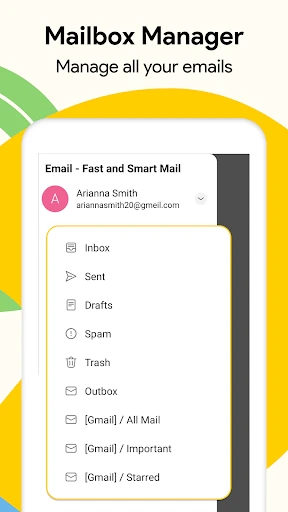
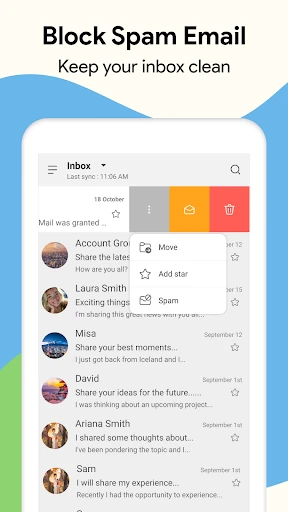
The core functionality of Email - Fast and Smart Mail centers on efficient triage and management of incoming messages. Upon setup, the app aggregates emails from all connected accounts into a unified inbox. A primary function is its smart categorization, which automatically sorts emails into tabs like Primary, Social, and Promotions, mimicking popular web interfaces but with enhanced customization. It features a powerful swipe gesture system for quick actions like archive, delete, or snooze. The integrated snooze function allows users to temporarily remove emails from the inbox and have them return at a specified, more convenient time. Furthermore, the app includes a built-in search that quickly filters through emails, contacts, and attachments. For composing, it offers a rich text editor, attachment support from cloud storage like Google Drive and Dropbox, and scheduled sending, allowing users to write now and send later.
Chapter 2: Value
The value proposition of Email - Fast and Smart Mail lies in its intelligent automation and user-centric design, which collectively save time and reduce inbox anxiety. Its key advantage is the smart assistant that goes beyond basic filtering. By learning user habits, it can suggest quick replies, highlight potentially important emails, and bundle newsletters for batch reading. The app emphasizes privacy, processing data locally on the device where possible and providing transparent privacy controls. Unlike many competitors, it offers a focused experience largely free of intrusive ads, especially in its premium tier. The unified inbox eliminates the need to switch between multiple apps, providing a consolidated view of all communications. The speed is evident in its optimized performance for both loading threads and searching through years of emails. Another significant value is customization; users can tailor notification sounds, vibration patterns, and swipe actions per account or folder, creating a personalized workflow. This combination of smart features, privacy focus, and deep customization empowers users to regain control over their inbox, transforming email from a source of stress into a well-managed tool for productivity and communication.
Chapter 3: Scenarios
Email - Fast and Smart Mail is ideally suited for professionals, students, and anyone managing multiple email accounts who feels overwhelmed by a cluttered inbox. Its primary target users are mobile-centric individuals who need to process email quickly on the go. A busy professional can benefit from the snooze and scheduled send features, handling urgent communications immediately while deferring less critical ones to appropriate times, thus maintaining focus on deep work. Students juggling academic, personal, and project emails can use the unified inbox and smart folders to keep different aspects of their life organized and ensure important announcements from university are never missed. Freelancers and small business owners who use email as a primary client communication channel will appreciate the quick-reply suggestions and easy attachment from cloud storage, speeding up their response time. Everyday use cases include triaging the morning inbox with smart swipe gestures, using the 'snooze until tonight' feature for non-urgent newsletters, searching for a specific receipt or document attachment in seconds, and safely connecting both work and personal accounts in one secure, ad-minimal environment.
Uninstall Instructions
For step-by-step guidance on how to safely remove this application from your device, please refer to our 《Uninstall Instructions》 document.
Pros
- one-tap smart sorting for priority inboxes
- offline search across all connected accounts
- integrated calendar creates events from email text
- send later scheduler with time-zone optimization
- lightweight client under 15MB install size
Cons
- smart sorting requires initial manual training
- push notifications limited to two free accounts
- no native integrated office document editor
- advanced search syntax differs from gmail
- unified folders view excludes custom IMAP labels
Frequently Asked Questions
What is Email - Fast and Smart Mail?
Email - Fast and Smart Mail is a mobile email client application designed for efficient inbox management. Its core positioning is to provide a fast, clean, and intelligent email experience on smartphones. It typically supports major email services (Gmail, Outlook, Yahoo, etc.), offering unified inbox management, smart categorization, push notifications, and quick search functions to help users process emails more swiftly.
Is this email app free to use?
The app is generally free to download and use for basic email management functions. Some advanced or premium features, such as enhanced security options, advanced customization, or ad-free experiences, may require in-app purchases or a subscription. The app does not require additional hardware. It may request permissions for notifications, contacts, and storage for full functionality.
On which devices and systems does this app work?
Email - Fast and Smart Mail is primarily designed for mobile devices. It is available on both Android (via Google Play Store) and iOS (via the App Store) platforms. The specific version compatibility (e.g., minimum OS version) depends on the developer's requirements, which are listed on the respective app store pages. It is not typically available for desktop operating systems like Windows or macOS.
How does the smart categorization feature work?
The smart categorization feature automatically sorts incoming emails into different tabs or folders, such as Primary, Social, Promotions, and Updates. This is achieved through on-device or server-assisted algorithms that analyze email content, sender information, and user behavior. It aims to reduce inbox clutter by filtering less critical messages, allowing users to focus on important emails first. The logic and category names may vary slightly across different app versions.
Can I use the app without granting contact permissions?
You can use the app for basic email sending and receiving without granting contact access. However, without contact permissions, features like auto-completing email addresses from your device's address book, linking sender profiles to contacts, or easily sharing emails to contacts will be limited or unavailable. The app will function, but with reduced convenience for features that involve recipient management.
App Info
Technical Info
Recommended For You

Hiya: Spam Blocker & Caller ID
Communication

Artistry Virtual Beauty
Beauty

AI Outfits: Try on Clothes
Art & Design

Jotform - Form, Sign & Survey
Business

Eyecon Caller ID & Spam Block
Communication

Google Pixel Watch
Communication

ヘア&ビューティーサロン検索/ホットペッパービューティー
Beauty

マンガほっと -話題の漫画や人気コミックが読めるマンガアプリ
Comics

AARP SafeTrip™
Auto & Vehicles

DreamPic - AI Image Generator
Art & Design

Sweet Editor Camera Lite
Beauty

JusTalk - Video Chat & Calls
Communication

Lyft Driver
Business

VSD Viewer for Visio Drawings
Business

Caller ID - Block Spam Call
Communication

CLZ Comics comic book database
Comics

PhiApp
Beauty

Handshake Jobs & New Careers
Business

Yolla: International Calling
Communication

DMV Practice Test Pro 2024
Auto & Vehicles