Draw Anime: Paint & Sketch App
Screenshots



Description
About Draw Anime: Paint & Sketch App Features
Draw Anime: Paint & Sketch App is a specialized digital art application designed for creating anime and manga-style illustrations. It provides a streamlined, user-friendly platform that caters to both aspiring artists and seasoned enthusiasts of the genre. The app focuses on delivering tools and resources specifically tailored to the unique aesthetics of anime art, from character design to dynamic scene composition. By simplifying the digital drawing process with intuitive interfaces and genre-specific guidance, it lowers the barrier to entry for creating professional-looking anime artwork directly on mobile devices.
Chapter 1: Function
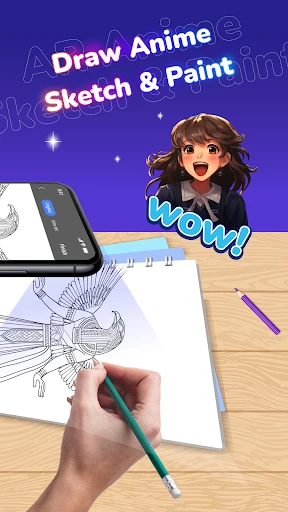
The core functionality of Draw Anime: Paint & Sketch App centers on providing a complete digital toolkit for anime creation. It features a variety of customizable brushes, including pen, pencil, and airbrush tools, optimized for line art, coloring, and shading typical in anime. The app includes a layered canvas system, allowing artists to separate line work, base colors, shadows, and highlights for non-destructive editing. Key functions also encompass a rich color palette with pre-set anime-appropriate color schemes, symmetry drawing tools for creating balanced characters, and transformation controls for scaling and rotating elements. Furthermore, it offers a library of basic anime anatomy guides, pre-made shapes, and poseable mannequin models to assist with proportion and perspective, serving as a foundational aid for sketching characters and scenes.
Chapter 2: Value
The primary value proposition of Draw Anime: Paint & Sketch App lies in its specialized and accessible approach to a niche art form. Unlike generic drawing applications, it curates its tools and learning resources specifically for anime and manga aesthetics, providing targeted value to its user base. A key advantage is its educational component; the app often includes step-by-step tutorials that break down complex anime characters into simple shapes and lines, effectively teaching artistic principles while users create. This demystifies the drawing process and fosters skill development. Its portability as a mobile app offers unparalleled convenience, transforming any spare moment into a productive drawing session. The software is typically optimized for touchscreen use with responsive stylus support, making the drawing experience natural and fluid. By integrating reference materials, practice exercises, and a dedicated creation workspace into one ecosystem, the app saves users time and effort spent searching for disparate resources online. It empowers users to progress from beginners learning fundamentals to more advanced artists refining their style, all within a focused and supportive digital environment designed to celebrate and facilitate anime artistry.
Chapter 3: Scenarios
The app primarily targets anime and manga enthusiasts who wish to create their own artwork but may lack formal training or access to complex desktop software. Key user groups include hobbyist artists and students beginning their journey into digital art, seeking guided, structured practice. It is also valuable for content creators, such as social media influencers or webcomic artists, who need a portable tool for sketching ideas, drafting panels, or creating finished illustrations on the go. Everyday use cases are diverse. A novice might follow an in-app tutorial after school to learn how to draw expressive eyes or specific hairstyles. A fan artist could use the layer and brush tools during a commute to sketch a portrait of their favorite character. Someone planning a webcomic might utilize the poseable models to block out action sequences before finalizing drawings on a larger workstation. The app serves as a digital sketchbook, a practice coach, and a full-fledged illustration tool, fitting seamlessly into moments of learning, casual creativity, and dedicated project work for anyone passionate about bringing anime-style visions to life.
Uninstall Instructions
For step-by-step guidance on how to safely remove this application from your device, please refer to our 《Uninstall Instructions》 document.
Pros
- offers guided tutorials for anime-specific styles
- includes a library of anime-themed brushes and stamps
- layering system supports complex character illustrations
- one-tap shading for cel-style anime coloring
- community feed focused on anime art sharing
Cons
- advanced layer features require a subscription
- limited to anime-style brushes and tools
- export options are basic for professional use
- tutorials assume some prior drawing knowledge
- community features need an internet connection
Frequently Asked Questions
What is Draw Anime: Paint & Sketch App?
Draw Anime: Paint & Sketch App is a mobile application designed for creating anime and manga-style digital artwork. Its core function is to provide a specialized toolkit with brushes, layers, and tutorials tailored for drawing characters and scenes in this specific art style. It positions itself as an accessible tool for both beginners learning anime art and enthusiasts practicing their skills.
Is the app free to use or does it have in-app purchases?
The app is typically free to download and use with basic features. However, it usually includes in-app purchases to unlock premium content such as additional brush sets, advanced layer tools, tutorial packs, or the removal of advertisements. No additional physical equipment is required beyond a compatible touchscreen device.
What devices and systems is this app compatible with?
Draw Anime: Paint & Sketch App is primarily available for iOS and Android mobile devices. Specific compatibility depends on the version, but it generally supports common smartphones and tablets. It is designed for touch interaction and does not require a specific stylus, though one may enhance the experience. It is suitable for users of various skill levels interested in anime art.
What are the unique features for anime drawing?
Unique features include anime-specific brush sets for creating smooth line art, cel-shading, and screentone patterns. It often provides built-in tutorials on drawing anime eyes, faces, and hair, along with pose references or mannequins. Layer support is standard, allowing for separate sketch, line art, and coloring stages essential for this art style.
How do I save or export my completed artwork?
The app allows you to save projects internally and export finished images to your device's photo gallery. Common export formats include PNG or JPEG. For issues with saving, ensure sufficient storage space and granted permissions. The developer's official support channel should be contacted for persistent technical problems, as in-app help options may be limited.
App Info
Technical Info
Recommended For You

Fuel Forward
Auto & Vehicles

Typology Paris - Skincare
Beauty

PDF Pro-View PDF
Business

myQQ – Quick Quack
Auto & Vehicles

GIMP
Art & Design

Daily Bible: Holy Bible KJV
Books & Reference

Spam Call Blocker for Android
Communication

Manga Renta
Comics

Call Blocker - Block Numbers
Communication

Carly — OBD2 car scanner
Auto & Vehicles

Inkitt: Books, Novels, Stories
Books & Reference

PSA | Card Grading Service
Books & Reference

Opera GX: Gaming Browser
Communication

Holafly eSIM Prepaid Card
Communication

Daily Bible Devotion & Prayer
Books & Reference

My Total Wireless: Account App
Communication

Pixelcut AI Photo Editor
Art & Design

Tattoo Simulator Tattoo Maker
Art & Design

FotoFusion - Editor Photo
Beauty
All Document Reader:PDF Viewer
Business