
Pixilart - Make Pixel Art
Screenshots
Description
About Pixilart - Make Pixel Art Feature
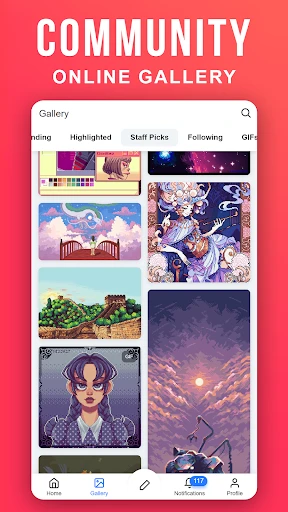
Pixilart is a comprehensive digital application designed for the creation, sharing, and discovery of pixel art. It serves as both a powerful drawing tool and a vibrant social platform, catering to artists of all skill levels. Accessible via web and mobile apps, Pixilart provides an intuitive interface where users can craft detailed pixel-based artwork from scratch or edit existing images. Beyond its creation suite, the app fosters a community where artists can publish their work, participate in challenges, and draw inspiration from a vast global gallery. It effectively bridges the gap between a sophisticated digital art studio and an interactive social network for pixel art enthusiasts.
Chapter 1: Function
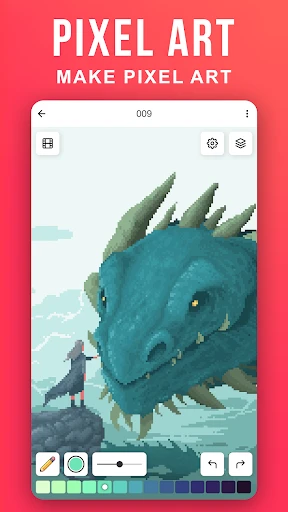
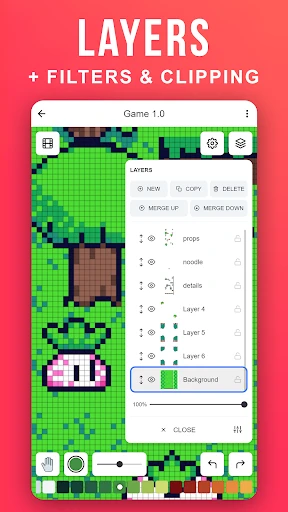
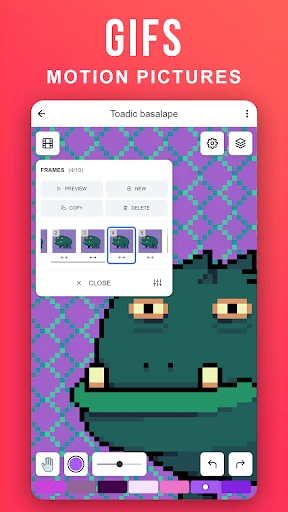
Pixilart's core functionality centers on a robust pixel art editor. The tool features a customizable canvas, a versatile color palette with advanced blending options, and essential drawing instruments like pencil, brush, fill bucket, and shape tools. Key for pixel art, it offers precise grid control and zoom capabilities down to the individual pixel level for meticulous editing. Users can work with layers to manage complex compositions and utilize animation frames to create simple GIFs. The app also includes utilities such as a symmetry tool, color picker, and the ability to import images for tracing or conversion. All projects are autosaved, ensuring work is never lost. This integrated editor provides a complete, professional-grade workspace tailored to the specific demands of pixel art creation.
Chapter 2: Value
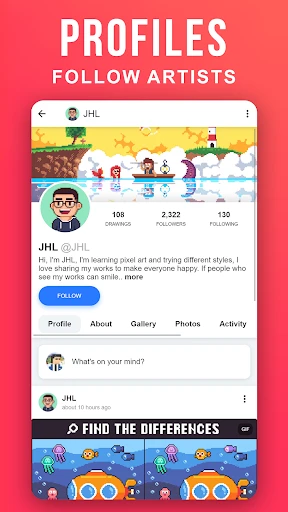
The primary value of Pixilart lies in its seamless integration of a professional creation tool with an engaged, global community. Unlike standalone drawing apps, Pixilart offers significant social and educational advantages. Its key strength is the platform's ecosystem: artists can instantly publish their creations to a public gallery, receive feedback through likes and comments, and follow other creators. This transforms a solitary activity into a shared, inspirational experience. The app regularly hosts themed contests and collaborative projects, motivating users and enhancing skills. For learners, the platform is invaluable; newcomers can study the layer-by-layer construction of artworks shared by others, accelerating the learning curve. The tool itself is completely free for core features, removing financial barriers to entry. Its cross-platform availability ensures artists can sketch ideas on mobile or refine them on desktop with cloud-synced projects. By combining an accessible, feature-rich editor with a supportive social network, Pixilart delivers more than just software—it provides a nurturing environment where passion for pixel art can grow, making it an exceptional resource for hobbyists, game developers, and digital artists alike.
Chapter 3: Scenarios
Pixilart primarily serves indie game developers, digital art hobbyists, students, and social artists. For indie developers creating retro-style games, the app is an indispensable tool for designing sprites, characters, tilesets, and animated icons efficiently. Hobbyists and art students use it to explore the pixel art medium, practice digital art fundamentals, and build a portfolio in a low-pressure, community-driven setting. Its accessibility makes it ideal for quick creative sessions during commutes or breaks. Teachers might incorporate it into lessons on digital design or computer graphics due to its straightforward tools. Furthermore, social artists who thrive on interaction and challenge find constant engagement through the platform's feed, contests, and the ability to remix or collaborate on friends' artworks. Common use cases include designing profile pictures and avatars for online forums, creating custom emoticons for streaming, crafting pixel art for personal projects like cross-stitch patterns, and simply relaxing through the meditative process of placing pixels. It effectively supports both serious project work and casual, creative play.
Uninstall Instructions
For step-by-step guidance on how to safely remove this application from your device, please refer to our 《Uninstall Instructions》 document.
Pros
- offers a dedicated pixel art brush with adjustable grid
- includes a frame-by-frame animation tool for sprites
- community galleries allow for sharing and remixing art
- functions entirely in-browser without mandatory downloads
- real-time multiplayer drawing on shared canvases
Cons
- advanced animation tools require a paid premium subscription
- performance lags with large canvas sizes or many layers
- limited export formats compared to desktop pixel software
- no native offline mode
- requiring constant internet access
- steep learning curve for full palette and layer management
Frequently Asked Questions
What is Pixilart and what can I do with it?
Pixilart is a digital art application focused on creating pixel art and GIF animations. Its core functions include a drawing canvas with pixel-specific tools like a precise pencil, fill bucket, and symmetry tool. You can create sprites, icons, and retro-style artwork from scratch or edit existing images. The app also features a community gallery for sharing creations and participating in art challenges. It is primarily designed for artists, game developers, and hobbyists interested in the pixel art medium.
Is Pixilart free to use, and what are the in-app purchases?
Yes, Pixilart is free to download and use with a comprehensive set of core drawing tools. It offers optional in-app purchases through a subscription (Pixilart Premium) or one-time purchases. These primarily unlock advanced features like higher resolution canvases, more layers, priority support, an ad-free experience, and exclusive brush sets. The free version is fully functional for basic to intermediate pixel art creation, with ads displayed in the community sections.
On which devices and platforms is Pixilart available?
Pixilart is a cross-platform application. It is available as a mobile app for both iOS and Android devices. Additionally, it can be accessed and used directly through any modern web browser on desktop or laptop computers via its official website. This allows users to start a project on one device and continue it on another. The app is designed to be suitable for all age groups interested in digital art.
What are the key technical features for creating pixel art?
Pixilart provides specialized tools tailored for pixel art creation. Key features include a color palette editor with custom swatches, a layering system for complex artwork, and a dithering tool for shading. Its animation suite allows frame-by-frame GIF creation with onion skinning. The app supports a precise grid and zoom for detailed work. Artwork can be exported in common formats like PNG, GIF, and its native project format for future editing.
How can I save and export my completed pixel art projects?
You can save your work to your Pixilart account cloud storage, which is linked to your user profile. For export, the app allows you to download your image or animation to your device's local storage. Export options typically include PNG (for static images) and GIF (for animations), with settings for transparency. If you encounter issues, ensure you have sufficient storage permissions enabled on your device and a stable internet connection for cloud saves.
App Info
Technical Info
Recommended For You

PocketBook reader - any books
Books & Reference

PAeDocket
Books & Reference

Zello PTT Walkie Talkie
Communication

Flashlight : SMS & Call Alert
Communication

Easy Pose - 3D pose making app
Art & Design

Marathon ARCO Rewards
Auto & Vehicles

Universalis
Books & Reference

Makeup Tutorial step by step
Beauty

Magic Beauty Makeup Camera
Beauty

MERO - Programări Online
Beauty

AI Art Generator: AI Picture
Art & Design

LinkedIn: Jobs & Business News
Business

Virtual Hair Style Changer
Beauty

Moonstories
Books & Reference

Webfic - Fantastic Reading
Books & Reference

Anime AI - Photo Maker
Art & Design
TrueCar Used Cars and New Cars
Auto & Vehicles
Dashtoon: Comics & Manga
Comics

Sweet Editor Camera Lite
Beauty

Perfect Viewer
Comics