
SMS Auto Reply - Autoresponder
Screenshots
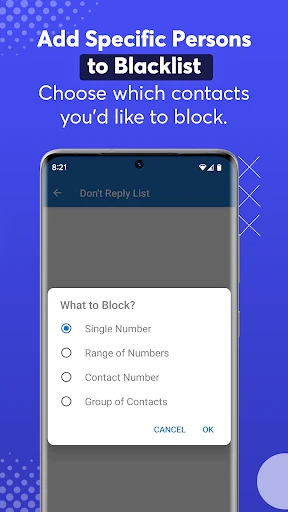
Description
About SMS Auto Reply - Autoresponder Feature
SMS Auto Reply - Autoresponder is a specialized mobile application designed to automate text message responses. It serves as a digital assistant for managing SMS communications, allowing users to set up custom, rule-based automatic replies to incoming messages. The app is particularly useful for individuals who are frequently occupied, driving, in meetings, or in situations where manually replying to texts is inconvenient or impossible. By intelligently filtering senders and keywords, it ensures that only appropriate messages trigger an automatic response, helping users maintain communication etiquette without constant manual intervention. Its straightforward interface and flexible configuration make it a practical tool for enhancing personal and professional communication efficiency.
Chapter 1: Function
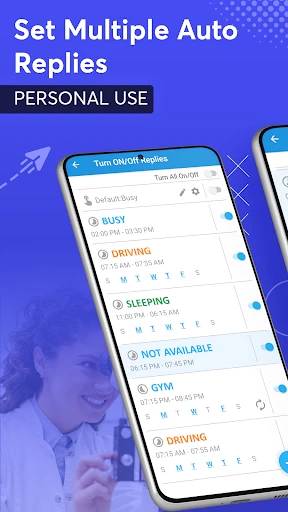
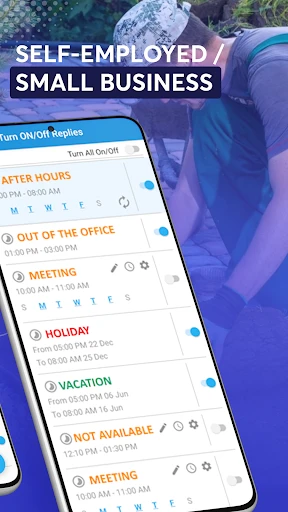
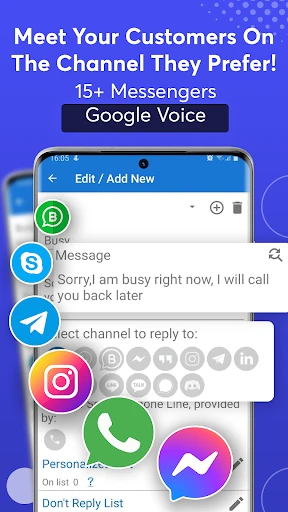
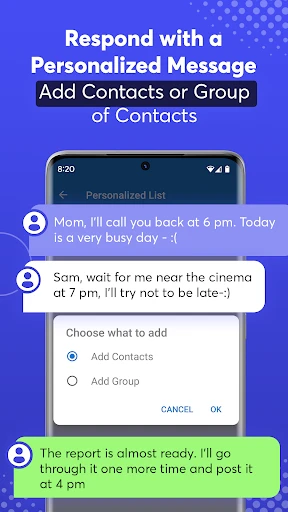
The core functionality of SMS Auto Reply - Autoresponder revolves around automating SMS responses based on user-defined rules. Users can create multiple personalized reply profiles, each activated under specific conditions such as during driving, sleeping, or meetings. The app allows for the customization of reply messages, which can include dynamic variables like the sender's name. A key function is its filtering system, where users can whitelist or blacklist specific contacts, or set keyword triggers, ensuring automatic replies are sent only to relevant messages. Additionally, it can integrate with device states, such as connecting to Bluetooth in a car to activate a 'Driving Mode' auto-reply. The app also provides scheduling options, enabling automatic enabling or disabling of autoresponder profiles at set times. Logs of all automated replies are maintained for user review, ensuring transparency and control over the communication process.
Chapter 2: Value
The primary value proposition of SMS Auto Reply - Autoresponder lies in its ability to save time, enhance safety, and maintain professional and personal responsiveness. For busy professionals, it eliminates the distraction of constant messaging by providing immediate, courteous acknowledgments, thereby managing sender expectations and allowing focused work. Its driving mode feature offers significant safety value by discouraging manual texting while on the road, potentially preventing accidents. The app also provides peace of mind; users can disconnect during sleep or important events knowing that urgent contacts can still be configured to bypass the auto-reply or receive an immediate notification of the user's status. Unlike built-in system features which are often limited, this app offers granular control, detailed logging, and multi-profile management. Its key advantages include high customizability without requiring technical expertise, reliable operation in the background, and respect for user privacy by processing all data locally on the device without uploading messages to external servers. This combination of convenience, safety, and control makes it a valuable utility in a connected world where constant availability is often expected but not always feasible.
Chapter 3: Scenarios
The app primarily targets user groups who require managed communication due to schedule constraints or specific situational demands. Professionals and office workers are key users, utilizing it during back-to-back meetings or deep work sessions to auto-reply to clients or colleagues with their availability. Drivers, including commuters and delivery personnel, use the driving mode to promote road safety. Individuals with active social lives may employ it during events, dates, or family time to minimize phone use without appearing rude. Freelancers and small business owners who need to project professionalism can set up business-hour auto-replies for customer inquiries received after hours. Furthermore, it serves users in low-connectivity areas or during travel, sending automated replies about delayed responses. In everyday use, a user might activate a 'Meeting' profile that sends a reply like 'I am currently in a meeting and will respond shortly' to non-urgent work contacts. At night, a 'Sleeping' profile could inform friends that messages will be read in the morning. The app seamlessly integrates into these varied routines, acting as a polite and efficient communication buffer.
Uninstall Instructions
For step-by-step guidance on how to safely remove this application from your device, please refer to our 《Uninstall Instructions》 document.
Pros
- automatically replies to SMS with customizable templates
- schedules auto-responses based on time or driving mode
- works offline without requiring an internet connection
- creates unique rules for specific contacts or keywords
- minimal battery drain due to lightweight design
Cons
- interface feels outdated compared to modern messaging apps
- advanced rule setup can be complex for casual users
- no AI-based smart reply suggestions in free version
- occasionally delays on older Android OS versions
- lacks integration with popular third-party chat apps
Frequently Asked Questions
What is SMS Auto Reply - Autoresponder?
SMS Auto Reply - Autoresponder is a utility app designed to automatically send predefined replies to incoming SMS messages. Its core function is to act as a virtual assistant for text messages, allowing users to set custom responses for specific contacts or during certain times, like driving or meetings. It operates based on user-configured rules without sending messages on its own.
Is SMS Auto Reply free to use or does it have in-app purchases?
The app typically follows a freemium model. The basic automatic reply functionality is often free. However, advanced features like scheduling, contact-specific rules, or removing ads usually require a one-time purchase or a subscription. No additional physical equipment is needed. Check the app's description on your platform's store for current pricing details.
What permissions does this app require to function?
To perform its core function, the app requires permission to access your SMS messages (to read incoming texts) and send SMS (to deliver automated replies). It may also request contact access to apply rules to specific people. These permissions are standard for its functionality. The app does not collect or share your personal message content without consent, as stated in its privacy policy.
How does the automatic reply feature work technically?
The app works locally on your device. You create rules defining when a reply should be sent (e.g., if driving mode is on, or from specific contacts). When an SMS is received, the app checks it against your rules. If a match is found, it automatically sends your predefined reply via your phone's standard messaging system. It does not use an independent server to process your messages.
Can I use this app alongside my default messaging app?
Yes. SMS Auto Reply is designed to work in the background alongside your default SMS app (like Messages or Google Messages). It does not replace your messaging interface. You will still receive and read messages in your main app. The autoresponder operates silently, sending replies based on your settings. Ensure it is not battery-optimized to be killed, which might interrupt its background service.
App Info
Technical Info
Recommended For You

DreamPic - AI Image Generator
Art & Design

Flowt Wear
Auto & Vehicles

Imikimi Photo Frames & Effects
Art & Design

Nail Art Design Ideas
Beauty

Sketch Pro: Draw & Create Art
Art & Design

TeamViewer Remote Control
Business

FedEx Mobile
Business

FaceSwap: Aging & Cartoon Me
Beauty

e.l.f. Cosmetics and Skincare
Beauty

AI Dress up-Try Clothes Design
Beauty

Meeting - Video Conference
Business

AR Drawing: Paint & Sketch App
Art & Design

Second Phone Number - 2Number
Communication

طاقچه؛ کتاب الکترونیکی و صوتی
Books & Reference

JW Library
Books & Reference

The General® Auto Insurance
Business

AR Drawing : Trace Anything
Art & Design

2nd Phone Number - Call & Text
Communication

Minicraft Crafting Building
Comics

King James Bible - KJV Offline
Books & Reference