
Tattoo Maker - Tattoo Design
Screenshots


Description
About Tattoo Maker - Tattoo Design App Feature
Tattoo Maker - Tattoo Design is a mobile application designed for tattoo enthusiasts, artists, and those considering body art. It serves as a virtual tattoo studio, allowing users to create, preview, and experiment with tattoo designs directly on photos of their own body or on model templates. The app bridges the gap between conceptualization and reality, providing a risk-free platform to visualize how different designs, sizes, and placements would look before committing to permanent ink. By offering an extensive library of designs and powerful editing tools, it empowers users to make informed and creative decisions about their personal body art.
Chapter 1: Function
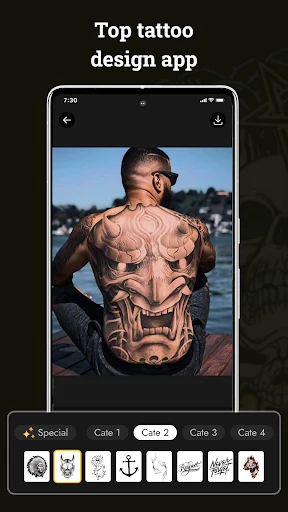
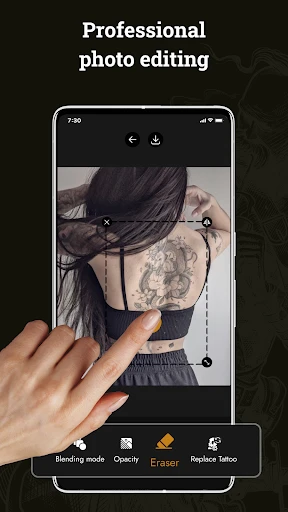
The core functionality of Tattoo Maker - Tattoo Design centers on virtual tattoo application and customization. Users begin by selecting a base image, either from their device's gallery or using built-in model photos covering various body parts like arms, backs, and legs. The app provides access to a vast, categorized library of pre-made tattoo designs, ranging from traditional and tribal to modern geometric and watercolor styles. The key tool is the intuitive editor, which allows users to place a chosen design onto the photo. They can then resize, rotate, adjust opacity, and change the color of the design to achieve a perfect fit and look. Advanced features may include layering multiple designs, applying blend modes for realistic skin integration, and using an eraser tool for fine-tuning edges. Essentially, it transforms a smartphone into a simulation tool for tattoo placement and design prototyping.
Chapter 2: Value
The primary value proposition of Tattoo Maker - Tattoo Design lies in its empowerment of users through visualization and creativity, effectively reducing uncertainty. For individuals contemplating a tattoo, the app's greatest advantage is mitigating regret by providing a realistic preview, which is impossible with static sketches on paper. It answers critical questions about size, placement, and style synergy with one's body shape and skin tone. For tattoo artists, it serves as a collaborative and client-communication tool, enabling quick mock-ups to align vision with client expectations before the needle touches skin. The app's extensive and regularly updated design library acts as a boundless source of inspiration, helping users explore styles they might not have previously considered. Furthermore, its user-friendly interface makes professional-grade design simulation accessible to everyone, regardless of artistic skill. By fostering informed decision-making and creative exploration, the app adds significant value to the tattoo journey, transforming it from a daunting commitment into an engaging, creative process. It stands as an essential digital companion in the body art community.
Chapter 3: Scenarios
The app primarily targets three user groups. First are potential tattoo clients who are curious or decided but seek confidence in their design choice. They use the app to try various designs on their own photos, experimenting with placements like a wrist tattoo one day and a full back piece the next, often sharing results with friends or artists for feedback. Second are professional and amateur tattoo artists who utilize the app for client consultations, creating custom proposals and visualizing composite designs. It streamlines their workflow and enhances client presentations. Third are general art and design enthusiasts who enjoy the creative process of mixing and matching elements to create unique artwork, even if not for an actual tattoo. Everyday use cases include a person browsing the Celtic knot category to find a design for their forearm, an artist preparing a sleeve concept by layering multiple elements on a client's arm photo, or someone simply having fun applying dramatic designs to photos for humorous social media posts. The app is a tool for planning, creation, and playful expression.
Uninstall Instructions
For step-by-step guidance on how to safely remove this application from your device, please refer to our 《Uninstall Instructions》 document.
Pros
- offers a vast library of authentic tattoo flash from global artists
- realistic skin texture preview with adjustable body part models
- one-tap design generation based on user-input keywords and styles
- collaborative design tools for direct artist-client mockup iteration
- high-fidelity AR try-on using phone's camera for accurate placement
Cons
- premium artist flash collections require separate in-app purchases
- AR try-on accuracy decreases on complex body curvatures
- keyword-to-design generator can produce generic or repetitive motifs
- no vector export option for studio-grade printing equipment
- collaboration features require account creation from both parties
Frequently Asked Questions
What is Tattoo Maker - Tattoo Design app?
Tattoo Maker - Tattoo Design is a mobile application for creating and visualizing tattoo designs. Its core function is to provide a virtual platform where users can design tattoos by placing pre-made artwork or text onto photos of body parts. It serves as a tool for experimenting with tattoo ideas before getting inked. The app typically includes features like a library of designs, editing tools, and realistic skin previews. It is positioned as a design and utility app for personal creativity.
Is the app free to use or does it have in-app purchases?
The app is generally free to download and use with basic features. However, it commonly operates on a freemium model, meaning access to the full library of premium tattoo designs, advanced editing tools, or the removal of advertisements typically requires in-app purchases. These purchases are usually one-time or subscription-based. No additional physical equipment is needed. The app may require permissions like camera and photo library access for using personal photos as a base.
On which devices and systems can I use this tattoo app?
Tattoo Maker - Tattoo Design is primarily designed for mobile devices. It is commonly available for both iOS (via the Apple App Store) and Android (via Google Play) operating systems. Specific version requirements, such as needing iOS 13.0 or Android 8.0 and above, apply. The app is adapted for smartphones and tablets. It is intended for general audiences interested in tattoos, but it is not a professional graphic design tool and has limitations compared to desktop software.
How can I save or share the tattoo designs I create?
Within the app, you can typically save your final design directly to your device's photo gallery or camera roll. Sharing options are usually integrated, allowing you to export the image and share it via social media platforms, messaging apps, or email directly from the app interface. The process involves using the export or share button after finalizing your design. Note that saving high-resolution images or sharing without watermarks may be a feature included in the premium version.
Can I use my own photos to design a tattoo?
Yes, a core feature of this app is the ability to use your own photos. You can take a new photo using your device's camera or select an existing image from your gallery to use as a canvas. The app then allows you to overlay and adjust tattoo designs onto that specific body part in the photo for a realistic preview. This function helps visualize how a tattoo would look on your actual skin. Technical performance may vary based on photo quality and device capabilities.
App Info
Technical Info
Recommended For You

StyleKorean
Beauty

Manga UP!
Comics

Quran for Android
Books & Reference

ReShot : AI Photo Generator
Art & Design

InstaFeet
Beauty

Skincare and Face Care Routine
Beauty

Upwork for Freelancers
Business

WhatsApp Messenger
Communication

AI Face Swap Video App-Swapme
Art & Design

Funny Jokes And Riddles
Comics

Mangamo Manga & Comics
Comics

Passport Photo: ID Photo Print
Art & Design

Skincare Routine: FeelinMySkin
Beauty

Brave Private Web Browser, VPN
Communication

MANGA Plus by SHUEISHA
Comics
Nail Art Design : Nails Polish
Beauty

Message Plus - SMS Messager
Communication

AutoZen-Car Dashboard&Launcher
Auto & Vehicles

OBD Auto Doctor: OBD2 Scanner
Auto & Vehicles

KJV Bible: Audio+Verse
Books & Reference