NetShare - no-root-tethering
Screenshots
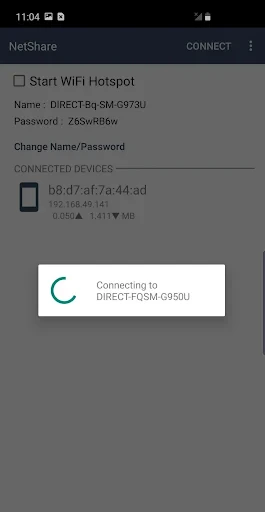
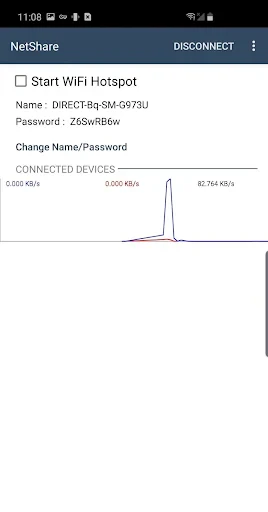
Description
About NetShare - no-root-tethering Feature
NetShare - no-root-tethering is a mobile application designed to enable internet tethering from an Android device to other devices such as laptops, tablets, or other smartphones without requiring root access. It functions by creating a local Wi-Fi hotspot that shares the device's mobile data or existing Wi-Fi connection. The app distinguishes itself by bypassing the typical carrier restrictions or system limitations that often prevent standard tethering, offering a straightforward solution for users who need immediate internet sharing capabilities. Its core promise is to provide a reliable and convenient tethering experience directly from the user's primary device, eliminating the need for complex configurations, additional hardware, or modifying the device's operating system.
Chapter 1: Function
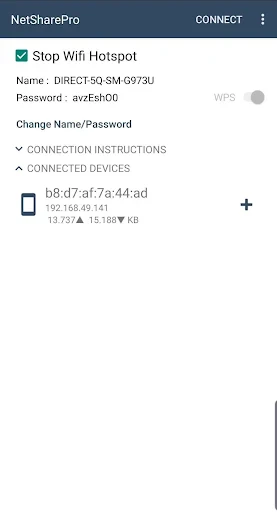
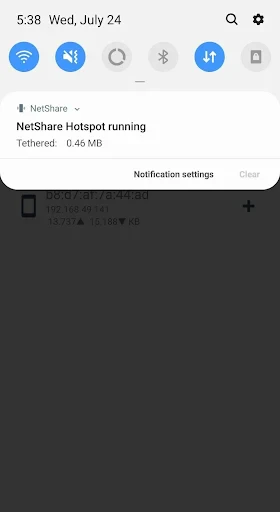
NetShare operates by utilizing the device's built-in capabilities to create a wireless access point. Its primary function is to share the internet connection from the host Android device with other client devices. Upon launching the app, users can typically start a hotspot with a single tap. The app then generates a Wi-Fi network name (SSID) and a password, which other devices can use to connect. Crucially, it can work in two main modes: sharing the device's cellular mobile data or acting as a repeater to share an already-connected Wi-Fi network. The app manages the connections, displays connected clients, and allows for basic network management such as changing the SSID or password. It handles the network routing and firewall rules in the background, requiring no technical knowledge from the user. The entire process is designed to be as seamless as the standard portable hotspot feature but with the added ability to function in scenarios where the standard feature is blocked or unavailable.
Chapter 2: Value
The value proposition of NetShare lies in its ability to democratize internet access by overcoming significant technical and commercial barriers. Its foremost advantage is the elimination of the root requirement, making advanced tethering accessible to the vast majority of users who do not wish to void warranties or risk bricking their devices. This provides immense practical value for individuals whose mobile carriers restrict or charge extra for official tethering plans, offering a potential workaround. Secondly, the app provides convenience and immediacy. In situations where public Wi-Fi is unreliable or insecure, or where a traditional router is absent, NetShare can instantly transform a smartphone into a personal, secure internet hub. For travelers, remote workers, or students, this means guaranteed internet access for a laptop or tablet using a single mobile data subscription. Another key advantage is cost-effectiveness; it leverages existing hardware and data plans without necessitating additional subscriptions for tethering. Furthermore, by potentially allowing Wi-Fi sharing, it can extend a weak signal or share a wired connection (via USB Tethering to the phone first) wirelessly. While performance may depend on the host device's hardware and signal strength, the app's core value is providing a simple, software-based solution to a common connectivity problem, empowering users with greater control over their internet resources.
Chapter 3: Scenarios
NetShare targets a broad spectrum of users who face connectivity challenges. Primary user groups include frequent travelers who often find themselves in hotels or locations with limited or paid Wi-Fi. By using NetShare with their local SIM card's data, they can provide internet to all their devices securely. Students constitute another key group, especially those in dorms or libraries with restrictive network policies or device limits; sharing one phone's connection can facilitate group study or provide access for a laptop. Remote workers and digital nomads in areas with unstable infrastructure can use the app as a reliable backup, ensuring their work continues uninterrupted. Technicians or professionals on field assignments can quickly set up a temporary network for equipment or team collaboration. Additionally, it serves users in regions where mobile carriers impose strict tethering fees, offering an economical alternative. Everyday use cases are varied: sharing a phone's 4G/5G connection with a friend's device when their service is poor, creating a quick hotspot for a gaming console during an internet outage at home, or extending a café's Wi-Fi signal to a quieter corner of the room. Essentially, any scenario demanding instant, ad-hoc, and carrier-agnostic internet sharing from an Android device falls within the practical scope of NetShare.
Uninstall Instructions
For step-by-step guidance on how to safely remove this application from your device, please refer to our 《Uninstall Instructions》 document.
Pros
- creates Wi-Fi hotspot without requiring root access
- shares mobile data via ad-hoc Wi-Fi connection
- minimal configuration needed for basic tethering
- functions on older Android versions lacking native hotspot
- uses local network
- avoiding cloud data routing
Cons
- requires enabling 'install via USB' for setup on some devices
- ad-hoc Wi-Fi may not be recognized by all client devices
- limited to Wi-Fi sharing
- no USB or Bluetooth tethering options
- performance depends on device's Wi-Fi hardware capabilities
- interface lacks advanced network management features
Frequently Asked Questions
What is NetShare and what does it do?
NetShare is a utility app that enables Wi-Fi or Bluetooth tethering (mobile hotspot) on your Android device without requiring root access. It shares your phone's internet connection with other devices like laptops, tablets, or other phones. The core function is to create a wireless hotspot using your device's cellular data or existing Wi-Fi connection, bypassing carrier or system restrictions that sometimes prevent standard tethering.
Is NetShare completely free to use?
NetShare operates on a freemium model. The basic app can be downloaded and used for tethering at no initial cost. However, it may include limitations such as session duration, speed, or data caps. Full, unrestricted tethering typically requires a one-time purchase or a subscription within the app. The app description should be checked for the latest pricing and feature tiers.
What devices and Android versions are supported?
NetShare is designed for Android devices. Specific compatibility depends on the app version, but it generally supports a wide range of Android versions (often from Android 5.0 Lollipop and up). It does not require additional hardware but relies on your device's built-in Wi-Fi or Bluetooth radios. Success can vary by device manufacturer and specific carrier firmware modifications.
How does NetShare work without root access?
NetShare uses a local VPN or proxy method to route internet traffic from connected devices through your phone. It creates a local Wi-Fi network or pairs via Bluetooth, then intercepts and forwards the data packets. This technical workaround avoids modifying system-level tethering settings, which typically need root permissions. Note that this method may not be as seamless as native hotspot and can sometimes be blocked by carriers.
Why can't other devices connect to my NetShare hotspot?
Common connection issues can stem from several factors: firewall or security software on either device blocking the connection, incorrect proxy settings on the client device, Bluetooth pairing failures, or interference from the device's power-saving modes. Ensure you follow the in-app setup instructions precisely for configuring the client device's network proxy or Bluetooth settings. Restarting the app and both devices often resolves temporary glitches.
App Info
Technical Info
Recommended For You

Grubhub for Drivers
Business

Flashlight : SMS & Call Alert
Communication

Whova - Event & Conference App
Business

Arvin® - AI Logo Maker
Art & Design

Messages - SMS, Chat Messaging
Communication

CarMax: Used Cars for Sale
Auto & Vehicles

Vagaro Pro
Business

Phoenix - Fast & Safe
Communication

Solo: Your Gig Business App
Business

Logos Bible Study App
Books & Reference

DIKIDI Online
Beauty

Photoleap: AI Photo Generator
Art & Design

Uber - Driver: Drive & Deliver
Business

Beauty Make Up Photo Editor
Beauty

NDI HX Camera: Easy Streaming
Communication

Show My Colors: Color Palettes
Beauty

Legion Workforce Engagement
Business

E-PASS Toll App
Business

Caller ID Name, Location & SMS
Communication

FPL
Business