
Tattoo Design & Tattoo Maker
Screenshots


Description
About Tattoo Design & Tattoo Maker App Features
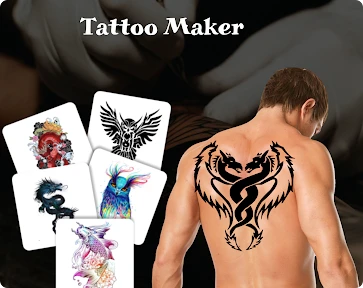
Tattoo Design & Tattoo Maker is a comprehensive mobile application designed for tattoo enthusiasts, artists, and anyone considering body art. It serves as a digital studio, offering a vast library of pre-made designs and powerful tools to create, customize, and visualize tattoos. The app bridges the gap between inspiration and realization, allowing users to experiment with different styles, placements, and concepts directly on photos of their own body. By combining an extensive design catalog with intuitive editing features, it empowers users to make confident and personalized decisions about their tattoos, transforming abstract ideas into tangible visual plans.
Chapter 1: Function
The app's core functionality revolves around design exploration, creation, and simulation. It provides access to a massive, categorized gallery of tattoo designs spanning various styles such as tribal, geometric, realistic, and lettering. Its central feature is the tattoo maker tool, which enables users to select a design, adjust its size, rotation, and color, and then superimpose it onto a photo from their gallery or using the device's camera. Advanced editing options may include blending modes, opacity control, and layer management for combining multiple elements. Additional functions often include the ability to save and organize favorite designs, share creations with artists or friends, and browse curated collections for ongoing inspiration, effectively consolidating the entire pre-consultation creative process into a single, user-friendly platform.
Chapter 2: Value
The primary value of Tattoo Design & Tattoo Maker lies in its empowerment of users through visualization and creative control. For individuals contemplating a tattoo, it significantly reduces uncertainty by allowing them to see how a design will look on their specific body part before committing to permanent ink. This mitigates the risk of dissatisfaction. For tattoo artists, it serves as a valuable client consultation tool, facilitating clearer communication of ideas and streamlining the design approval process. The app's key advantages include its extensive and constantly updated design library, which provides immense inspiration that might be hard to find elsewhere. The photo-realistic simulation technology is a major advantage, offering a convincing preview. Furthermore, it democratizes tattoo design, enabling users with no artistic training to experiment and compose meaningful personal art. By offering a risk-free, iterative, and collaborative environment for tattoo planning, the app adds tangible value by increasing user confidence, enhancing artist-client collaboration, and ultimately contributing to more satisfying and well-considered tattoo outcomes.
Chapter 3: Scenarios
The app primarily targets three user groups. First are prospective tattoo clients who are seeking inspiration or wish to meticulously plan their first or next piece. They use the app to browse trends, mock up designs on their photos, and build a concrete idea to present to their artist. Second, professional and amateur tattoo artists utilize it as a digital sketchbook and client presentation tool, using the simulation feature to show proposed artwork during consultations. Third, body art enthusiasts and hobbyists enjoy using the app for creative expression, designing tattoos for fun or sharing concepts within communities. Everyday use cases include a user taking a photo of their forearm, testing different sleeve concepts; someone saving dozens of mandala designs to a favorites folder for later consideration; an artist quickly modifying a client's chosen sketch to fit their shoulder curvature; or a group of friends sharing and voting on design ideas for matching tattoos. It is used in the ideation phase, transforming fleeting inspiration into a visual plan ready for the tattoo studio.
Uninstall Instructions
For step-by-step guidance on how to safely remove this application from your device, please refer to our 《Uninstall Instructions》 document.
Pros
- offers a vast library of exclusive
- artist-submitted tattoo designs
- preview designs realistically on body photos with skin-tone matching
- powerful editor for customizing and creating unique tattoo artwork
- connects users directly with local tattoo studios for appointments
- high-resolution outputs suitable for professional artist consultation
Cons
- premium design collections require separate in-app purchases
- ar try-on feature limited to specific
- well-lit environments
- studio booking function not available in all regions
- advanced editing tools have a steep learning curve for beginners
- large design file downloads consume significant mobile data
Frequently Asked Questions
What is Tattoo Design & Tattoo Maker?
Tattoo Design & Tattoo Maker is a mobile application for creating, customizing, and visualizing tattoo designs. Its core function is to provide a vast library of tattoo templates and a set of editing tools, allowing users to design their own tattoos or modify existing ones. Users can also superimpose designs onto photos of their body parts to preview how a tattoo would look. It serves as a digital sketchbook and visualization tool for tattoo enthusiasts.
Is the app free to use?
The app is free to download and use with basic features. However, it operates on a freemium model. This means access to the full library of premium designs, advanced editing tools, and the removal of watermarks or ads typically requires a subscription or one-time in-app purchases. Specific pricing and subscription tiers are detailed within the app's store page and settings.
How does the body preview feature work?
The body preview feature uses augmented reality (AR) technology. You can take a photo of or select an image of a body part (e.g., arm, leg). The app then allows you to place, scale, rotate, and adjust the transparency of your chosen tattoo design onto that photo. This provides a realistic simulation of how the final tattoo might appear on your skin, aiding in decision-making and placement.
Can I print or share my final designs?
Yes, the app allows you to export and share your created or customized tattoo designs. You can save them to your device's photo gallery or share them directly via social media and messaging platforms. Designs can be discussed with a professional tattoo artist for further refinement. Note that exporting high-resolution or watermark-free images may be a feature reserved for premium subscribers.
Does the app require special permissions?
The app requires standard permissions common to photo and design applications. These typically include access to your device's photo gallery/media (to import background photos and save designs) and the camera (to take new photos for the AR preview feature). The app does not require unrelated permissions. All permissions are requested explicitly when the relevant feature is first used.
App Info
Technical Info
Recommended For You

Fax.Plus - Send Fax from Phone
Business

Doodle Master - Glow Art
Art & Design

OBD JScan
Auto & Vehicles

ABP for Samsung Internet
Communication

King James Bible Study KJV
Books & Reference

Blazing: Ignite Your Love Life
Communication

INKR — Comics, Manga, Webtoons
Comics

One Block for Minecraft Maps
Books & Reference

Reverso Translate and Learn
Books & Reference

Pixel Studio PRO: editor
Art & Design

Hallow: Prayer & Meditation
Books & Reference

Nomad Sculpt
Art & Design

Ascension | Bible & Catechism
Books & Reference

VirtuNum - Virtual Number
Communication

Black Magic
Books & Reference

AI Image Generator - Dali
Art & Design

HiHello: Digital Business Card
Business

Penny Puss 2.0
Business

Barber Chop
Beauty

Knots 3D
Books & Reference