
Anime Avatar Maker & Creator
Screenshots


Description
About Anime Avatar Maker & Creator Features
Anime Avatar Maker & Creator is a specialized mobile application designed for effortlessly crafting personalized anime-style avatars. It provides users with an intuitive, no-drawing-skills-required platform to generate unique digital characters that reflect their personality or imagination. By offering an extensive library of artistic elements and smart customization tools, the app bridges the gap between professional anime art and casual users, making character creation accessible, fun, and highly engaging for a broad audience.
Chapter 1: Function
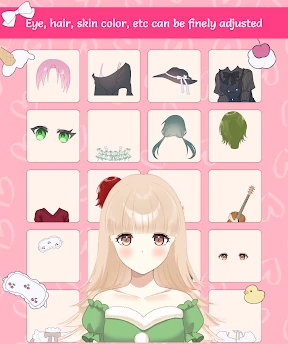
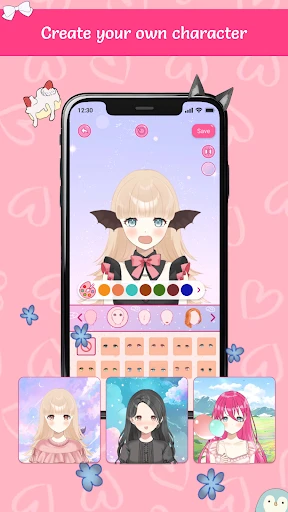
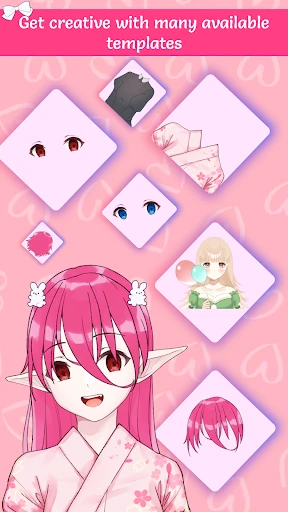
The core function of Anime Avatar Maker & Creator centers on modular avatar construction. Users begin by selecting a base character model, which can then be meticulously customized. The app offers a vast array of options including diverse hairstyles, hair colors, facial features like eyes, eyebrows, and mouths, as well as various skin tones. Beyond the face, users can adorn their avatars with accessories such as glasses, hats, and earrings, and choose from a collection of outfits and backgrounds. The interface typically features a drag-and-drop or simple tap-to-select mechanism, allowing real-time previews. Additional functions often include the ability to save creations in high resolution, share directly to social media platforms, and sometimes create multiple characters for stories or group pictures, all within a streamlined and user-friendly workflow.
Chapter 2: Value
The primary value proposition of Anime Avatar Maker & Creator lies in democratizing anime art creation and fostering personal expression. Its key advantage is eliminating the need for artistic training or complex software; anyone can become a character designer in minutes. This empowers users to create a distinct digital identity for use across social media profiles, gaming personas, or online communities, enhancing personal branding in a visually appealing style. The app offers significant creative freedom through its extensive, often updated library of assets, ensuring avatars are highly unique and not template-bound. For anime enthusiasts, it provides a tangible connection to the aesthetic they love. Furthermore, the process itself is a form of entertainment and stress relief, offering a creative outlet. The value extends to practical utility—these custom avatars serve as perfect, safe alternatives to real photos for online privacy. Compared to commissioning an artist, the app is a cost-effective, instant solution. Its focus on user experience, with an intuitive interface and quick results, delivers immediate satisfaction and shareable content, making it a valuable tool for both creative expression and practical digital representation.
Chapter 3: Scenarios
The app primarily targets anime and manga fans, gamers, and social media active users seeking a unique online identity. Teenagers and young adults form a significant user base, utilizing the app to create profile pictures for platforms like Discord, Twitter, Instagram, or gaming forums like Steam and multiplayer online games. It is also ideal for role-playing communities where members create visual representations of their original characters. In everyday use, a user might open the app to design an avatar that matches their mood or a new hairstyle they are considering. Content creators and streamers may use it to develop a consistent, recognizable cartoon persona for their channels. Additionally, friends can use it for fun group activities, creating a set of matching or themed avatars. Parents might engage with younger children to design friendly characters for stories. The scenarios emphasize casual creativity, personal branding, privacy protection, and social sharing, making the app a versatile tool for anyone looking to visually express themselves in a popular and stylized artistic format.
Uninstall Instructions
For step-by-step guidance on how to safely remove this application from your device, please refer to our 《Uninstall Instructions》 document.
Pros
- generates anime avatars from a single selfie
- offers extensive art style and detail customization
- exports high-resolution images for profile use
- local AI processing enhances privacy for photos
- streamlined workflow from photo to final avatar
Cons
- requires a clear
- well-lit frontal photo for best results
- premium art styles locked behind a subscription
- offline processing demands significant device storage
- limited editing tools for fine-tuning generated images
- avatar styles may not match all anime art preferences
Frequently Asked Questions
What is Anime Avatar Maker & Creator?
Anime Avatar Maker & Creator is a mobile application in the art & design category. It allows users to create personalized anime-style avatars or profile pictures through a character customization system. The core function is to provide a library of artistic elements—like hairstyles, eyes, outfits, and accessories—for users to combine and generate unique digital illustrations, positioning itself as a tool for social media profile creation and personal expression.
Is the app free to use with in-app purchases?
Yes, the app is free to download and use with basic customization features. However, it typically operates on a freemium model. Many premium hairstyles, clothing items, accessory packs, and advanced editing tools are locked and require separate purchase or a subscription to access. The app may also display advertisements, which can often be removed via a one-time purchase or subscription.
What devices and systems does this app support?
Anime Avatar Maker & Creator is primarily designed for smartphones. It is commonly available for both iOS and Android operating systems. You can find it on the Apple App Store for iPhones/iPads and on Google Play for Android devices. It is generally optimized for touch interaction and does not require any additional external hardware to function.
How can I save or export my created avatar?
After designing your avatar, the app provides an export or save function, usually represented by a download or share icon. This allows you to save the final image directly to your device's photo gallery. The typical output is a high-resolution PNG or JPEG file with a transparent or solid background, enabling you to use it directly as a profile picture on various social platforms.
Can I edit my avatar after saving the project?
This depends on the app's specific technical design. Many avatar creators offer a 'save project' or 'workspace' feature that lets you store the editable file within the app. If this feature exists, you can reload and modify your design later. However, if you only exported the final image (like a PNG), that file is not editable, and you would need to recreate the avatar from scratch to make changes.
App Info
Technical Info
Recommended For You

Quran for Android
Books & Reference

Shell: Fuel, Charge & More
Auto & Vehicles

Carista OBD2
Auto & Vehicles

Beauty Calculator Pretty Scale
Beauty

Car Key Smart Remote Connect
Auto & Vehicles

Audubon Bird Guide
Books & Reference

OBDocker - OBD2 Car Scanner
Auto & Vehicles

BookTok- Read Good Novel
Books & Reference

PayPal Business
Business

Perfect Viewer
Comics

Photo App - AI Photo Enhancer
Art & Design

FAX App: Send Faxes from Phone
Business

FillUp - Gas Mileage Log
Auto & Vehicles

maxim — order a taxi & food
Auto & Vehicles

Pixel Studio PRO: editor
Art & Design

Boat Trader
Auto & Vehicles

AR Drawing Paint Sketch Trace
Art & Design

CARFAX Car Care App
Auto & Vehicles

CamCard-Digital business card
Business
HD Camera for Android: 4K Cam
Beauty